Home / Reference / ONTAP upgrade runbook
ONTAP upgrade runbook
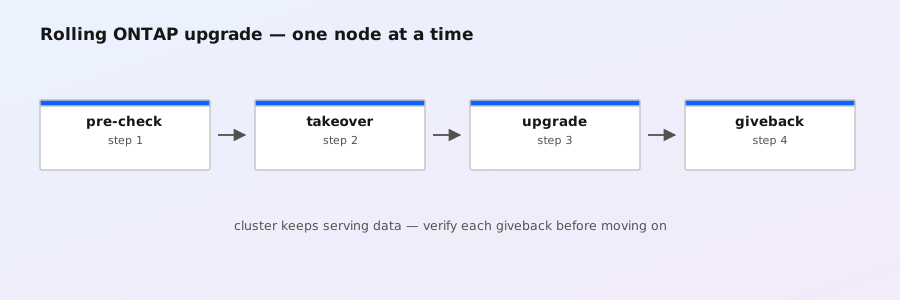
Upgrading ONTAP is a rolling operation: the cluster upgrades one node at a time while each node's HA partner serves its data. If your HA pairs are healthy, storage clients keep working through the whole event. This runbook walks the full cycle — pre-checks, image staging, validation, the update itself, post-checks, and the rollback path — with the commands you actually type. It targets ONTAP 9.x (the cluster image command family).
Phase 0 — Plan the upgrade
- Pick a supported path. ONTAP only allows direct upgrades to the next few releases (e.g. 9.14.1 → 9.15.1 works; jumping several releases usually requires an intermediate stop). Check the upgrade path for your exact version, and run NetApp's Upgrade Advisor (in Active IQ / ASUP portal) — it checks your cluster's config against the target release and flags known issues.
- Read the release notes and known issues for the target release before touching anything. Also check security.netapp.com for advisories affecting the version you're moving to or from.
- Confirm the image includes what you need. ONTAP 9.x update packages carry the ONTAP image and, since 9.6, the node's SP/BMC firmware — the service processor firmware updates automatically during the node update phase. Check with
system service-processor image showafter the upgrade. - Book a window anyway. A healthy HA pair makes the upgrade nondisruptive to data, but each node reboot causes a few seconds of I/O pause and session reconnects; SAN clients fail paths, NFS mounts may blip, SMB sessions reconnect. SnapMirror transfers pause during each node reboot and resume after.
- Snapshot the config. A configuration backup is your cheapest insurance — take one before you start, and keep it somewhere off the cluster:
system configuration backup create -node node1 -backup-name pre-upgrade-9.15.1

# confirm the backup exists
system configuration backup show -backup-name pre-upgrade-9.15.1
Phase 1 — Pre-flight checks
Run these on the cluster before staging anything. Fix anything red — ONTAP's own validation will refuse to start (or worse, an upgrade during a degraded state turns a rolling upgrade into an outage).
# Cluster is whole and quorate: every node listed, nothing 'false' for quorum/eligibility
cluster show

# Exact current version on every node
version -v

# HA pairs fully healthy — 'Partial' takeover state blocks a clean upgrade
storage failover show
storage failover show-takeover -fields node,is-takeover-possible,reason

# No failed disks or reconstructing aggregates (wait for reconstruction to finish)
storage disk show -state failed
storage aggregate show -state degraded

# No active health alerts
system health alert show

# Hardware sanity per node (this is the classic full sweep)
system node run -node node1 sysconfig -a

# Enough free space on the root aggregate for the image (~2–4 GB per node)
df -h

# Time is sane and synced — NTP drift breaks certificate validation and logs
cluster time-service ntp server show
Also worth checking before you commit: network interface show -role data (all LIFs up and on their home ports — a LIF that fails failover will take its SVM's clients down during a node reboot), snapmirror show (note relationships that are mid-transfer; they'll resume, but schedule heavy transfers away from the window), and system node run -node * uptime (you want nodes that have been stable, not one that's been crash-looping).
Phase 2 — Stage & validate the image
The cluster image family manages upgrade packages cluster-wide. You download the package once, validate it, and ONTAP stages it on the nodes when the update starts.
# Copy the package into the cluster from an HTTP/FTP server or a local path
cluster image get -package http://192.0.2.10/ontap/9.15.1_image.tgz

# See what's staged and on which nodes
cluster image show -fields node,package,version,state,is-current

# Validate BEFORE updating — this checks prerequisites and reports issues
cluster image validate -node node1 -package 9.15.1_image.tgz
cluster image getneeds a source the cluster can reach (an HTTP server or a path on a node). You can't push the file from your laptop directly.- Validation checks the package, the node state, and your config against the target version's prerequisites. Fix whatever it reports — it will list concrete issues, not just "failed".
- Keep the old package on the cluster (don't delete the previous image) until you're confident — it's your fastest rollback asset.
cluster image showlists both installed images; theis-currentfield shows which is active.
Phase 3 — Rolling update
With everything green, start the update. The canonical one-node-at-a-time form:
# Update a single node first as a canary, then the rest
cluster image update -node node1 -package 9.15.1_image.tgz

# Monitor progress — watch the phase column
cluster image upgrade-progress

# Once node1 is green, roll the remaining nodes
cluster image update -nodes node2,node3,node4 -package 9.15.1_image.tgz
What actually happens per node (you'll see these phases in cluster image upgrade-progress):
- Prerequisites / validation — ONTAP re-checks the node before committing.
- Automatic takeover — the node being upgraded triggers HA takeover; its partner takes over its storage and LIFs. Data keeps flowing on the partner. (This is why HA health was a Phase 1 gate.)
- Image install + reboot — the node writes the new image and reboots. It boots into a paused state, rejoins the cluster, and waits.
- Giveback — the node gives its aggregates and LIFs back from the partner and resumes serving.
- Next node — ONTAP repeats the cycle. Each node's cycle is typically 20–40 minutes for the reboot portion alone; budget 1–2 hours for a 2-node cluster, more for larger ones.
Tips for the window:
- Watch
cluster image upgrade-progressperiodically. If a node fails to come back, ONTAP's automatic rollback kicks in within the revert window and reboots it onto the previous image — the cluster returns to a consistent state on its own. - Don't start new SnapMirror transfers or manual failovers mid-window; let the rolling process own the nodes.
- If you updated only some nodes in a previous run,
cluster image show -fields is-currentshows stragglers — the cluster runs mixed versions until all nodes match. Get them all to the same release promptly; mixed-version clusters are supported only as a transient state.
Phase 4 — Post-upgrade verification
# Every node on the new release, no stragglers
cluster image show -fields node,version,is-current
version -v

# Cluster whole, HA healthy again
cluster show
storage failover show

# All LIFs back on home ports, data LIFs up
network interface show -role data
network interface show -fields home-node,current-node,home-port,current-port,is-home

# No new alerts, no degraded aggregates, no failed disks
system health alert show
storage aggregate show -state degraded
storage disk show -state failed

# SP/BMC firmware landed with the update
system service-processor image show

# Services actually answer: spot-check NFS/CIFS/S3 from a client
vserver services nfs show
vserver cifs show
vserver object-store-server show
Then the human checks: mount an NFS export and read/write, open a file share, run an S3 list-objects, confirm SnapMirror transfers are completing (snapmirror show -fields state,last-transfer-end-time), and look at a fresh statistics show sample to confirm traffic looks normal. Only after that, delete the staged-but-unused old package if you want the space back — but keep it until the new version has run for at least a few days.
Phase 5 — Rollback & emergency options
There are two different "rollback" situations, and they need different commands:
During the update (automatic): if a node can't boot the new image, ONTAP automatically reverts it to the previous image within the revert window and reboots it — you mostly need to not interfere, just watch cluster image upgrade-progress and open a case if the node stays down.
Deliberate downgrade (after the fact): you treat the previous version as a new target — stage it, validate, update. The previous image is usually still staged on the nodes from before the upgrade:
# Confirm the old image is still staged
cluster image show -fields node,package,version,state

# If not, re-download it, then validate and update as usual
cluster image get -package http://192.0.2.10/ontap/9.14.1_image.tgz
cluster image validate -node node1 -package 9.14.1_image.tgz
cluster image update -nodes node1,node2 -package 9.14.1_image.tgz
cluster image upgrade-progress- Downgrade caveats: ONTAP supports downgrading only to a release that is at or above the version the cluster was running when it was last initialized/upgraded — you can't go back before the release the cluster was born on. Configuration created or changed by the newer version may not survive (features added in 9.15.1 are gone once you're back on 9.14.1). ASUP and the docs call this out per release; check the downgrade notes for your pair of versions.
- Data on disk is never touched by an upgrade or downgrade — WAFL aggregates are format-compatible across the versions you can actually run on a given platform. What changes is the system image and (forward) config. That's why the config backup from Phase 0 matters: after a downgrade you may need to restore or re-apply config that the newer version reformatted.
- If the cluster is wedged and won't complete an update at all, that's a support case, not a runbook step — capture
cluster image upgrade-progress,cluster show, andsystem health alert showoutput first.
Gotchas that bite
- Upgrading with a degraded HA pair turns NDO into an outage. If takeover is partial or impossible, the node reboot takes its data offline with it. Fix HA before you start — this is the #1 cause of "the upgrade brought the cluster down".
- Disk reconstruction in progress. ONTAP refuses to upgrade (or you should refuse) while an aggregate is reconstructing; the docs tell you to wait for it to complete.
- Mixed versions. It's fine mid-upgrade, it's a problem as a resting state — some features and commands behave differently per node, and automated tools assume a uniform version.
- The "no network" download trap.
cluster image getrequires the cluster to reach the source; a management-network-only node can't pull from your laptop. Stage the package on a reachable HTTP server first. - SP firmware. In 9.6+ the update package includes SP firmware, but not every package does — verify with
system service-processor image showafterwards and update SPs separately if the package skipped them. - Certificates and time. If NTP is wrong, certificate-based checks (and some validation steps) fail in confusing ways. Fix time before you stage.
cluster image upgrade documentation; always confirm against your exact release's Upgrade Guide and man pages, and run Upgrade Advisor before planning your window.