FlexGroup deep-dive: one namespace, many nodes
A FlexGroup is ONTAP's scale-out NAS volume: one logical volume, one junction path, one mount point — but the data is striped across constituent FlexVols that live on different nodes and aggregates. That's how a single filesystem escapes the throughput and capacity ceiling of one node. This guide covers how placement works, how to size it, the commands that manage it, and the limitations that still bite.
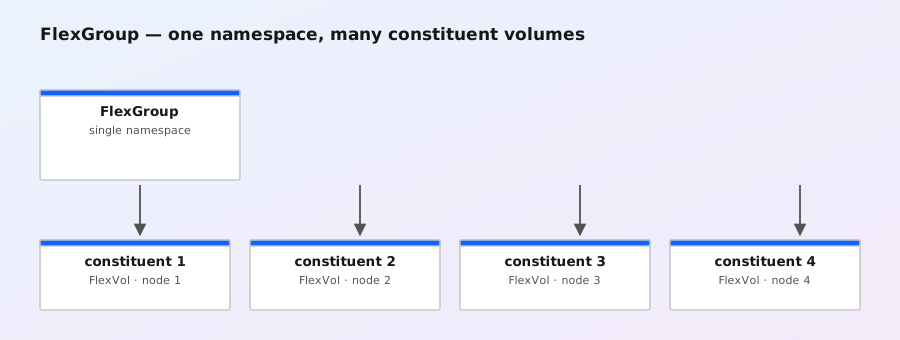
What a FlexGroup actually is
When you create a FlexGroup, ONTAP silently creates a set of ordinary FlexVols — the constituents — and presents them to clients as a single namespace. Clients see one volume; underneath, files are distributed across the constituents. Nothing about the client experience changes: same NFS/SMB mount, same junction path, same snapshot directory semantics. Everything about performance changes: 8 constituents on 4 nodes can push a lot more aggregate bandwidth than any single FlexVol.
- Constituents: the FlexVols that make up the FlexGroup. Each has its own aggregate, its own inode file, its own snapshots.
- Namespace: the single logical volume and junction path clients see. Capacity shown by
dfis the sum of the constituents. - Placement: ONTAP decides which constituent owns a file, and can move files between constituents later (rebalance).
Think of it as RAID at the volume level: instead of striping blocks across disks, you're striping files across volumes.
How files land on constituents
Placement is a hash of the file's directory entry, not a round-robin of writes. A file is assigned to a constituent based on its name (and parent), so the same path always maps to the same constituent — which is what makes the namespace stable across reboots and reconnects. Practical consequences:
- Directories are not striped. A directory lives entirely on one constituent. A directory with a million files is a million files on one constituent — its metadata operations are bounded by that one aggregate.
- A single file lives on one constituent. Sequential reads of one big file hit one node's bandwidth. Parallel workloads (many files, many clients) scale across all constituents; one file, one client does not.
- Hash distribution is statistical. With enough files, distribution evens out. With a handful of enormous files, you can end up lopsided — that's what rebalance is for.
- Renames can cross constituents. If a rename would move a file to a different constituent, ONTAP handles the migration internally — the client never sees a partial result.
Creating a FlexGroup
Creation is a single command; the constituent layout follows from the aggregates you name.
volume create -vserver vs1 -volume datasets -type flexgroup \
  -aggregate-list aggr1,aggr2,aggr3,aggr4 \
  -constituents-per-aggregate 2 \
  -junction-path /datasets -size 40TB
This example spreads the volume across four aggregates with two constituents per aggregate — 8 constituents total. The constituents are named automatically (datasets_0001 … datasets_0008).
Rules of thumb for the layout:
- Default is 8 constituents when you don't specify anything — the safe general-purpose choice.
- Use fewer (4) for modest workloads or small clusters; every constituent carries fixed overhead.
- Use more (16) when you need maximum aggregate throughput or expect tens of millions of files. Historically the cap was 16 constituents; newer ONTAP releases raise it substantially (and let you add constituents to an existing FlexGroup) — check your version's documentation.
- Spread across nodes and aggregates. Constituents on the same aggregate share its disks; the whole point is parallelism, so distribute them.
- Keep constituents equal-sized. The namespace is only as balanced as its biggest constituent.
volume show -volume datasets*          # list the FlexGroup and its constituents
volume show -fields files,files-used -volume datasets*   # inode usage per constituent
Inode planning (the thing people miss)
Each constituent owns its own inode file, and the FlexGroup's total inode capacity is the sum of its constituents'. ONTAP sizes inodes at creation from the default ratio (roughly 1 inode per 32 KB of capacity). For many-small-file workloads — home directories, build trees, code repositories, dataset lakes — that default runs out long before capacity does, and you can't just add inodes to a constituent later (shrinking the file size or rebuilding is the usual remedy, which nobody wants).
So: decide your file-count estimate before creating, and size the volume (or use the inode options at create time) so that total inodes = estimated file count with headroom. From a client, df -i on the mount shows the combined picture; if any constituent reports 100% inode use, the whole namespace starts throwing ENOSPC-style errors for new files even with free capacity elsewhere.
Rebalancing
Placement is statistical, so workloads drift: a project directory that grew fast, a big file that landed on one constituent, deletes that emptied others. Rebalance moves files from heavy constituents to lighter ones, in the background, with the volume online the whole time.
volume rebalance start -vserver vs1 -volume datasets   # kick off a rebalance
volume rebalance show -vserver vs1 -volume datasets     # watch progress
Notes from the field:
- Rebalance is throttled — it deliberately yields to foreground I/O, so a rebalance on a busy volume can run for a long time. That's by design; don't kill it for being slow.
- You can stop it with
volume rebalance stopif you need the bandwidth back, and restart later. - Rebalance only moves files, and it moves them whole. Directories stay put.
- After adding significant new capacity or deleting a lot of data, a rebalance is the standard maintenance move — add it to your quarterly routine, not just your incident playbook.
When FlexGroup is the right tool
- One big namespace for many clients: home directories for thousands of users, shared project trees, build farms, HPC scratch — workloads where parallelism across files is the point.
- Capacity beyond one aggregate pair: a single FlexVol tops out at its aggregate's size and one node's throughput. FlexGroup joins many aggregates into one view.
- AI/ML dataset lakes: huge read-mostly trees of training data served to many GPU hosts — exactly the many-files-many-clients pattern FlexGroup scales.
When it's not:
- Single hot file, single hot directory: if your workload is one enormous file or one directory with millions of entries, that entity lives on one constituent and you get single-node performance anyway. FlexVol is no worse and simpler.
- Heavy small-random-write workloads: writes spread across constituents but so does any consistency overhead; a well-placed FlexVol on fast aggregates is often the better answer.
- When you need features FlexGroup doesn't offer — see below.
Feature limitations (check your release)
FlexGroup support has been catching up release by release, so this table is directionally right but version-dependent — verify against the ONTAP documentation for the release you run.
| Feature | FlexGroup status |
|---|---|
| SnapMirror | Supported (SnapMirror for FlexGroup) in ONTAP 9.8+; earlier releases: not supported |
| SnapVault | Not supported (use SnapMirror for FlexGroup instead) |
| FlexClone | Supported in newer releases (9.6+) |
| Deduplication / compression | Not supported on FlexGroup constituents |
| Qtrees | Not supported (use separate FlexGroups for isolation) |
| Quotas | Support added in newer releases — verify for your version |
| NDMP | Not supported (snapshot + SnapMirror workflows instead) |
| Thin provisioning, QoS, snapshots | Supported |
The practical rule: if your design needs dedupe, qtrees, or NDMP, FlexGroup isn't the volume for it — build with FlexVols (or FlexGroups per tenant, and accept the dedupe loss).
Quick sizing checklist
- Count files, not bytes. Estimate total inodes; size per-constituent inodes for that.
- Choose constituent count from parallelism need (8 default; 4 small; 16 high-throughput), not from aesthetics.
- Spread constituents across nodes and aggregates, equal-sized.
- Plan the hot path: is any single directory or file going to be hot? If yes, assume one constituent carries it.
- Schedule rebalance into normal operations, and re-run after major capacity or data changes.
- Re-check feature support for the ONTAP release you're actually deploying.