Home / Reference / MetroCluster
MetroCluster fundamentals: FC vs IP, mediator, and the DR workflow
MetroCluster is ONTAP's synchronous, zero-RPO, site-level disaster-recovery technology: two sites, stretched HA pairs, and every aggregate mirrored live between them. When one site dies, the other keeps serving without losing a write. This guide covers the architecture, the FC-vs-IP choice, what the mediator actually does, and the switchover/switchback workflow you'll run when it matters.
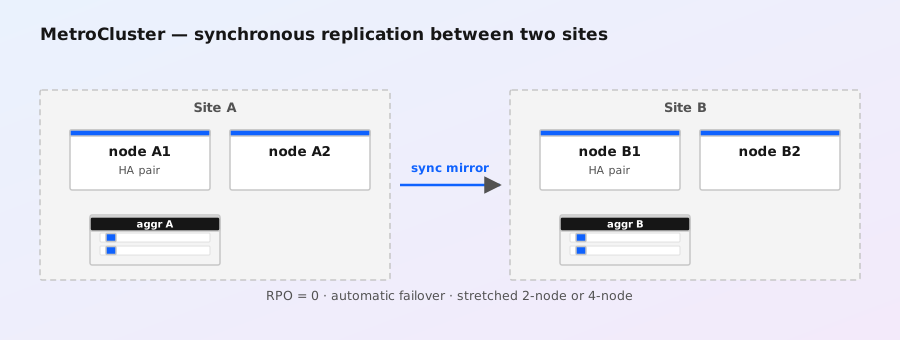
The big idea: mirrored aggregates, stretched HA
MetroCluster treats pairs of sites as one logical cluster. At each site you have one or more HA pairs, and the two sites' nodes are paired into DR groups — each node at site A has a DR partner at site B. The trick that makes this work at block level is SyncMirror: every aggregate lives as two plexes, one on local disks and one on the remote site's disks. Every write goes to both plexes before the write is acknowledged, which is exactly why MetroCluster can claim RPO 0 at the storage layer — the remote site always has a current copy.
- HA pair (takeover domain): two nodes at the same site, protecting each other against node failure (normal
storage failover). - DR group (disaster domain): one node from each site, protecting against whole-site loss. A 2-node MetroCluster (one node per site) is a single DR group; 4-node (2+2) has two DR groups; 8-node (4+4) has four.
- SyncMirror plex: a mirrored aggregate has plex0 at the local site and plex1 at the remote site. Reads come from the local plex; writes are mirrored synchronously.
- RPO 0: the surviving site's plex is always current, so recovery loses no acknowledged writes.
The price of RPO 0 is that every write is a round trip to the other site. Distance and round-trip time therefore matter more than bandwidth alone — that's the heart of MetroCluster planning (see Limits and planning).
FC vs IP: two transports, one story
MetroCluster has been delivered over Fibre Channel since its introduction, and since ONTAP 9.7 it can run entirely over standard IP networks. Functionally the replication behavior is the same; the plumbing differs a lot.
| Feature | MetroCluster FC (traditional) | MetroCluster IP |
|---|---|---|
| Inter-site transport | FC switches, FC-ISLs between sites | Standard IP switches (10/25/40GbE ISLs) |
| Disk attachment | FC-to-SAS bridges (e.g. ATTO) let remote shelves attach to the local FC fabric | No bridges; shelves stay local to each site, replication is network-only |
| Distance / RTT envelope | Shorter — FC round trips are the constraint | Longer distances supported (IP is more forgiving) |
| Automatic unplanned switchover | Manual switchover only (admin decides) | Mediator + automatic unplanned switchover (AUSO) available |
| Extra hardware | FC fabric + bridges | Mediator VM only |
Exact distance and round-trip-time limits depend on the configuration (2-node vs 4-node vs 8-node) and the ONTAP release — NetApp's "MetroCluster supported configurations" documentation for your version is the authoritative source, and metrocluster check will validate your actual fabric before you ever need it in anger.
The mediator: MetroCluster IP's tiebreaker
For MetroCluster IP (and 8-node FC in later releases), ONTAP 9.7+ introduced the mediator: a small Linux VM, deployed from an OVA, that both sites can reach over a separate management path. It does two jobs:
- Witness / tiebreaker: if the two sites lose sight of each other (split brain territory), the mediator breaks the tie so only one side keeps serving.
- Automatic unplanned switchover (AUSO): if the mediator confirms a site has failed (not just lost connectivity to it), ONTAP can switch over automatically — no admin needed in the middle of the night.
The mediator must be reachable out-of-band: not on the same switches or paths as the data replication network, ideally at a third location, and its clock and connectivity matter. It is a small VM, but it is a single point of failure for automatic switchover: if the mediator is down, AUSO is disabled — manual switchover still works, but nobody is watching for you. Monitor it like any other production service.
metrocluster configuration-settings show
metrocluster configuration-settings mediator show
The first command shows the overall MetroCluster configuration (mode, DR groups, mediator address); the second drills into mediator state. If the mediator is unreachable you'll see its state go non-optimal, and you should treat automatic switchover as unavailable until it recovers.
Seeing the configuration: show and check
Before touching anything, know what you're looking at. These are the three commands you'll live in:
metrocluster show                      # configuration summary, DR groups, mode
metrocluster check run                 # validate configuration & connectivity
metrocluster check show                # results of the last validation
metrocluster check run is the health gate: it verifies DR group pairing, SyncMirror state, switchover capability, and (for IP) mediator connectivity. Run it before and after any site event, and after any network change between the sites. A clean metrocluster check show output is the difference between "we know it works" and "we hope it works."
Site fails: switchover
When a site is lost, the surviving site must take over serving the failed site's data. That's switchover. There are three flavors:
- Planned switchover —
metrocluster switchover -type planned. Both sites are still up; you're about to take one down deliberately (maintenance, DR test, migration). ONTAP synchronizes state, cleanly moves LIFs and ownership, and no writes are at risk. This is also how you run a DR test without actually breaking anything. - Unplanned switchover —
metrocluster switchover -type unplanned. The site really died. ONTAP fails over the DR groups whose partners are unreachable; the surviving nodes take over the failed nodes' storage and LIFs. - Automatic unplanned switchover (AUSO) — IP MetroCluster (or later FC configs) with a healthy mediator can do the unplanned case for you. The mediator decides the site is down and drives the switchover unattended.
metrocluster switchover -type unplanned    # after a real site loss
metrocluster show                           # confirm DR groups switched over
storage failover show                       # confirm takeovers completed
After switchover, the surviving site serves both sites' data out of its surviving plexes. Users connect to the same LIFs (they migrated), the same SVMs, the same names — which is the entire point: from the application's perspective, the cluster just kept answering.
Site comes back: switchback
Switchback is the return trip, and it's the part people underestimate. The failed site is repaired and rebooted; it comes up in a waiting-for-switchback state, acting as a secondary that re-synchronizes its plexes from the surviving site. Once the SyncMirror plexes are back in sync (this can take a while for large aggregates — it's a full resync of everything that changed), you return to normal operation:
metrocluster switchback                 # return to normal two-site operation
metrocluster show                       # verify all DR groups are back to normal
metrocluster check run && metrocluster check show
Vetoes: switchback refuses to run if conditions aren't safe (for example, a DR group that couldn't be fully re-synced). metrocluster check show tells you what's blocking; fix the underlying issue rather than overriding the veto — an override exists, but you should know exactly why you're using it.
DR testing without drama
You should test failover more often than you think you need to, and MetroCluster is designed for it. The clean pattern:
metrocluster check run                          # pre-test health gate
metrocluster switchover -type planned           # simulate site loss, cleanly
# ... run your application recovery drills on the surviving site ...
metrocluster switchback                         # return to normal
metrocluster check run && metrocluster check show
Because a planned switchover is non-destructive and reversible, you can run this quarterly without a maintenance window — the storage stays online throughout on the surviving site, and writes resume on the original site after switchback.
Limits and planning
- Round-trip time is the budget. Every write crosses the inter-site link twice in effect (write to both plexes, ack when both land). The supported RTT envelope differs between FC and IP configurations and grows with release maturity — check the supported-configurations matrix for your exact version before designing.
- Bandwidth must cover peak write rate, not average. SyncMirror writes are synchronous; if the link can't absorb your peak write burst, application latency climbs. Size for the worst hour, not the typical one.
- It's not a backup. RPO 0 protects against site loss, not against logical corruption, ransomware, or accidental deletes — those replicate across the mirror too (well, ransomware/snapshot deletion protects you, but a bad script deleting files mirrors just as happily as a good one). Keep your snapshot and SnapMirror-to-third-site strategy layered on top.
- The mediator is infrastructure. Budget for it: a VM, a third network path, monitoring, and a documented recovery procedure if it dies.
- Switchback is the long pole. Resync time after a site return scales with change volume. Have a realistic recovery-time estimate; storage on the surviving site keeps serving while resync runs, so it's rarely urgent, but it should be planned, not discovered.
Quick troubleshooting hits
| Symptom | First move |
|---|---|
| Site event happened, nothing switched over | metrocluster show — check DR group state; for AUSO, check mediator status (metrocluster configuration-settings mediator show). No mediator = no automatic switchover. |
| Switchback blocked | metrocluster check show — read the veto reason; typically a plex still resyncing or a DR group not fully recovered. |
| Performance degraded after failover | Expected: one site now serves everything, and remote plex reads are on the inter-site path. Verify LIF distribution and capacity on the survivor. |
| MetroCluster shows non-optimal after a network change | Re-run metrocluster check run; check inter-site link MTU/errors and (IP MCC) mediator reachability. |
NCDA exam snapshot
If you're studying: MetroCluster = synchronous, block-level, RPO 0, mirrors aggregates (not volumes) via SyncMirror, two sites, stretched HA pairs, DR groups. FC (traditional, bridges, manual switchover) vs IP (9.7+, mediator, AUSO). Ops verbs: metrocluster switchover / metrocluster switchback / metrocluster check run. Contrast with SnapMirror (volume-level, async/sync, RPO by schedule) — MetroCluster is the whole-site, zero-RPO answer, SnapMirror is the targeted-replication answer. See also the Data Protection study page.