Home / Troubleshooting / Network & Connectivity Problems
Network & Connectivity Problems
Symptoms: clients can't mount or connect, "no route to host", LIFs that flap or won't come home, transfers that crawl, iSCSI sessions that drop. This guide walks the ONTAP command path from link to LIF to route to packet.
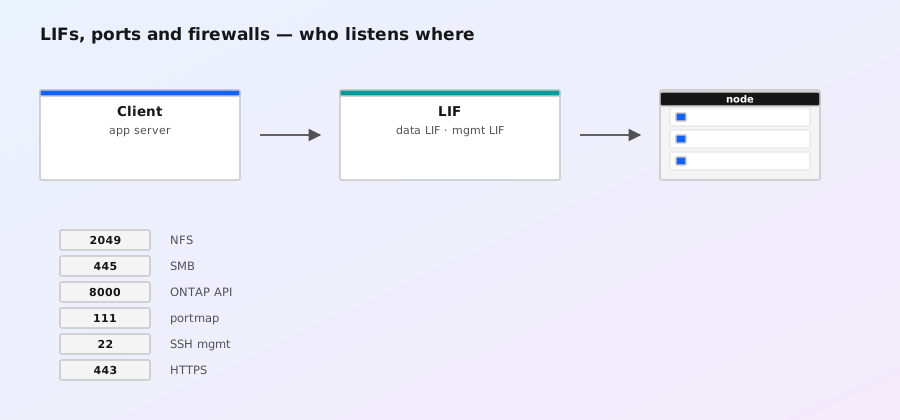
1. First, decide which network is failing
ONTAP participates in up to three logically separate networks, and the fix is different for each:
| Network | Who is on it | Typical failure symptom |
|---|---|---|
| Data / client network | NFS, SMB, iSCSI, S3 clients hitting SVM LIFs | Mounts time out, "no route to host", IO errors, slow throughput |
| Cluster interconnect | Nodes talking to each other (e0a/e0b or e4a-e4f) | Cluster haphazard, cluster show shows nodes unreachable, volume move stalls |
| Management / node network | Cluster mgmt LIF, node mgmt LIFs, SSH/HTTPS | Can't SSH in, ONTAP System Manager unreachable, monitoring down |
Ask: can clients reach the LIF IP at all? If a ping to the LIF address fails while the node's other LIFs work, it's LIF- or switchport-level. If nothing on the subnet works, check the switch first — ONTAP is frequently the victim of a misconfigured port-channel or VLAN, not the cause.
2. Is the LIF where you think it is?
# The single most useful command: every LIF, current location, state
network interface show -fields vserver,lif,role,home-node,home-port,curr-node,curr-port,address,state,failover-policy
# Short form
network interface show
# Detail for one LIF
network interface show -vserver vs1 -lif lif1 -instance- state = up — the LIF is bound to a port and answering. Still verify reachability (below) — "up" doesn't mean the switchport is in the right VLAN.
- state = down — the LIF cannot bind. Either the home port is down (
network port show) or the LIF is admin-down. Checknetwork interface modify -vserver vs1 -lif lif1 -status-admin uponly after confirming the port is up. - home-node/home-port ≠ curr-node/curr-port — the LIF failed over (or was manually migrated). It will keep serving, but you're now on a different physical path; check failover groups so you know where it can live:
network interface failover-groups show. - role = data LIFs are what clients use; cluster-mgmt / node-mgmt are management; intercluster LIFs carry SnapMirror between clusters.
-failover-policy disabled (or sfo-partner-only if you must), and use iscsi node show -instance to confirm hosts see all paths.
3. Link-level problems: ports, SFPs, switchports
# Every port: link state, health, speed, ifgrp membership
network port show -fields node,port,role,link,admin-status,health,ifgrp,mtu,speed
# Detailed counters for one port
network port show -node node1 -port e0c -instance
# ifgrp members and their link states
network ifgrp show- link = down: cable, SFP/QSFP, or the switchport. Swap the cable/SFP first (cheapest test). If link comes up, check the switchport config — VLAN membership, port-channel membership, and
spanning-tree portfast/ edge port settings. - health = degraded: the port has seen errors. Drill into per-interface counters:
# Classic: error counters per interface (tx errors, rx errors, discards)
system node run -node node1 -command netstat -x | grep -A6 "e0c"
# Per-interface drops and input/output errors
system node run -node node1 -command netstat -i
# Or via ONTAP statistics
statistics show -object nic -instance node1:e0c -sample-id netchk
# (stop with)
statistics stop -sample-id netchk- High rx errors / CRC errors on one side of a link: bad cable, bad SFP, or a duplex mismatch (rare on modern auto-negotiating gear, still worth checking on legacy switches).
- High discards: usually congestion or buffer pressure — correlate with throughput issues rather than assuming the cable is bad.
- An ifgrp with members in different link states (one member up, one down) is a switch-side port-channel problem: the switch must have the same members in its LACP bundle, or it will drop frames hashed to the missing member.
4. MTU / jumbo-frame mismatches (the classic "small works, large fails")
If NFS mounts, pings, and small transfers work but large reads/writes hang or time out, suspect MTU. ONTAP ports default to 1500; jumbo environments set 9000 on the node port, the switch (including every hop), and the client. One 1500 hop in the middle of a 9000 path silently breaks large packets.
# What MTU is configured on the ONTAP ports?
network port show -fields node,port,mtu
# Ping with the DF (don't-fragment) bit and a jumbo payload, from ONTAP itself
network ping -vserver vs1 -destination 10.1.1.50 -size 8972 -df true -count 3
# From a Linux client against the LIF
# ping -M do -s 8972 10.1.1.1018972= 9000 MTU minus 20 (IP) minus 8 (ICMP).1472is the equivalent for 1500 MTU.- If the DF ping with 8972 fails but 1472 succeeds, walk the path: every switch hop and the client must run the same MTU. Check
network port show -instanceon the node, then the switch'sshow interfaceMTU on each hop. - Change MTU with
network port modify -node node1 -port e0c -mtu 9000. Note: ifgrp members must all have the same MTU, and changing MTU on a port takes the LIFs on it briefly down — plan a maintenance window. - Also check VLAN tagging: a VLAN-tagged LIF (
network port vlan show) inherits the parent port's MTU.
5. Routing and reachability
# Routes ONTAP knows about, per SVM
network routes show -vserver vs1
# Default route(s) — every data SVM needs one or a subnet route
network routes show -vserver vs1 -fields destination,gateway,metric
# Where LIFs are allowed to live (routing groups tie LIFs to routes)
network routing-groups show -vserver vs1
# Test reachability from ONTAP's perspective (9.9+; older: vserver ping)
network ping -vserver vs1 -destination 10.1.1.50 -count 3
network traceroute -vserver vs1 -destination 10.1.1.50- "No route to host" from clients: the SVM has no route covering the client's subnet, or the gateway is wrong. Compare
network routes showwith the actual network design. - ONTAP can ping out but clients can't reach LIFs: check the switch VLAN and the LIF's failover group — the LIF may be up on a port whose switchport is in the wrong VLAN (LIF "up" ≠ LIF "reachable").
- Routing groups: a LIF is associated with a routing group; routes are looked up per routing group. If a route exists but traffic from that LIF still fails, confirm the LIF's routing group covers the destination (
network interface show -vserver vs1 -lif lif1 -fields routing-group). network pingon ONTAP uses the SVM's routing context — a ping that fails from ONTAP but works from a client (or vice versa) tells you which side's routing is broken.
6. Name resolution: NFS by hostname, AD, NIS
Many "network" failures are really name-resolution failures — the mount works by IP but not by hostname, or SMB/Kerberos fails because the SVM can't resolve the domain controller.
# What DNS servers does the SVM use, and can it reach them?
vserver services name-service dns show -vserver vs1
vserver services name-service dns check -vserver vs1
# Check name resolution for a specific host from ONTAP
vserver services name-service getxxbyyy -vserver vs1 -hostname dc01.example.com -type host
# NIS domain status (if used)
vserver services name-service nis-domain show -vserver vs1
dns checktests each configured DNS server in order and reports latency — a DNS server that's slow or unreachable will cause intermittent NFS/SMB delays even when the data path is fine.- For NFS mounts by hostname, ONTAP resolves the client name for export rules; if the client's reverse lookup fails,
export-policyrules matching by hostname silently don't match. Rule of thumb for a fast diagnosis:export-policy rule showentries by IP vs the failing client's resolved name. - Kerberos/SMB: the SVM must resolve the AD domain controllers and its own name. Check
vserver services active-directory showand the DNS search domains (dns show).
7. Packet path validation and captures
# packet-tracer replays a packet through the data path and tells you the verdict
network packet-tracer -vserver vs1 -source 10.1.1.50 -destination 10.1.1.101 -protocol nfs
# More detail with the port and connection ID
network packet-tracer -vserver vs1 -source 10.1.1.50 -source-port 63456 -destination 10.1.1.101 -destination-port 2049 -protocol tcp -connection-id 1
# Live capture on a port (with filters to keep it small)
network packet capture start -node node1 -port e0c -duration 30 -host 10.1.1.101 -vserver vs1
network packet capture show
network packet capture stop -node node1 -port e0c- packet-tracer is the fastest way to answer "would this packet be accepted?" It evaluates the packet against LIF state, export policies, and security rules and prints PASS/FAIL at each stage — invaluable for export-policy and LIF-reachability disputes. Requires the packet to be simulatable from the node (no real client needed).
- Captures land in
/mroot/etc/capture/on the node as pcap files; pull them withsystem node run -node node1 -command "ls /mroot/etc/capture"and copy viasystem node run+ your normal scp path (ONTAP 9.x:vserver services web accessor copy the file via NFS/SMB share if mounted). - Check TCP connection state from ONTAP's side:
network connection show -vserver vs1 -protocol nfs— if clients are inSYN_SENTwhile the LIF is up, the answer is almost always switch/VLAN/MTU, not ONTAP.
8. ifgrp / LACP: hashing, member mismatch, single-flow limits
# ifgrp config: members, mode (lacp/static), policy, mtu
network ifgrp show -fields node,ifgrp,mode,policy,mtu,port
# Which node ports belong to which ifgrp and their link state
network port show -fields node,port,ifgrp,link- Mode must match the switch: LACP (
lacp) requires the switch to run LACP on the same members;static(manual) requires the switch side to be a manual/static port-channel. A mismatch shows up as flapping or dropped traffic on some members. - Single-flow limit: the ifgrp hashes flows to members (policy
iphashes on IP+port). One TCP connection always lands on exactly one member — a single NFS client doing a big sequential copy gets one link's worth of throughput, no matter how many members the ifgrp has. That's expected; parallel flows distribute. Don't chase "my ifgrp only uses one port" as a bug without checking flow count. - Member mismatch: if the switch has 2 members and ONTAP has 4 (or vice versa), frames hashed to the unmatched member get dropped. Verify member lists on both sides.
- LACP negotiation state:
network ifgrp show -fields node,ifgrp,lacp-modeand check the switch's LACP counters forout of syncmembers.
9. iSCSI-specific connectivity issues
# Which LIFs are iSCSI, and are all paths visible to hosts?
iscsi node show -instance
iscsi interface show -vserver vs1
# Sessions per host
iscsi session show -vserver vs1
# ALUA path state (all paths should be active/optimized or active/non-optimized)
iscsi node show -instance | grep -i -A3 alua- Sessions dropping: check if an iSCSI LIF failed over (see §2). If failover policy moved the LIF, every session re-establishes; hosts that don't reconnect (or take minutes) show up as IO errors. Fix the policy, not the host.
- Host sees fewer paths than configured: confirm the iSCSI LIFs are on different nodes/ports and in the same broadcast domain as the host NICs, and that the switch carries all VLANs involved.
iscsi interface showlists the LIFs; compare with what the host's initiator logged in to. - Throughput capped on one path: iSCSI multipath uses one path per session (per I/O); if you expected aggregation across NICs, check that the host has multiple sessions (
iscsi session showcounts them) and that round-robin/ALUA path selection is configured on the host side. - MTU matters here too: jumbo iSCSI (9000) with a 1500 switch hop causes exactly the "small IO fine, large IO fails" signature from §4.
10. Cluster interconnect problems
# Cluster health from one node
cluster ping-cluster -node node1
# Interconnect ports (role = cluster) and their link state
network port show -fields node,port,role,link,speed
# Which node is the mediator/epsilon, and are all nodes in the quorum?
cluster show- Interconnect LIFs live on dedicated ports (e0a/e0b on classic platforms, e4a-e4f on AFF A-series); they must be direct-connect or on a dedicated switch/VLAN — never shared with data VLANs.
cluster ping-clusterruns connectivity and latency checks between all nodes; high latency or packet loss here causes "node not responding" messages, volume-move stalls, and slow failovers.- Interconnect ports are part of the cluster's own routing; a down interconnect port on a 2-node cluster usually takes the partner out of quorum (see
cluster showfor epsilon).
11. Prevention checklist
- Document the network map: which switchports/VLANs carry which LIFs, plus MTU per segment. Half of network outages are config-drift between switch and ONTAP.
- Monitor
network port show -fields link,healthandnetwork interface show -fields statein your alerting; alert on LIF failover and port health degraded, not just link down. - Keep iSCSI LIF failover disabled and in dedicated failover groups (see §2).
- Standardize MTU per segment and test with DF pings after any switch change.
- Before opening a NetApp case, collect:
network port show -instance,network interface show,network routes show,netstat -x, and a packet-tracer result — that set answers most questions without a case.