Home / Troubleshooting / NFS Mount Failures
NFS Mount Failures
The four classic mount failures: Permission denied (export policy), RPC: Connection refused (service/firewall), No such file or directory (wrong path), and hangs (network/LIF). Here's how to tell them apart fast.
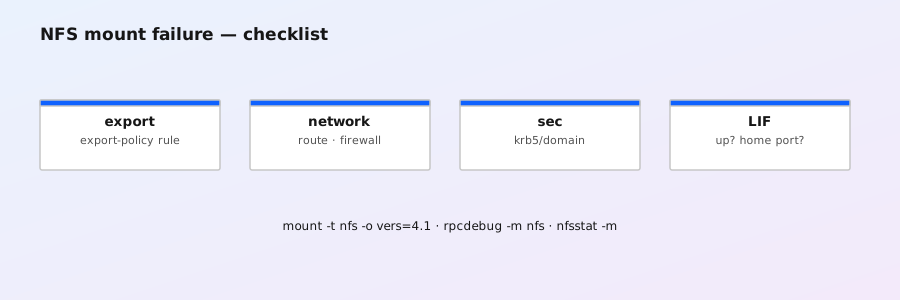
1. Read the error, pick the path
| Client error | Most likely layer |
|---|---|
Permission denied | Export policy rule (client match or sec flavor), root squash, NFSv4 domain |
RPC: Connection refused / RPC: Program not registered | NFS service not enabled on the SVM, or firewall blocking 2049/111 |
No such file or directory (on mount) | Export path doesn't exist (wrong junction/volume), or export policy has no matching rule so ONTAP hides the path |
| Mount hangs / times out | Network: LIF down, routing, firewall drop (not reject), port channel issue |
Mounts but everything owned by nobody | NFSv4 ID mapping domain mismatch (see below) |
2. Export policy: the #1 cause
# Which export policy is on the volume, and what are its rules?
volume show -vserver vs1 -volume vol1 -fields policy
vserver export-policy rule show -vserver vs1 -policy default
# Test exactly what the client would be allowed (the killer command)
vserver export-policy check-access -vserver vs1 -client-ip 10.1.2.50 -volume vol1 -authentication-method sys
Fix: add or adjust a rule — the client's IP must match (-v4client/-clientmatch), and the security flavor must match how the client mounts (-rorule sys etc.):
vserver export-policy rule create -vserver vs1 -policy default \
-v4client 10.1.2.0/24 -protocol nfs -rorule sys -rwrule sys -superuser sysdefault export policy contains a default rule with no access. Many first-mount failures are simply "nobody added a rule yet." Also: if the export path is wrong, ONTAP may return ENOENT rather than EACCES — check the junction path with volume show -fields junction-path.
3. NFS service not enabled
# Is NFS enabled on the SVM, and which versions?
vserver nfs show -vserver vs1
# Enable if needed
vserver nfs enable -vserver vs1
# Client side sanity: what does the server advertise?
showmount -e 10.0.0.5
If showmount hangs or is refused but the LIF pings, check client firewall (nfs-utils, rpcbind) and that the data LIF actually has the NFS protocol: network interface show -fields data-protocols.
4. Network / LIF problems
# LIF up? On its home node? Failover state?
network interface show -fields lif,address,home-node,home-port,status-oper,status-admin
# Routing from the SVM
network route show -vserver vs1
# Ping a LIF from the cluster (tests the data path)
network ping-lif -vserver vs1 -lif data1
# Port health
network port show -fields node,port,link,duplex,speed,error-*
Hangs usually mean a firewall drop (SYN never answered) or a broken port channel. Compare showmount/ping from two different clients to isolate client vs server side.
5. Security flavors and root squash
- Mount with
sec=krb5but the rule only allowssys? Denied. Match the rule's sec flavor to the mount options — or add both flavors to the rule. - Root squash maps uid 0 → anonymous (65534). If root can't write, check
-superuseron the rule:-superuser sysallows root. For normal users, squash doesn't apply. - Kerberos issues (no ticket, clock skew, missing SPN) look like permission denied or
krb5errors in the event log. Checkevent log show -message-name secd*on the SVM.
6. NFSv4 and the "nobody" problem
NFSv4 uses names (strings), not uid numbers. ONTAP maps Unix uid/gid ↔ Windows SIDs using the SVM's NFSv4 ID domain. If the client's domain (e.g., ad.example.com via Kerberos realm or idmapd) differs from the SVM's configured domain (default defaultv4iddomain.com), files show as nobody and permissions break.
# Current NFSv4 domain config
vserver nfs show -vserver vs1 -fields nfsv4id-domain
# Align it with your AD/Kerberos realm
vserver nfs modify -vserver vs1 -v4-id-domain ad.example.com
# Client side must match (Linux: /etc/idmapd.conf Domain=)
7. Prevention checklist
- Standardize export policy rules (subnet-based,
sys+krb5i) and document them. - Use
vserver export-policy check-accessin your change process before telling a team "mount it." - Keep the NFSv4 domain in your build documentation — it's a silent killer.
- Monitor data LIF failover events; a LIF stuck on a non-home port with a dead link causes intermittent hangs.