Home / Troubleshooting / SnapMirror Problems
SnapMirror Problems
Symptoms: lag keeps growing, transfers fail, the relationship is stuck in an odd state, or failover to the destination doesn't work the way you expected.
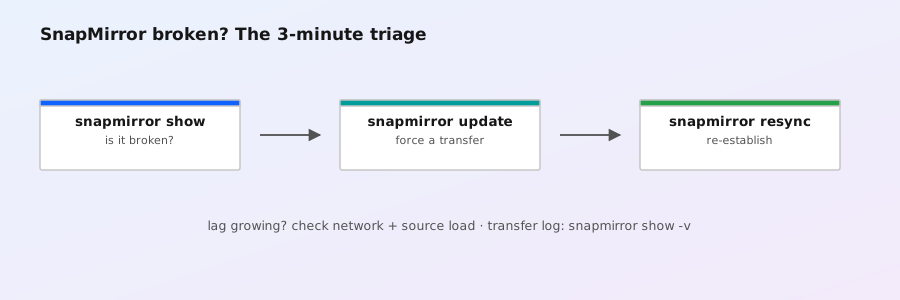
1. Understand the states first
| State | Meaning |
|---|---|
Snapmirrored | Healthy — replicating on schedule |
Uninitialized | Relationship created but never initialized — run snapmirror initialize |
Broken-off | Destination was breakn — it is now read-write and no longer receiving updates |
Resyncing | Recovering after resync — the destination is being brought back in sync (may take a while) |
Failed / transfer errors | Last transfer failed — investigate (below) |
# The two commands that tell you 90% of the story
snapmirror show
snapmirror show -destination-path vsB:volB -detail
# Lag and last transfer
snapmirror show -fields destination-path,state,status,lag-time,last-transfer-end,last-transfer-size
2. Lag growing / never catching up
Lag = how stale the destination is. If it grows continuously:
- Change rate exceeds transfer rate. The source is generating more changed data per interval than can be shipped. Options: reduce snapshot frequency (fewer, larger transfers can be more efficient), increase network bandwidth, enable compression on the relationship (
snapmirror modify -compress true— available where supported), or use SnapMirror S3 for less time-critical copies. - Network bottleneck. Check intercluster LIF throughput:
network interface show -role intercluster, port errors:network port show -fields link,error-*. Test with the catch-up estimator to see if your link can even theoretically keep up. - Source volume busy. SnapMirror competes with production I/O. QoS on the source or scheduling transfers off-peak helps.
# Force an update and watch it
snapmirror update -destination-path vsB:volB
snapmirror show -destination-path vsB:volB -detail   # watch last-transfer-size and time
3. Transfer failures
snapmirror show -detail prints the last transfer error. Common ones:
| Error | Typical cause / fix |
|---|---|
| Peer unreachable / connection failed | Cluster or SVM peering broken; intercluster LIFs down; firewall blocking port 10000. Verify: cluster peer show, vserver peer show, network ping-lif |
| Destination volume full | The destination volume (or its aggregate) lacks space for the next snapshot. Grow it or free space; thin provisioning recommended on destinations |
| Snapshot not found on source | A snapshot the relationship needed was deleted before transfer (e.g., autodelete ate it). Re-run snapmirror update to resync from the latest common snapshot, or snapmirror resync |
| Authentication/peering failure | Peering passphrase mismatch or SVM peer deleted. Re-establish cluster peer/vserver peer |
| Destination read-only mismatch | The destination volume was modified (e.g., someone wrote to it after break). Re-create the relationship if the destination data is disposable |
Failed to find a sync marker: entry doesn't exist | SnapMirror couldn't find the common snapshot/transfer marker it expects on the destination. Typically: the baseline snapshot was deleted (autodelete), the destination volume was restored/reverted out from under the relationship, or the relationship was created against a different baseline than the one that exists. Recovery: snapmirror resync to re-establish from the latest common snapshot — or if the baseline is truly gone, delete and re-create the relationship (full re-seed). See section 7 below |
4. Breaking and restoring
To fail over to the destination (DR), you break the relationship — the destination becomes writable:
# Fail over: make the destination writable
snapmirror break -destination-path vsB:volB
# (applications now use the former destination)
To return after the source is healthy, re-establish and resync — this brings the old source back in sync from the destination without a full reseed (it only ships changes since the common snapshot):
# From the (former) destination cluster: re-establish toward the original source
snapmirror resync -destination-path vs1:vol1
# Wait for state to become Snapmirrored, then optionally switch direction back
snapmirror show -fields state,status,lag-timesnapmirror resync -destination-path vs1:vol1, the destination is the volume being resynced to — i.e., the original source volume. Get the direction wrong and you can overwrite the wrong side. When in doubt, snapmirror show the relationship and follow its arrow.
5. Restoring data from the destination
# Restore the destination snapshot back onto the source volume (in-place restore)
snapmirror restore -source-path vsB:volB -destination-path vs1:vol1
# Or browse the destination via NFS/SMB after break, and copy files back
Restore overwrites the source volume with the destination's data — confirm the snapshot you're restoring is the right one, and snapshot the current source first if there's any doubt.
6. SnapVault / vault relationships
- Vault relationships use labels: the source's snapshot policy must create snapshots with matching labels (e.g.,
daily,weekly), otherwise nothing transfers. Check both policies:snapshot policy showandsnapmirror policy show. - Retention is per-label on the destination — "why isn't my weekly kept for 5 years?" is usually a label mismatch.
- Verify/release: after breaking a vault relationship for testing, re-establish with
snapmirror create+resync, orsnapmirror releaseto clean up source-side state.
7. SnapMirror S3 and the "sync marker" error
Two cases that trip up admins who move replication across SVMs, subnets, or to object storage:
SnapMirror S3 (volume to S3 bucket)
- SnapMirror S3 replicates volume snapshots to an S3-compatible bucket (object storage) instead of another ONTAP volume — handy for long-term, low-cost copies, compliance archives, and sending data into cloud object storage. The bucket can be on ONTAP's own object-store server, StorageGRID, or a public cloud S3 service.
- Setup uses a different policy type: create the relationship with an S3-appropriate policy (
snapmirror policy create -policy-type mirror-vaultor the built-in S3 policies) and ans3:destination path. - Cross-subnet gotcha: the SVM that owns the object-store server and the SVM that owns the source volume must be able to see each other. With SVMs in different subnets or broadcast domains, the object-store server's LIF may not be reachable from the source SVM's network — the relationship initializes but the first transfer fails with a connection error. Fix: ensure the SVMs share routing (inter-SVM routing or a LIF on a common subnet) and that firewall rules allow the object-store port (usually 80/443 for HTTPS S3).
# Check what the object-store server exposes and where its LIFs live
vserver object-store-server show
network interface show -vserver svm_obj -fields address,home-port,role
# Confirm the source SVM can reach it (test from the cluster)
network ping -lif svm_src_lif -destination <object-store-server-ip>
"Failed to find a sync marker: entry doesn't exist"
This error appears when the destination (volume or bucket) doesn't have the sync marker — the baseline snapshot/transfer record — that the relationship expects. It's almost always one of:
- The baseline snapshot was deleted after the relationship was created (autodelete, manual cleanup, or a policy that didn't protect it). SnapMirror marks snapshots as protected; if something deleted one anyway (e.g.
snapshot deleteforced), the marker is gone. - The destination was reverted or restored to a point before the marker (e.g. a snapshot restore on the destination volume).
- The relationship was re-created against the wrong baseline, or a partial initialization was interrupted and never completed.
# Diagnose: what snapshots actually exist on both sides?
snapshot show -vserver vsA -volume volA
snapshot show -vserver vsB -volume volB
# Try to re-establish from the latest common snapshot
snapmirror resync -destination-path vsB:volB
# If resync can't find a common baseline, re-seed from scratch
snapmirror release -destination-path vsB:volB
snapmirror delete -destination-path vsB:volB
snapmirror create -source-path vsA:volA -destination-path vsB:volB -type XDP
snapmirror initialize -destination-path vsB:volBresync first (it reuses the newest common snapshot), and protect the baseline snapshot from deletion going forward (configure autodelete to exclude snapshots SnapMirror needs).
8. Prevention checklist
- Thin-provision destinations; monitor destination aggregate usage.
- Alert on lag:
snapmirror show -fields lag-timein your monitoring, threshold on your RPO. - Don't let autodelete remove snapshots the relationship still needs — configure autodelete with
snapmirrorprotection awareness (autodelete won't delete snapshots needed by SnapMirror when configured correctly). - Document your DR runbook: break → fail over → resync → switchback. Test it — the exam and the real world both reward a tested runbook.