Home / Reference / S3 on ONTAP
S3 on ONTAP: the object store server
ONTAP has spoken S3 natively since 9.8. Every SVM can host an object store server that serves S3 buckets out of ordinary FlexVols — no gateway VM, no extra licensing. This guide covers the architecture, the commands you actually type, and the limits that bite.
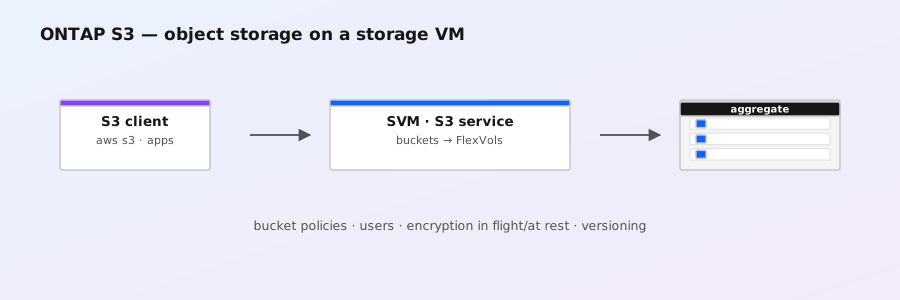
What ONTAP S3 actually is
An object store server is an S3-compatible service that runs inside an SVM. Buckets are not a new filesystem — each bucket is carved out of a FlexVol on the SVM, and objects are stored as files in that volume with a small amount of object metadata alongside. That means everything you already know about ONTAP applies: snapshots protect buckets, QoS throttles them, dedupe/compression works on the underlying volume, and the data is served from the same HA pairs as any other workload.
It is not StorageGRID. ONTAP S3 is for S3-compatible access to data on the cluster you already own — app backup targets, archive, dual-protocol NAS+S3. StorageGRID is the scale-out, erasure-coded, multi-site object platform for when you need true object storage at scale (see the SMB guide for the NAS side of the same story).
Architecture in one picture
- Per SVM: an object store server belongs to exactly one SVM (ONTAP 9.8–9.10: one per SVM; later releases allow more than one). It binds to the SVM's data LIFs.
- Root volume: the object store server needs a dedicated root volume (a small FlexVol) that holds object store metadata.
- Data volumes: one or more FlexVols where bucket contents live. A bucket is created inside one of these volumes, not across them.
- Endpoint: clients reach the server over the SVM's LIFs on HTTP (default 80) and/or HTTPS (default 443) — the same IPs you use for NFS/CIFS, different ports.
- Authentication: ONTAP issues its own access-key/secret-key pairs; there is no AD/Kerberos binding for S3. Access is scoped by bucket policies.
Step 1 — Create the object store server
vserver object-store-server create \
  -vserver vs1 \
  -root-volume data_vs1_root \
  -root-volume-security-style unix \
  -data-volumes data_vs1_data1,data_vs1_data2 \
  -bucket-endpoint-style path-style \
  -policy default
The root volume must be a dedicated volume (ONTAP creates it with the right settings if the name doesn't exist — keep it empty and unshared). -data-volumes lists the volumes buckets may be created in; you can add more later with vserver object-store-server modify -data-volumes ....
-bucket-endpoint-style chooses how clients address buckets:
path-style—https://host/bucket/key(the safe default, works with every client)virtual-hosted-style—https://bucket.host/key(needs DNS wildcards; only if clients require it)
vserver object-store-server show
vserver object-store-server show -vserver vs1 -instance
Step 2 — Create buckets
vserver object-store-server bucket create \
  -vserver vs1 \
  -bucket reports \
  -volume data_vs1_data1 \
  -size 1TB \
  -policy default

# grow, shrink (shrink only to used size), or delete
vserver object-store-server bucket modify -vserver vs1 -bucket reports -size 2TB
vserver object-store-server bucket delete -vserver vs1 -bucket reports

vserver object-store-server bucket show- Bucket names: 3–63 characters, lowercase letters, digits, periods and hyphens; must start and end with a letter or digit.
- A bucket starts at 0 bytes and grows up to its configured
-size; it is not pre-allocated. The size is a hard ceiling — writes fail once the bucket is full even if the volume has space. - Deleting a bucket requires it to be empty (or you use force-delete in newer releases).
Step 3 — Create users and get keys
vserver object-store-server user create -vserver vs1 -user backup-svc \
  -comment "Veeam service account"

# ONTAP prints the credentials once:
#   Access Key:  A5B9...
#   Secret Key:  Xk2m...   (shown once, save it now)

vserver object-store-server user show
vserver object-store-server user modify -vserver vs1 -user backup-svc -comment "..."
vserver object-store-server user delete -vserver vs1 -user backup-svc
Store the secret key at creation time — ONTAP will not show it again. If it's lost, delete and recreate the user. Keys are cluster-wide unique; the same user can be used against any object store server on the cluster.
Step 4 — Policies (IAM-style access control)
By default, buckets are private. You grant access with policies and statements, modeled on AWS IAM. A policy is a named container; statements inside it declare effect (allow/deny), principal (which user), action (s3:GetObject, s3:PutObject, s3:ListBucket, ...), and resource (an ARN like arn:aws:s3:::reports/*).
vserver object-store-server policy create -vserver vs1 -policy reports-ro

vserver object-store-server policy statement create \
  -vserver vs1 -policy reports-ro \
  -effect allow \
  -principal backup-svc \
  -action s3:GetObject,s3:ListBucket \
  -resource arn:aws:s3:::reports/*,arn:aws:s3:::reports

vserver object-store-server policy show
vserver object-store-server policy statement show -vserver vs1 -policy reports-ro
Statements are evaluated in order; deny wins. If a user has no matching allow statement, the request is rejected. When policies change, existing open connections may hold old permissions briefly.
Step 5 — Connect from clients
Point any S3 client at the SVM's data LIF. AWS CLI is the easiest test:
# path-style endpoint against the SVM LIF (10.0.0.5 here)
aws --endpoint-url https://10.0.0.5 --no-verify-ssl s3 ls
aws --endpoint-url https://10.0.0.5 --no-verify-ssl s3 mb s3://reports
aws --endpoint-url https://10.0.0.5 --no-verify-ssl s3 cp big-file.tgz s3://reports/
aws --endpoint-url https://10.0.0.5 --no-verify-ssl s3 ls s3://reports/
--no-verify-ssl is only for testing against ONTAP's default self-signed certificate. In production, install a CA-signed certificate for the SVM (System Manager → SVM → Security, or security certificate install) and drop the flag. ONTAP serves HTTPS on port 443 by default; you can change the HTTP/HTTPS ports with vserver object-store-server modify -http-port 80 -https-port 443.
DNS tip: with path-style endpoints, no DNS is needed beyond normal LIF resolution. Virtual-hosted style needs *.svm.example.com pointing at the LIFs.
REST API (ONTAP 9.8+)
The same configuration is available over the ONTAP REST API — handy for automation and IaC:
# create the object store server (PUT /api/svm/svms/{svm.uuid}/object-store/servers)
curl -k -u admin -X PUT \
  "https://cluster-mgr/api/svm/svms/00000000-0000-0000-0000-000000000000/object-store/servers" \
  -H "Content-Type: application/json" \
  -d '{
        "name": "svm1",
        "root_volume": {"name": "data_vs1_root"},
        "data_volumes": [{"name": "data_vs1_data1"}],
        "bucket_endpoint_style": "path_style"
      }'

# create a bucket
curl -k -u admin -X POST \
  "https://cluster-mgr/api/svm/svms/00000000-0000-0000-0000-000000000000/object-store/servers/11111111-1111-1111-1111-111111111111/buckets" \
  -H "Content-Type: application/json" \
  -d '{"name": "reports", "volume": {"name": "data_vs1_data1"}, "size": 1099511627776}'

curl -k -u admin "https://cluster-mgr/api/svm/svms/00000000-0000-0000-0000-000000000000/object-store/servers"
Get the real UUIDs from vserver object-store-server show -instance (UUID) and vserver show -vserver vs1 -fields uuid before scripting.
Lifecycle, snapshots, and replication
- Volume snapshots protect buckets: snapshot the data volume and the bucket is captured with it. You can take a bucket-level snapshot too:
vserver object-store-server bucket snapshot create -vserver vs1 -bucket reports -snapshot snap1— objects are then recoverable from that snapshot via S3 object-version-style access. - Lifecycle rules (newer releases): ONTAP supports expiration of objects, versions, and non-current versions, configured with
vserver object-store-server bucket lifecycle-managementcommands. Behavior tracks the S3 lifecycle model, not StorageGRID-style tiering — there is no automatic transition of objects off the cluster. - SnapMirror S3: newer ONTAP can mirror S3 buckets to another ONTAP cluster (SnapMirror S3), giving you an async DR path for object data. Also relevant: SnapMirror can use S3 as a destination for archiving volume snapshots to object storage.
- Dual protocol: the same FlexVol can serve NFS/CIFS and host buckets. Files written via NFS won't be visible as S3 objects (and vice versa) — the object layout is internal. Keep bucket volumes dedicated unless you enjoy surprises.
Monitoring and troubleshooting
# object store server status and stats
vserver object-store-server show -instance
vserver object-store-server stats show -vserver vs1
vserver object-store-server bucket show -fields name,size,used,percent-used

# object latency / ops
statistics show -object object-store-server -sample-id s3

# check the audit log / EMS for S3 events
event log show -event *s3* -severity warning
Common failure signatures:
- AccessDenied on a working key → policy statement missing or wrong ARN; check
-resource arn:aws:s3:::bucket/*vs the bucket itself (both are usually needed for list + object ops). - Timeout / connection refused → firewall between client and SVM LIF (port 443/80), or the object store server was created before the LIF existed — recreate it.
- Bucket full but volume has space → bucket hit its configured
-size; grow it withvserver object-store-server bucket modify. - SignatureDoesNotMatch → clock skew between client and cluster (NTP), or the secret key was retyped/rotated underneath the client.
Limits and gotchas (the parts that bite)
| Item | Limit | Note |
|---|---|---|
| Max object size | 5 GiB | Larger objects fail on PUT; multipart upload doesn't raise the ceiling on ONTAP |
| Bucket default / max size | 10 TB default, up to 100 TB | Set at creation with -size; growing later is easy |
| Object store servers | 1 per SVM (9.8–9.10); more in later releases | Plan one SVM per object namespace |
| Endpoint style | path-style or virtual-hosted, set once | Changing style later breaks clients using the old form |
| Auth | Access/secret keys only | No IAM federation, no AD integration — manage keys via CLI/REST |
| Feature parity | Not full AWS S3 | No event notifications, no website hosting, no cross-region replication |
Verify limits against the exact ONTAP release you run — vserver object-store-server help and the S3 configuration section of the ONTAP documentation are authoritative for your version.
Use cases that fit (and one that doesn't)
- Fits: backup/archive target for S3-native backup tools (Veeam-style object repositories), dev/test S3 workloads, long-term retention on existing flash/capacity pools, modernizing NFS workloads to S3 API without buying new hardware.
- Doesn't fit: multi-site global object storage, erasure-coded cold tiering, public-facing buckets at internet scale — that is StorageGRID's job.