Content Library · Docs

Docs Archive

Browse 147 Docs items in the NetApp Black Box content library, sorted newest first.

Library JSON API

Showing all 147 items

Docs

What's new for ONTAP Select 9.19.1

Source: https://docs.netapp.com/us-en/ontap-select/reference_new_ots.html

ONTAP Select 9.19.1 ships two headline features for software-defined ONTAP: (1) Support for external key management via KMIP — ONTAP Select now supports an external KMIP key manager (e.g., SafeNet, Thales, Vormetric) for NVE encryption keys. Cloud key managers (AWS KMS, Azure Key Vault, GCP KMS) are explicitly NOT supported — only on-prem KMIP. Enable post-deploy via the management GUI or REST API; existing 9.19.1 clusters gain the option after upgrade. (2) Support for AMD processors on both KVM and ESXi hypervisor hosts — previously Intel-only. The KVM hypervisor path is now viable on AMD EPYC servers (important for modern server fleets that have largely moved off Intel Xeon SP). Both features have been requested heavily by SMB customers running ONTAP Select on commodity hardware and by orgs standardising on AMD for sustainability/perf reasons. Prior major releases: 9.18.1 simplified product downloads to two artifacts (ONTAP Select Deploy + ONTAP Select Image, replacing the legacy 4-image matrix), 9.17.1 added NVMe-oF support on KVM, 9.16.1 brought 100GbE support. Reference for any ONTAP Select capacity planner / hardware refresh conversation.

Open source
Docs

ONTAP base immutability features on FAS2820

Source: https://community.netapp.com/community/discussion/468362/ontap-base-immutabilty-features

Question asked on NetApp Community about whether the standard ONTAP base (FAS2820) includes any immutability feature by default, or if ONTAP ONE is required for WORM + SnapLock licensing. The accepted answer confirms the FAS2820 entry-tier system runs ONTAP 9.x and supports the same WORM (SnapLock) immutability primitives as larger AFF/FAS once ONTAP ONE (or legacy SnapLock license) is enabled. Plain ONTAP 9 (no SnapLock entitlement) does NOT give compliance-mode WORM; only SnapMirror lock-style retention is possible via SnapLock Compliance or SnapLock Enterprise modes. Practical answer for any size: SnapLock Compliance = strict WORM, no admin override even by root; SnapLock Enterprise = WORM with privileged delete; both require the SnapLock license, which is bundled in ONTAP ONE on FAS2820 going forward. If only NetApp Snapshot copies are in play, immutable snapshots (introduced ONTAP 9.12.1) provide append-only retention against ransomware without SnapLock — the SnapLock license is for regulatory compliance retention, not snapshots. Reference for FAQ / hardening guide.

Open source
Docs

FAS70 to DS212C shelf connectivity clarification

Source: https://community.netapp.com/community/discussion/468369/need-clarity-on-on-fas70-to-ds212c-shelf-connectivity

A field engineer asked which cabling diagram to follow when connecting a FAS70 controller to two DS212C shelves, citing the FAS70/90 install-cable doc (https://docs.netapp.com/us-en/ontap-systems/fas-70-90/install-cable.html) which shows DS460C connectivity and the SAS3 cabling rules (https://docs.netapp.com/us-en/ontap-systems/sas3/install-cabling-rules.html) for platforms without internal storage. The point that often confuses new installers: the FAS70/90 install-cable page references DS460C as the example topology because that's the recommended high-density shelf, but the port-pair rules for SAS3 multipath HA are identical for DS212C (12Gb SAS, IOM12C). The official answer in the thread confirms that for an HA-pair FAS70 with 2× DS212C: use both controllers' ports 0a/0b and 0c/0d (4 SAS lanes per controller) with multi-path HA cabling — each shelf IOM connects to both controllers in a square so any single IOM, HBA, or cable failure doesn't drop the shelf. Reference for FAS/DS212C installation how-to.

Open source
Docs

Cable the FAS70 or FAS90 hardware for network and storage connectivity

Source: https://docs.netapp.com/us-en/ontap-systems/fas-70-90/install-cable.html

Canonical NetApp doc for cabling a FAS70 or FAS90 HA pair (new 2025-2026 generation FAS entry/mid-tier). Step 1: connect the storage controllers to your data network — each FAS70/FAS90 controller ships with onboard 100GbE ports (e0a/e0b on a dedicated NIC) plus optional PCIe NIC slots; standard practice is one LACP bond pair for data and a separate management L2. Step 2: cable host-network connections (iSCSI, NFS, SMB client traffic) — use dedicated NICs/slots, never share with intercluster or NDU. Step 3: cable management-network connections to the service-processor/management switch — the FAS70/90 nodes expose a dedicated 1GbE management port plus the RJ-45 SP. Step 4: cable the shelf connections — SAS3 (12 Gb/s) multipath HA to supported DS212C/DS224C/DS460C shelves using IOM12C modules. The doc emphasises the multipath square: each controller's ports 0a/0b/0c/0d connect to both shelves' IOM-A and IOM-B, so any single IOM, HBA, cable, or controller failure doesn't drop the shelf. This is the exact topology a field engineer was confused about in community thread 468369 — the FAS70/90 example shows DS460C, but the rules are identical for DS212C and DS224C; only port counts and lane counts differ. Useful install reference for any 2026 FAS deployment.

Open source
Docs

AWS Transform now supports NetApp ONTAP as a migration target (SMB Tech AU)

Source: https://smbtech.au/news/aws-transform-now-supports-netapp-ontap-as-a-migration-target-for-enterprise-storage-workloads/

Announces AWS Transform adding NetApp ONTAP as a supported migration target, extending the AWS Transform AI-driven migration service beyond AWS-native targets to include NetApp's flagship storage OS. The integration lets enterprises use AWS Transform's generative-AI-assisted discovery, planning, and execution workflows to migrate workloads onto on-premises or cloud-resident ONTAP (including Amazon FSx for NetApp ONTAP).

Open source
Docs

Migrate VMware Storage to Amazon FSx for NetApp ONTAP using AWS Transform

Source: https://aws.amazon.com/blogs/storage/migrate-vmware-storage-to-amazon-fsx-for-netapp-ontap-using-aws-transform/

AWS Storage Blog (Advanced / 300, Technical How-to). This technical how-to walks VMware administrators and storage engineers through a direct migration path from on-premises enterprise storage (NetApp ONTAP, Dell, Everpure, HPE) to Amazon FSx for NetApp ONTAP using AWS Transform, the agentic AI–driven modernization service. It explains why enterprise storage capabilities (automatic failover, instant snapshots, writable clones, inline deduplication, multi-protocol access) must be preserved Day 1, then maps each on-prem capability to its FSx for ONTAP counterpart, and shows how AWS Transform delivers non-disruptive testing, built-in failback, and atomic cutover that moves compute, network, and storage together in one operation. Existing ONTAP customers keep their operational workflows, automation scripts, and monitoring tools; customers from other platforms get the same category of capabilities without adopting unfamiliar tooling. The post matters because Q1 FY27 saw NetApp emphasise VMware Cloud Foundation 9.1 + FSx for ONTAP + AWS Transform as the canonical path for VMware customers modernising around ONTAP, and AWS Transform's AI-driven discovery/dependency-mapping reduces the project-blocking re-architecture conversation that usually delays enterprise storage migrations.

Open source
Docs

2026-09-03-tr-1462-2-ansible-automation-ontap

Source: NetApp

NetApp released a refreshed technical report (TR-1462-2) covering end-to-end automation of ONTAP cluster operations through Red Hat Ansible Automation Platform (AAP). The report walks through installing `netapp.ontap` collection from Ansible Galaxy, configuring the ONTAP REST API credential (`/api/cluster` and `/api/security`), and using Ansible Controller (Execution Environments with `python 3.11` + `netapp-lib`) to drive day-1 (cluster setup, SVM create, NFS/SMB export policy) and day-2 (volume create, snapshot policy, SnapMirror schedule, quota report) workflows. The -2 revision adds AAP 2.5 workflow job templates and inventory plug-ins, plus integration with ONTAP's webhook notifications (`/api/support/auto-support/events`) so Ansible can react to ASUP events and run remediation playbooks automatically.

Open source
Docs

2026-09-03-spglobal-fsx-ontap-dr-snapshots-aws

Source: AWS Big Data Blog

AWS published an architectural case study detailing how S&P Global built a multi-region disaster recovery solution for SQL Server workloads running on Amazon FSx for NetApp ONTAP, using ONTAP's native snapshot technology plus SnapMirror to replicate the FSx file systems cross-region. The design relies on consistent application-aware snapshots via the FSx ONTAP REST API (`/api/protocols/snapmirror/relationships` and `/api/storage/volumes/{id}/snapshots`) so that VSS-equivalent quiescing happens before the snapshot is taken, then the snapshots are replicated to a secondary FSx ONTAP instance in the DR region. Recovery time objectives (RTO) hit sub-60 minutes because the SnapMirror destination is kept near-current and the SQL Server databases are mounted from the secondary FSx volume rather than being restored from backup.

Open source
Docs

2026-09-03-flex-unified-ontap-mode-ga-netapp

Source: NetApp

NetApp announced the general availability of "Flex Unified ONTAP-mode" — a new deployment mode that consolidates SAN (iSCSI/FC) and NAS (NFS/SMB) protocols on the same FlexVol volume while exposing a unified management plane via ONTAP System Manager. The new mode replaces the prior protocol-licensing friction where enabling both SAN and NAS on a single SVM required a feature license key swap; Flex Unified mode activates all four protocols at cluster create time and lets admins carve LUNs and shares from the same aggregate. ONTAP 9.16.1+ is required. Documentation note: cluster peers should still use `cluster peer create` and SVM peering remains a separate workflow — the only change is the unified licensing envelope.

Open source
Docs

2026-09-02-ontap-s3-bucket-policy

Source: https://docs.netapp.com/us-en/ontap/s3-config/create-bucket-policy-task.html

Step-by-step procedure for writing a JSON access policy on an ONTAP S3 bucket, including Allow/Deny statements on s3:GetObject, s3:PutObject, s3:ListBucket, and principal/user conditions. The reference is the operational foundation for multi-tenant object storage on ONTAP 9.x: required reading for any ONTAP S3 deployment, especially when isolating tenant data inside a single SVM.

Open source
Docs

2026-09-02-ontap-manage-iscsi-san-initiators

Source: https://docs.netapp.com/us-en/ontap/san-admin/manage-iscsi-san-initiators-task.html

How-to for adding, removing, and viewing iSCSI initiators on an ONTAP SVM using System Manager or the ONTAP CLI (vserver iscsi initiator add/remove/show). Covers initiator naming conventions (IQN), group/portal binding, and per-LUN masking. Essential reference for SAN administrators who script LUN access or troubleshoot connectivity from Linux/ESXi hosts. Applies to ONTAP 9.x and ASA systems.

Open source
Docs

2026-09-02-ontap-fpolicy-event-config-plan

Source: https://docs.netapp.com/us-en/ontap/nas-audit/plan-file-fpolicy-event-config-concept.html

Conceptual reference covering how to plan FPolicy events in ONTAP: file-operation filtering (create, read, write, rename, delete, setattr), volume scope, persistent vs. non-persistent notifications, and the engine/protocol pairing. FPolicy is the NAS-native file-auditing/quotas-blocker; this page is the design pre-requisite for any FPolicy implementation that uses either the native or an external FPolicy server.

Open source
Docs

2026-09-02-ontap-fpolicy-create-policy

Source: https://docs.netapp.com/us-en/ontap/nas-audit/create-fpolicy-policy-task.html

How-to for assembling an FPolicy policy from its components (event, engine, scope, policy), enabling it on an SVM, and verifying status. The article is the canonical operational reference for `vserver fpolicy policy create` and its required parameters. Required reading whenever an enterprise deploys ONTAP-native file auditing, ransomware detection, or data-loss-prevention workflows.

Open source
Docs

Protect ONTAP consistency groups

Source: https://docs.netapp.com/us-en/ontap/consistency-groups/protect-task.html

Creating a consistency group does not automatically enable protection. Protection policies can be set at the time of creation or after creating your consistency group. You can protect consistency groups using: SnapMirror active sync (referred to as SnapMirror Business Continuity in versions of ONTAP before 9.15.1) If you are utilizing nested consistency groups, you can set different protection policies for the parent and child consistency groups. Beginning with ONTAP 9.11.1, consistency groups offer two-phase consistency group snapshot creation . The two-phase snapshot operation executes a pre-check, ensuring the snapshot is captured successfully.

Open source
Docs

ONTAP S3 architecture using FlexGroup volumes

Source: https://docs.netapp.com/us-en/ontap/s3-config/architecture.html

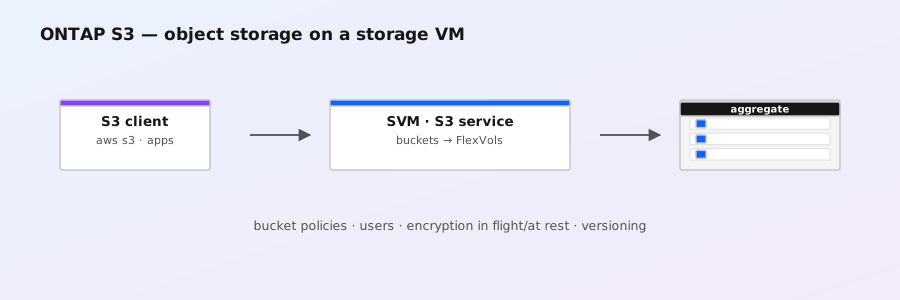
Access to the bucket is provided through authorized users and client applications. When a bucket is used exclusively for S3 applications, including use as a FabricPool endpoint, the underlying FlexGroup volume will only support the S3 protocol. Beginning with ONTAP 9.12.1, the S3 protocol can also be enabled in multiprotocol NAS volumes that have been preconfigured to use NAS protocols. When the S3 protocol is enabled in multiprotocol NAS volumes, client applications can read and write data using NFS, SMB, and S3. Minimum bucket capacity is determined by the ONTAP platform.

Open source
Docs

Learn about NFS over RDMA in ONTAP

Source: https://docs.netapp.com/us-en/ontap/nfs-rdma/index.html

Official ONTAP docs index page for NFS over RDMA (Remote Direct Memory Access). Covers the protocol overview, why RDMA lowers latency for AI/HPC workloads, supported hardware (RoCE-capable NICs), supported ONTAP versions, and configuration entry points. Useful as the canonical reference when sizing RDMA-capable NFS exports and pairing with NFS clients that support NFSoRDMA (Linux kernel client + MellusX/RXE software emulation where supported).

Open source
Docs

Configure external directory services for ONTAP S3 access

Source: https://docs.netapp.com/us-en/ontap/s3-config/configure-access-ldap.html

You can provide user groups belonging to an external directory service with access to your ONTAP object storage environment. Lightweight Directory Access Protocol (LDAP) is an interface for communicating with directory services, such as Active Directory, that provide a database and services for identity and access management (IAM). To provide access, you need to configure LDAP groups in your ONTAP S3 environment. After you have configured access, the group members have permissions to ONTAP S3 buckets. For information about LDAP, see Learn about using LDAP name services on ONTAP NFS SVMs . You can also configure Active Directory user groups for fast bind mode, so that user credentials can be validated and third-party and open-source S3 applications can be authenticated over LDAP connections. Ensure the following before configuring LDAP groups and enabling the fast bind mode for group access: An S3-enabled storage VM containing an S3 server has been created. See Create an SVM for S3 .

Open source
Docs

Configure a hierarchical ONTAP consistency group

Source: https://docs.netapp.com/us-en/ontap/consistency-groups/configure-hierarchy-task.html

Hierarchical consistency groups have a parent that can include up to five individual consistency groups. Hierarchical consistency groups can support different local snapshot policies across consistency groups or individual volumes. If you use a remote protection policy, that will apply for the entire hierarchical consistency group (parent and children). Beginning with ONTAP 9.13.1, you can modify the geometry of your consistency groups and move volumes between child consistency groups . For object limits on consistency groups, see Object limits for consistency groups . When creating a hierarchical consistency group, you can populate it with new LUNs. Beginning with ONTAP 9.13.1, you can also use new NVMe namespaces and NAS volumes.

Open source
Docs

Configure LIFs for NFS over RDMA

Source: https://docs.netapp.com/us-en/ontap/nfs-rdma/configure-lifs-task.html

You must be running ONTAP 9.12.1 or later to create a network interface for NFS over RDMA with System Manager. When you select NFS,SMB/CIFS,S3 , you have the option to Use RoCE ports . Select the checkbox for Use RoCE ports . Select the storage VM and home node. Assign a Name , IP address , and Subnet mask . Once you enter the IP address and subnet mask, System Manager filters the list of broadcast domains to those that have RoCE capable ports. Select a broadcast domain. You can optionally add a gateway.

Open source
Docs

Configure Cisco Duo 2FA for ONTAP SSH logins

Source: https://docs.netapp.com/us-en/ontap/authentication/configure-cisco-duo-mfa-task.html

If you enable Duo authentication for SSH logins, users will need to enroll a device the next time they log in using SSH. For enrollment information, refer to the Cisco Duo enrollment documentation . You can use the ONTAP command line interface to perform the following tasks with Cisco Duo: You can create a Cisco Duo configuration for either the entire cluster or for a specific storage VM (referred to as a vserver in the ONTAP CLI) using the security login duo create command. When you do this, Cisco Duo is enabled for SSH logins for this cluster or storage VM. Learn more about security login duo create in the ONTAP command reference . Enable Cisco Duo authentication for this storage VM, substituting information from your environment for the values in brackets:

Open source
Docs

Clone an ONTAP consistency group

Source: https://docs.netapp.com/us-en/ontap/consistency-groups/clone-task.html

When cloning a consistency group, you can clone it with its current configuration, but with volume contents as they are or based on an existing consistency group snapshot. Cloning a consistency group is supported only for the entire consistency group. You cannot clone an individual child consistency group in a hierarchical relationship: only the complete consistency group configuration can be cloned. When you clone a consistency group, the following components are not cloned: When you clone a consistency group, ONTAP will not create SMB shares for the cloned volumes if a share name is not specified. * Cloned consistency groups are not mounted if a junction path is not specified.

Open source
Docs

Change an ONTAP administrator password

Source: https://docs.netapp.com/us-en/ontap/authentication/change-login-password-task.html

You must be a cluster or SVM administrator to change your own password. You must be a cluster administrator to change another administrator's password. Change an administrator password: security login password -vserver svm_name -username user_name The following command changes the password of the administrator admin1 for the SVM vs1.example.com . You are prompted to enter the current password, then enter and reenter the new password.

Open source
Docs

Azure NetApp Files application volume group is now GA for SAP HANA

Source: NetApp video / product page (https://www.netapp.com/video/cgsqqqxcco8/azure-netapp-files-application-volume-group/)

Microsoft and NetApp have promoted the Azure NetApp Files (ANF) **application volume group** feature to general availability, and NetApp has documented it as the standard provisioning method for SAP HANA volumes on ANF. The feature replaces the per-volume manual placement that used to require Azure-team intervention for HANA-sized workloads.

Open source
Docs

Assess ONTAP S3 physical storage requirements

Source: https://docs.netapp.com/us-en/ontap/s3-config/assess-physical-storage-requirements-task.html

When you create an S3 bucket in an S3-enabled SVM, a FlexGroup volume is automatically created to support the bucket. You can let ONTAP select the underlying aggregates and FlexGroup components automatically (the default) or you can select the underlying aggregates and FlexGroup components yourself. If you decide to specify the aggregates and FlexGroup components — for example, if you have specific performance requirements for the underlying disks — you should make sure that your aggregate configuration conforms to best practice guidelines for provisioning a FlexGroup volume. Learn more: NetApp Technical Report 4571-a: NetApp ONTAP FlexGroup Volume Top Best Practices If you are serving buckets from Cloud Volumes ONTAP, it is strongly recommended that you manually select the underlying aggregates to ensure that they are using one node only. Using aggregates from both nodes can impact performance, because the nodes will be in geographically separated availability zones and hence susceptible to latency issues. Learn about creating buckets for Cloud Volumes ONTAP .

Open source
Docs

Add or remove volumes to an ONTAP consistency group

Source: https://docs.netapp.com/us-en/ontap/snapmirror-active-sync/add-remove-consistency-group-task.html

In most instances, this is a disruptive process requiring you to delete the SnapMirror relationship, modify the consistency group, then resume protection. Beginning with ONTAP 9.13.1, adding volumes to a consistency group with an active SnapMirror relationship is a non-disruptive operation. In ONTAP 9.9.1, you can add or remove volumes to a consistency group using the ONTAP CLI. Beginning with ONTAP 9.10.1, it is recommended that you manage consistency groups through System Manager or with the ONTAP REST API. If you want to change the composition of the consistency group by adding or removing a volume, you must first delete the original relationship and then create the consistency group again with the new composition.

Open source
Docs

StorageGRID 12.1 — What's new (NetApp Docs)

Source: https://docs.netapp.com/us-en/storagegrid/release-notes/whats-new.html

NetApp StorageGRID 12.1 release-notes landing page enumerating the new capabilities grouped by area. Highlights that matter operationally: access buckets across multiple StorageGRID systems for cross-grid replication; Object-Lock-enabled buckets, cross-grid replication for non-empty buckets, S3 Batch operations for pre-replicating versioning-enabled objects, and non-functional S3 REST headers + pre-calculated checksum values; **Security** brings multi-admin verification and refreshed FIPS policy updates; endpoints with mTLS; **Capacity** improves EC rebalance (now uses free space) and exposes metadata-allowed-space. Upgrade time has increased from <5 min to up to an hour for feature enablement. Reference for any 12.0.x → 12.1 upgrade or for evaluating the federated-namespace and multi-admin-verification features against regulatory/governance requirements.

Open source
Docs

Provision a local tier (aggregate)

Source: docs

CLI command to create ONTAP aggregates with disk selection, RAID group layout, and cloud-tier attachment ('-cloud-tier'). Discusses mixed-Rate/RPM disks, FabricPool, and ONTAP 9.x node compatibility. Cornerstone of ONTAP storage administration.

Open source
Docs

Map a LUN to an igroup

Source: docs

ONTAP SAN command that exposes a LUN to host initiator groups (igroups) by WWPN/IQN. Required for FC and iSCSI host-side LUN discovery, masking, and zoning verification. Cross-referenced by every SAN host setup doc.

Open source
Docs

Manage link costs in StorageGRID (NetApp Docs)

Source: https://docs.netapp.com/us-en/storagegrid/admin/manage-link-costs.html

StorageGRID 12.1 adds more-detailed link-cost information and settings that let operators prioritise which data-center site services a request when two or more sites exist. Link costs directly influence traffic-engineering decisions for the ADC service, load balancer placement, and object routing; mismatched costs are a common root cause of unexpected WAN egress or elevated latency between sites after topology changes. New in 12.1: explicit per-link settings and reporting that surface which sites are being preferred for which workflows, useful when validating multi-site deployments for AI factories that want to keep hot data close to GPU pools. Read alongside the StorageGRID 12.1 What's-new page and the global-namespace documentation when sizing cross-grid replication topology.

Open source
Docs

Logical storage management with the ONTAP CLI

Source: docs

Concept and CLI procedure for ONTAP volumes (FlexVol): creation, sizing, guarantees (none/file/vol), autosize, efficiency, snapshot policies, junction paths, and moving volumes across aggregates/SVMs. Updated 2026-05-04.

Open source
Docs

Learn about ONTAP data at rest encryption

Source: docs

End-to-end procedure for ONTAP NVE (NetApp Volume Encryption) with onboard/external key management (OKM / KMIP / SGX). Covers aggregate-level, volume-level, and SnapLock encryption; key-manager setup; key-transition; backup. Foundation for HIPAA/PCI/FIPS compliance.

Open source
Docs

Learn about ONTAP SnapMirror active sync

Source: docs

Bidirectional synchronous SnapMirror (SM-Business-continuity / SM-AS) for zero-RPO use cases including VMware vCenter Metro Storage Cluster, Oracle RAC, and SQL AlwaysOn. Discusses consistency-group mediation, planned/unplanned failover, ONTAP Mediator, and ONTAP 9.9.1+ availability. Updated 2026-06-17.

Open source
Docs

Learn about ONTAP SnapLock

Source: docs

Concepts and configuration for NetApp SnapLock Compliance and Enterprise WORM volumes - tamper-proof retention for regulatory workloads. Discusses 'snaplock create-volume', privileged-delete, retention periods, audit logging, and ComplianceClock. Updated 2026-06-16.

Open source
Docs

Learn about ONTAP SAN configuration

Source: docs

How to configure iSCSI, FC, FC-NVMe, and NVMe/TCP on ONTAP: SVM creation, LIFs, igroups, LUN mapping, host-side multipath, and zoning. Includes zoning best practices, switch config, and ASA/AFF build-outs. Updated 2025-03-31.

Open source
Docs

Learn about ONTAP S3 configuration

Source: docs

How to expose NetApp ONTAP as an S3 object-store endpoint without external servers: enable ONTAP S3, generate self-signed or CA-signed server certificates, create object-store SVMs/buckets, and integrate with AWS SDKs. Covers SnapMirror S3 for cross-cluster replication.

Open source
Docs

Learn about ONTAP FlexCache volumes

Source: docs

Concept and procedure doc for NetApp FlexCache - read-write caching of source volumes across clusters for WAN-distributed workloads. Covers cache creation ('volume create -volume ... -flexcache-cache-type'), origin/cache relationships, write-back semantics, and prepopulation. Updated 2026-03-19.

Open source
Docs

Learn about NFS configuration with the ONTAP CLI

Source: docs

Concepts and end-to-end procedure for delivering NFS exports from ONTAP: SVM creation, export policy + rules (vserver export-policy rule), NFSv3/NFSv4.x enablement, Kerberos, name-mapping, and client-troubleshooting flow. Updated 2025-05-30. Aligns with NCDA NFS domain.

Open source
Docs

Enable NFS on an SVM

Source: docs

CLI command to enable NFS services on an SVM, configure NFSv3/NFSv4.x, Kerberos, and Windows-style name mappings. Covers -access-cache-config, -auth-sys-config, -nfsv3, -nfsv41, -root, -wdelay, -xprtsec. ONTAP 9.9.1-9.19.1.

Open source
Docs

Create a logical interface

Source: docs

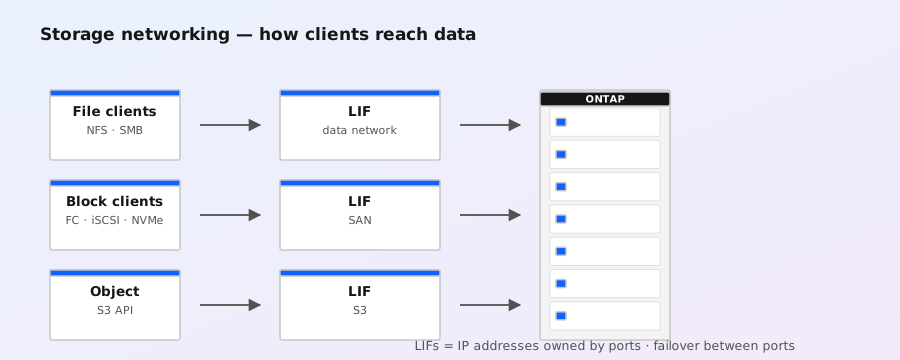
CLI command to provision LIFs on ONTAP SVMs across NAS/SAN/iSCSI/FC/S3 protocols. Covers role assignment (data, cluster-mgmt, node-mgmt, intercluster, backup), service policies, failover groups, and home-node/home-port selection. Documented across ONTAP 9.9.1-9.19.1.

Open source
Docs

Create a cluster

Source: docs

cluster creation CLI command for initializing a new ONTAP cluster; required before joining nodes or creating SVMs. Documents syntax (-node, -cluster-name, -cluster-username, -cluster-password, etc.), parameter reference, and bootstrap examples for single-node and multi-node setups. References ONTAP 9.9.1-9.19.1. Critical for NCDA/NCIE-SAN/NAS cluster bring-up workflows.

Open source
Docs

Create a SnapMirror relationship

Source: docs

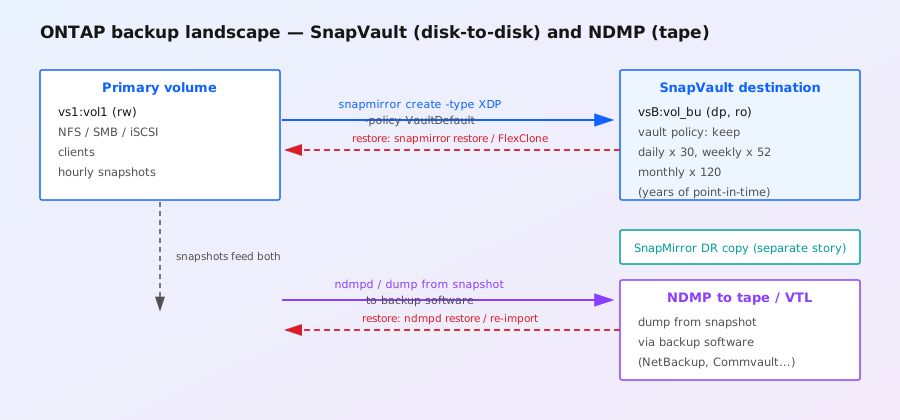
CLI command to create ONTAP SnapMirror DR, vault (long-term retention), and DP/XDP relationships between source and destination SVMs/volume-paths. Covers schedule policies, throttle, identity-preservation, and '-type XDP' for unified SnapMirror. ONTAP 9.9.1-9.19.1; critical for disaster-recovery and data-protection exams.

Open source
Docs

Working with local tiers in a MetroCluster configuration

Source: docs

Working with local tiers in a MetroCluster configuration — official NetApp ONTAP 9 documentation page (disks-aggregates). Covers ONTAP commands, configuration procedures, and feature explanations relevant to NCDA/NCIE-SAN/NAS exam prep. Cross-references the corresponding CLI commands and version-specific behavior (ONTAP 9.12-9.19). Sourced from docs.netapp.com.

Open source
Docs

SAN storage management

Source: docs

SAN storage management — official NetApp ONTAP 9 documentation page (san-management). Covers ONTAP commands, configuration procedures, and feature explanations relevant to NCDA/NCIE-SAN/NAS exam prep. Cross-references the corresponding CLI commands and version-specific behavior (ONTAP 9.12-9.19). Sourced from docs.netapp.com.

Open source
Docs

ONTAP 9.19.1 highlights

Source: docs

ONTAP 9.19.1 highlights — official NetApp ONTAP 9 documentation page (release-notes). Covers ONTAP commands, configuration procedures, and feature explanations relevant to NCDA/NCIE-SAN/NAS exam prep. Cross-references the corresponding CLI commands and version-specific behavior (ONTAP 9.12-9.19). Sourced from docs.netapp.com.

Open source
Docs

ONTAP 9.18.1 highlights

Source: docs

ONTAP 9.18.1 highlights — official NetApp ONTAP 9 documentation page (release-notes). Covers ONTAP commands, configuration procedures, and feature explanations relevant to NCDA/NCIE-SAN/NAS exam prep. Cross-references the corresponding CLI commands and version-specific behavior (ONTAP 9.12-9.19). Sourced from docs.netapp.com.

Open source
Docs

ONTAP 9.17.1 highlights

Source: docs

ONTAP 9.17.1 highlights — official NetApp ONTAP 9 documentation page (release-notes). Covers ONTAP commands, configuration procedures, and feature explanations relevant to NCDA/NCIE-SAN/NAS exam prep. Cross-references the corresponding CLI commands and version-specific behavior (ONTAP 9.12-9.19). Sourced from docs.netapp.com.

Open source
Docs

ONTAP 9.16.1 highlights

Source: docs

ONTAP 9.16.1 highlights — official NetApp ONTAP 9 documentation page (release-notes). Covers ONTAP commands, configuration procedures, and feature explanations relevant to NCDA/NCIE-SAN/NAS exam prep. Cross-references the corresponding CLI commands and version-specific behavior (ONTAP 9.12-9.19). Sourced from docs.netapp.com.

Open source
Docs

ONTAP 9.15.1 highlights

Source: docs

ONTAP 9.15.1 highlights — official NetApp ONTAP 9 documentation page (release-notes). Covers ONTAP commands, configuration procedures, and feature explanations relevant to NCDA/NCIE-SAN/NAS exam prep. Cross-references the corresponding CLI commands and version-specific behavior (ONTAP 9.12-9.19). Sourced from docs.netapp.com.

Open source
Docs

ONTAP 9.14.1 highlights

Source: docs

ONTAP 9.14.1 highlights — official NetApp ONTAP 9 documentation page (release-notes). Covers ONTAP commands, configuration procedures, and feature explanations relevant to NCDA/NCIE-SAN/NAS exam prep. Cross-references the corresponding CLI commands and version-specific behavior (ONTAP 9.12-9.19). Sourced from docs.netapp.com.

Open source
Docs

ONTAP 9.13.1 highlights

Source: docs

ONTAP 9.13.1 highlights — official NetApp ONTAP 9 documentation page (release-notes). Covers ONTAP commands, configuration procedures, and feature explanations relevant to NCDA/NCIE-SAN/NAS exam prep. Cross-references the corresponding CLI commands and version-specific behavior (ONTAP 9.12-9.19). Sourced from docs.netapp.com.

Open source
Docs

ONTAP 9.12.1 highlights

Source: docs

ONTAP 9.12.1 highlights — official NetApp ONTAP 9 documentation page (release-notes). Covers ONTAP commands, configuration procedures, and feature explanations relevant to NCDA/NCIE-SAN/NAS exam prep. Cross-references the corresponding CLI commands and version-specific behavior (ONTAP 9.12-9.19). Sourced from docs.netapp.com.

Open source
Docs

ONTAP 9 release highlights

Source: docs

ONTAP 9 release highlights — official NetApp ONTAP 9 documentation page (release-notes). Covers ONTAP commands, configuration procedures, and feature explanations relevant to NCDA/NCIE-SAN/NAS exam prep. Cross-references the corresponding CLI commands and version-specific behavior (ONTAP 9.12-9.19). Sourced from docs.netapp.com.

Open source
Docs

NAS storage management

Source: docs

NAS storage management — official NetApp ONTAP 9 documentation page (nas-management). Covers ONTAP commands, configuration procedures, and feature explanations relevant to NCDA/NCIE-SAN/NAS exam prep. Cross-references the corresponding CLI commands and version-specific behavior (ONTAP 9.12-9.19). Sourced from docs.netapp.com.

Open source
Docs

Learn about cluster administration with the ONTAP CLI

Source: docs

Learn about cluster administration with the ONTAP CLI — official NetApp ONTAP 9 documentation page (system-admin). Covers ONTAP commands, configuration procedures, and feature explanations relevant to NCDA/NCIE-SAN/NAS exam prep. Cross-references the corresponding CLI commands and version-specific behavior (ONTAP 9.12-9.19). Sourced from docs.netapp.com.

Open source
Docs

Learn about SMB configuration with the ONTAP CLI

Source: docs

Learn about SMB configuration with the ONTAP CLI — official NetApp ONTAP 9 documentation page (smb-config). Covers ONTAP commands, configuration procedures, and feature explanations relevant to NCDA/NCIE-SAN/NAS exam prep. Cross-references the corresponding CLI commands and version-specific behavior (ONTAP 9.12-9.19). Sourced from docs.netapp.com.

Open source
Docs

Disks and ONTAP local tiers

Source: docs

Disks and ONTAP local tiers — official NetApp ONTAP 9 documentation page (disks-aggregates). Covers ONTAP commands, configuration procedures, and feature explanations relevant to NCDA/NCIE-SAN/NAS exam prep. Cross-references the corresponding CLI commands and version-specific behavior (ONTAP 9.12-9.19). Sourced from docs.netapp.com.

Open source
Docs

What's new in ONTAP 9.19.1

Source: docs

Official NetApp release notes for ONTAP 9.19.1 (Aug 2026): covers new features across Data protection, NAS, Networking, SAN, S3 object storage, Security, Storage resource management, System Manager, and Upgrade. Highlights include expanded ARP/AI enhancements, S3 SnapMirror improvements, NVMe/TCP performance work, and SnapMirror active sync refinements. Reference for admins planning 9.19.1 deployments.

Open source
Docs

SnapLock configuration overview (ONTAP docs)

Source: docs

Official NetApp ONTAP concept doc on configuring SnapLock Compliance and Enterprise volumes: WORM file locking, retention periods, privileged delete, audit logging, and SnapLock-to-SnapVault integration. Covers license requirements, per-volume mode selection, and operational considerations for compliance workloads (SEC 17a-4, HIPAA, GDPR Article 17).

Open source
Docs

S3 SnapMirror considerations and cloud targets (ONTAP docs)

Source: docs

Official NetApp ONTAP concept doc on S3 SnapMirror cloud-target requirements: compatibility matrix for ONTAP S3, StorageGRID, and AWS S3 targets. Covers bucket-policy prerequisites, replication topology, IAM mapping, and aggregate/cluster sizing for large-scale object replication to the cloud.

Open source
Docs

ONTAP volume SnapMirror relationships with FlexClone files and LUNs

Source: docs

Official NetApp ONTAP concept doc on how volume SnapMirror relationships interact with FlexClone files and LUNs: clone-from-snapshot semantics across DR relationships, dependencies on base snapshots, and best practices for cloning on DP volumes. Reference for admins managing test/dev clones on DR-replicated volumes.

Open source
Docs

ONTAP anti-ransomware overview

Source: docs

Official NetApp ONTAP overview of the Autonomous Ransomware Protection (ARP/ARP-AI) feature: detects anomalous file-activity patterns in real time, takes automatic protective snapshots, and alerts admins to suspicious workloads. Covers ARP vs ARP-AI differences, workload profiles, training/learning mode, and recommended response actions when an attack is detected.

Open source
Docs

ONTAP SnapMirror active sync use cases (ONTAP docs)

Source: docs

Official NetApp ONTAP concept doc on SnapMirror active sync use cases: symmetric active/active replication for zero-RPO/RTO business-critical workloads, VMware vSphere Metro Storage Cluster (vMSC) and Oracle/RHEL clustering. Covers host-side mediator requirements, planned/unplanned failover flows, and consistency group semantics.

Open source
Docs

ONTAP SnapMirror active sync strategy and architecture (ONTAP docs)

Source: docs

Official NetApp ONTAP concept doc on SnapMirror active sync strategy: synchronous and asynchronous replication modes, consistency group topology, ONTAP Mediator role, and cluster-aware failover orchestration. Reference for architects designing zero-RPO stretched-cluster and metro-distance configurations.

Open source
Docs

FabricPool volume tiering policies (ONTAP docs)

Source: docs

Official NetApp ONTAP concept doc on FabricPool volume tiering policies: explains snapshot-only, auto, all, and none tiering policies, and how they interact with the cloud retrieval policy. Covers what happens when a tiering policy is modified, when a volume is moved or cloned, and how cloud-retrieval policies compose with tiering policies. Reference for capacity-tier planning.

Open source
Docs

FC and FC-NVMe SAN configuration overview (ONTAP docs)

Source: docs

Official NetApp ONTAP concept doc on configuring FC and FC-NVMe fabrics: zoning, switch configuration, host-side masking, asymmetric namespace access (ANA), and HA-pair failover behavior. Covers direct-attach and switched fabrics, NVMe/FC and NVMe/TCP, and LUN/namespace service migration between SVMs.

Open source
Docs

Considerations for S3 SnapMirror upgrades (ONTAP docs)

Source: docs

Official NetApp ONTAP concept doc on upgrade considerations when S3 SnapMirror relationships are present: mixed-version replication support windows, target cluster minimum-version requirements, and recommended upgrade order (consumers first, producers last). Reference for cluster upgrade planning.

Open source
Docs

Configure external key management with ONTAP NetApp Volume Encryption

Source: docs

Official NetApp ONTAP concept doc on configuring external KMIP key managers (Thales, Gemalto, Utimaco, IBM SKLM) for NetApp Volume Encryption (NVE) and NetApp Aggregate Encryption (NAE). Covers key-manager connectivity, key-availability validation, and high-availability cluster key replication. Required reading for FIPS-140-3 and KMIP deployments.

Open source
Docs

Tech ONTAP: PowerShell automation for VMware datastores on ASA systems

Source: NetApp Tech ONTAP Blogs via Community (ChanceBingen, active thread w/ OGill) · **Date:** 2026-08-25 · **Category:** docs

NetApp updated its VMware vSphere with ONTAP best practices to recommend the latency optimization policy (`latency_optimized_workload`) for VMware datastores on the new ASA series controllers, with companion PowerShell automation to enforce it at scale across datastore provisioning. Active community thread adds real-world tuning notes — directly applicable to anyone standardizing ASA-backed vSphere estates.

Open source
Docs

2026-09-05-kb-okm-passphrase-hardware-replacement

Source: https://kb.netapp.com/on-prem/ontap/Ontap_OS/OS-KBs/Misplaced_or_Forgotten_OKM_Passphrase_During_Hardware_Replacement

Recovery procedure for clusters whose Onboard Key Manager (OKM) passphrase was lost or never recorded during a controller / NVRAM / DIMM replacement. Walks through using `security key-manager onboard show-graphics` (modern) / `security key-manager onboard sync` and the OKM card / companion CLI to restore the passphrase against the OKM database, with explicit warnings that mis-typing the passphrase silently re-keys storage and locks out data access if fewer than the quorum of cards are still present. Important reference for any field engineer replacing an AFF/FAS head where NSE/NAE volumes exist — losing the OKM passphrase with no backup is unrecoverable without engaging NetApp TAC.

Open source
Docs

NetApp Inc (OQ: NTAP) Share Price, NTAP Stock News, NTAP Share Price & Updates - Kalkine

Source: docs.netapp.com

NetApp Inc (OQ: NTAP) Share Price, NTAP Stock News, NTAP Share Price & Updates - Kalkine — official NetApp ONTAP 9 documentation page (ontap). Covers ONTAP commands, configuration procedures, and feature explanations relevant to NCDA/NCIE-SAN/NAS exam prep. Cross-references the corresponding CLI commands and version-specific behavior (ONTAP 9.12-9.19). Sourced from docs.netapp.com.

Archive digest
Docs

2026-09-04-ontap-afx-9191-whats-new

Source: https://docs.netapp.com/us-en/ontap-afx/release-notes/whats-new-9191.html

AFX (the disaggregated all-flash system) gets its own 9.19.1 cut of the release notes (dated 2026-08-20). Notable AFX-1.5 updates vs the unified ONTAP release: SnapMirror active sync for NAS now reaches AFX clusters but only at the SVM level on NFS/SMB, 4-node AFX clusters only, with read-write access limited to the primary cluster; SnapMirror cloud bucket limit raised to 100 buckets. TCP performance improvements (PRR+RACK) apply here too. Performance: Cross File Sequential Read (CFSR) intelligently prefetches video frames to dramatically raise throughput and cut latency for video editing / M&E workloads; Global Deduplication extends dedup scope from per-volume to the entire Storage Availability Zone (SAZ) and runs by default; Dynamic Storage Efficiency auto-suspends inline/background dedup/compression/compaction during high-volume write bursts to protect throughput. Why it matters: AFX customers running NFS workloads now have an active/active DR option they didn't before, video/M&E shops get a built-in sequential-read booster, and dedup sizing assumptions should be revised — savings now reach SAZ-wide instead of single-volume. AFX differs from traditional AFF in that all-flash nodes are decoupled and the system scales by adding storage capacity nodes independently of compute — this release leans into that with SAZ-scoped dedup.

Open source
Docs

ONTAP 9 release highlights: 9.16.1 through 9.19.1

Source: https://docs.netapp.com/us-en/ontap/release-notes/index.html

NetApp's release hub now indexes feature pages through ONTAP 9.19.1. The durable operational story across recent releases includes ARP/AI expansion to SAN, NVMe support for SnapMirror active sync, cloud mediation, stronger identity controls, and storage-driven S3 bucket restore.

Open source
Docs

Dedicated offload processor storage efficiency behavior

Source: https://docs.netapp.com/us-en/ontap/concepts/builtin-storage-efficiency-concept.html

Current AFF A1K/A90/A70/A50/A30 and AFF C80/C60/C30 systems use dedicated offload processing for storage efficiency, with efficiency automatically applied to new thin-provisioned volumes and migrated data. Recent FAS90/FAS70/FAS50 behavior differs: existing enabled thin volumes retain the feature across upgrades, while new volumes may require explicit enablement.

Open source
Docs

Learn about ONTAP S3 configuration (NetApp Docs)

Source: https://docs.netapp.com/us-en/ontap/s3-config/index.html

ONTAP S3 landing page for ONTAP 9.x — the native S3 server in ONTAP that exposes an S3 endpoint on top of NAS-affine volumes and aggregates. Useful context for hybrid-AI pipelines where object-store semantics are required (S3 Batch operations, S3 Object Lock, cross-region replication) but the underlying data must live on ONTAP for snapshots, SnapMirror, or FabricPool reasons. Covers ONTAP 9.x S3 server creation, buckets, users, groups, policies (including read-only/full-access variants), TLS configuration, audit logging, and integration with NAS protocol coexistence on the same SVM. Important reference when architects compare ONTAP S3 against StorageGRID for object workloads — StorageGRID is the dedicated object store with global namespace and multi-site replication, while ONTAP S3 is the lightweight in-band option.

Open source
Docs

Automating FSx for NetApp ONTAP Mounts with SSM and MGN Post-Migration

Source: AWS Blog (Amazon Web Services)

AWS published a technical walkthrough for automating FSx for NetApp ONTAP filesystem mounts using AWS Systems Manager (SSM) and the Application Migration Service (MGN) after server migrations. Useful for ONTAP admins working hybrid cloud migrations: covers post-migration mount reconfiguration at scale without manual per-host edits.

Open source
Docs

2026-09-02-ontap-afx-rest-api-reference

Source: https://docs.netapp.com/us-en/ontap-afx/rest/api-reference.html

The AFX REST API reference is the authoritative source for every endpoint exposed by AFX storage systems, surfaced as a Swagger/OpenAPI document that can be loaded directly into API tooling. It is the primary automation entry point for AFX — replacing what classic ONTAP administrators would have done with the ONTAP CLI or the ZAPI interface — and is the recommended path for orchestrating bucket, storage-unit, and protection operations against an AFX cluster from external automation (Ansible, Terraform, custom controllers). For data-platform teams wiring pipelines to land AI training data into AFX S3 buckets, this is the contract that the platform team should pin in their IaC modules.

Open source
Docs

2026-09-02-ontap-afx-manage-s3-buckets

Source: https://docs.netapp.com/us-en/ontap-afx/manage-data/manage-buckets.html

AFX S3 bucket administration covers several routine tasks: editing bucket configuration after creation (capacity, protection, locking, and permissions), managing client access (users, access keys, and bucket policies), and inspecting the bucket for capacity/object counts. The page confirms S3 configuration and support in AFX is the same conceptual model as in classic ONTAP S3 — same protocol, same IAM/user model — but the access surface is through System Manager rather than the ONTAP CLI, which reflects AFX's storage-unit-oriented UX rather than the aggregate/volume hierarchy of classic ONTAP. For AI workloads that read object data from training jobs, this is the day-2 operations surface.

Open source
Docs

2026-09-02-ontap-afx-create-configure-s3-bucket

Source: https://docs.netapp.com/us-en/ontap-afx/manage-data/create-configure-bucket.html

AFX exposes S3 object storage natively on each SVM: in System Manager, navigate to Storage → Buckets, provide the bucket name and capacity, optionally expand "More options" for data-protection, locking, and permission settings, then save. The S3 service on the SVM must already be configured before clients can reach the bucket — the bucket attach step assumes the SVM-side S3 server, users, and TLS are already in place. SnapMirror Cloud backs these buckets to the cloud, so capacity planning should consider the protection target as well as the active bucket size. This is the primary entry point for standing up an S3 data lake on AFX for AI/analytics workloads where data lands in object storage before being read by training pipelines.

Open source
Docs

2026-09-02-whats-new

Source: https://docs.netapp.com/us-en/ontap-systems/whats-new.html

Top-level index of new and changed content across all ONTAP hardware platform documentation (AFF, ASA, FAS, AFX). Use this as the canonical pointer when looking for recently added install, setup, or hardware replacement content for a specific platform.

Open source
Docs

2026-09-04-ontap-9191-release-notes-data-protection

Source: https://docs.netapp.com/us-en/ontap/release-notes/whats-new-9191.html

ONTAP 9.19.1 release highlights (docs.netapp.com, dated 2026-07-28). Data protection: SnapMirror active sync now supports transparent application failover for AIX on 2-node clusters (symmetric active/active, zero RPO); SnapMirror cloud raised to 100 S3 buckets per relationship; SnapMirror synchronous gains tamperproof snapshot locking plus scheduled-snapshot replication to the destination volume. Networking: NFSv4.2 support can now be enabled/disabled per SVM independent of NFSv4.1, with NFSv4.2 on by default on new NFS services; system-defined failover group policy for NAS data LIFs now expands failover targets across the entire broadcast domain and any available node (was: only one other node); ONTAP 9.19.1 ships PRR (default-on) and RACK (opt-in, recommended for ~25 Gbps congested WANs) loss-recovery features into the ONTAP TCP stack for lossy/high-latency WAN links. NAS: more CPU devoted to small-directory (<25K files, <2MB) listings, which removes the need for FlexCache workarounds when hundreds-to-thousands of clients enumerate the same directory simultaneously. SAN: direct-attached FC without switches (FC and FC-NVMe hosts to AFF/ASA/FAS adapter ports), useful in remote/edge sites. S3: conditional writes/deletes with enforcement (prevent object overwrites and unintended deletes); dual S3 user access keys to maintain uptime across access-key rotation. Security: TLS offload for NFS-over-TLS now leverages NIC resources to cut CPU overhead; NFS-over-TLS 1.3 plus optional per-LIF mutual TLS host authentication and export-policy controls to deny non-TLS TCP for matching clients; ARP/AI now protects SnapMirror synchronous (NAS+SAN, FAS/AFF/AFX) and SnapMirror active sync SAN (AFF/ASA r2); WebAuthn `-rp-domains` parameter to lock down the FIDO2 relying-party domain for System Manager MFA; ARP "surge" presentation removed from System Manager UI (CLI/API still surface it) since surge was frequently misread as ransomware. Why it matters: anyone running MetroCluster IP, AFF A-series, ASA, FAS, or AFX on 9.16+ should re-review DR runbooks (active sync covers AIX + NAS SVMs + ARP/AI on sync replication), re-tune NAS LIF failover groups, decide on NFSv4.2 + NFS-over-TLS enablement, and re-baseline ARP alerts off CLI/API rather than the System Manager dashboard.

Open source
Docs

Manage storage consumption at scale using quotas on Amazon FSx for NetApp ONTAP

Source: https://news.google.com/rss/articles/CBMitwFBVV95cUxPRU9fSUctZngyRG15U3BUa3VRX3J5YjlXS1l4ak1XZEUwZmVhb2FSOXgzOVhFTU00SzdhMHpia0cwbllqbWtGX0tWSVRlUjFoWHlGZXlnRFFwQlFTekZmQWlkTXlzYjd0Q0IzeUZfR0R5N0R3U0YwQUUxejhRY0h5ZTQzRXVfLUZlZ0RacVBuZnh2ZjNhQTY2dnc2QVBPejZfVXBQcWlSbjh3ZG9UZW5UYkVaT2I4X0U?oc=5

AWS published guidance on applying user/group, quota rules, and default quotas at scale on Amazon FSx for NetApp ONTAP volumes. Useful reference for capacity governance on FSxN — mirrors classic ONTAP quota concepts in a fully managed service.

Open source
Docs

2026-09-02-ontap-whats-new-9191

Source: https://docs.netapp.com/us-en/ontap/release-notes/whats-new-9191.html

Official NetApp ONTAP 9.19.1 release notes listing new features and changes for NAS, SAN, S3, data protection, networking, security, system manager, and storage resource management. The release is the latest feature drop in the ONTAP 9.x stream and is required reading before any 9.19.1 upgrade.

Open source
Docs

2026-09-02-ontap-afx-whats-new-9191

Source: https://docs.netapp.com/us-en/ontap-afx/release-notes/whats-new-9191.html

AFX-specific 9.19.1 release notes. Covers S3 object storage enhancements, REST API additions, security, performance, data protection, and the cluster upgrade path for AFX systems. Use this page in tandem with the main ONTAP 9.19.1 release notes to plan AFX-specific upgrades.

Open source
Docs

2026-09-03-ontap-afx-expand-cluster

Source: https://docs.netapp.com/us-en/ontap-afx/administer/expand-cluster.html

AFX clusters let you grow compute capacity independently of storage capacity, and the expansion is non-disruptive — performance scales linearly as Automated Topology Management (ATM) rebalances volumes across the new nodes. ATM uses Zero Copy Volume Move (ZCVM) to relocate volumes via metadata updates instead of copying data, which is the default volume-move technology on AFX. Coverage walks through the prerequisites (cluster admin credentials, SSH to the ONTAP CLI, an even number of new nodes per release-size limits), the troubleshooting scenarios you can hit while volumes are moving (volumes stuck because the cluster is already balanced, ATM seemingly idle because it polls every ~5 minutes and a rebalance can launch up to 40 minutes after the last one), and the CLI commands to monitor expansion. A real how-to for operators scaling AFX in production.

Open source
Docs

2026-09-03-ontap-afx-display-svms

Source: https://docs.netapp.com/us-en/ontap-afx/administer/display-svms.html

Short but useful reference for the basic AFX administrative workflow of viewing the storage virtual machines (data SVMs) configured in an AFX cluster — each SVM gives you an isolated environment for organizing data and presenting client access. The procedure is simple in System Manager: open Cluster, then Storage VMs, hover over the SVM you want to inspect, and the menu exposes primary admin actions (start/stop the SVM) plus a per-SVM detail pane covering overview, settings, replication, and file system. Cross-references include the related configure-SVM and ONTAP SVM concepts pages. A good companion piece for the create-configure-volume and create-configure-bucket how-tos already in the library.

Open source
Docs

2026-09-02-ontap-afx-cluster-setup-workflow

Source: https://docs.netapp.com/us-en/ontap-afx/install-setup/cluster-setup.html

After AFX hardware is installed, the ONTAP cluster setup proceeds in four sequential configuration phases: discover the cluster network, set the admin password, configure the cluster/controller IP addresses and subnet masks, and configure DNS/NIS plus optional NTP and cluster encryption. Initial setup is done from a laptop connected to the AFX management switch using System Manager, then cluster setup is completed with three more configuration areas. Core prerequisites include a unique IPv4 cluster-management address, network gateway, DNS domain and name servers, and NTP servers — items an AFX admin should gather before the install window.

Open source
Docs

Supported AFF, ASA, and FAS controller upgrade paths

Source: https://docs.netapp.com/us-en/ontap-systems-upgrade/upgrade-arl/

NetApp's ARL selector maps supported controller replacements and minimum ONTAP levels, including A20 to A30/A50, A30 to A50, C30 to C60, A70 to A90, and FAS70 to FAS90 paths on newer trains. Older systems can have hard version ceilings, so a controller refresh may require a carefully staged ONTAP upgrade rather than a direct swap.

Open source
Docs

ONTAP REST API 9.16.1 adds identity, ARP, qtree, and S3 endpoints

Source: https://docs.netapp.com/us-en/ontap-automation/whats-new.html

ONTAP 9.16.1 added more than two dozen REST calls, notably Microsoft Entra ID group and role mappings, WebAuthn administration, ARP package management, optional qtree performance metrics, and S3 bucket snapshots. NetApp also warns that ASA r2 exposes a different REST API from AFF, FAS, and classic ASA systems.

Open source
Docs

2026-09-04-ontap-systems-whats-new

Source: https://docs.netapp.com/us-en/ontap-systems/whats-new.html

ONTAP hardware-systems what's-new (dated 2026-07-01). Two material additions. AFX 2K — a new disaggregated all-flash storage system extending the AFX line, targeted at high-performance NAS and S3 workloads including AI/ML applications. Ships with Cisco 9808 switches that link AFX 2K controller nodes to storage shelves; the 9808 joins Cisco 9364D-GX2A and 9332D-GX2B as the third switch family that lets you build ONTAP clusters of more than two nodes. VLAN tagging + multi-path + tech-refresh configurations underly the design. Hot-swap I/O modules (Jan 2026 update): supported on ONTAP 9.18.1 GA and later across AFF A1K/A20/A30/A50/A70/A90, ASA r2 A1K/A20/A30/A50/A70/A90/C30, AFF C30/C60/C80, FAS50/FAS70/FAS90, and AFX 1K. You can hot-swap a failed Ethernet I/O module in any slot whose ports are used for cluster, HA, or client connections — *not* for storage or MetroCluster connections. ONTAP 9.17.1 or 9.18.1RC also gains hot-swap for adjacent combinations but with constraints. Why it matters: AFX 2K is a significant new piece of kit for AI/ML customers that need NAS+S3 throughput at scale; existing AFF A1K/A9x/A70/A50/ASA r2 A-series customers now have a non-disruptive I/O module replacement path which previously required planned downtime.

Open source
Docs

Data discovery: How to find out what's on your Amazon FSx for NetApp ONTAP volumes

Source: AWS Storage Blog via Google News — https://news.google.com/rss/articles/CBMiugFBVV95cUxPejlTcEgwY1dJVjEtUnhOVmNHVkd5enF3NlgzUHE1WFQ0a0RjbjVQbDI5NXpGMjVtNkk1ZE5ubTZJTjhiSW9qQ2hmeE9qUlh4U0h0QmJoZHEwVkhVTzQ3NUQyV3NrSXQ3dUxTcTd2QUM4Q05uMDZmcHI5MUZoQTdzcXNUcnphZHJyeVZCVFVwOGNpSE14UDNkOGk5VWp2UkhKcV9Ld1oyMHZlaV9OMllMMFFwbENaZlZfYXc?oc=5

AWS walkthrough on inventorying FSx for ONTAP volume contents (file-system audits, usage reporting) before migrations or cleanups — practical admin technique for cloud ONTAP estates.

Open source
Docs

Data discovery on Amazon FSx for NetApp ONTAP volumes (AWS Storage Blog)

Source: https://aws.amazon.com/blogs/storage/data-discovery-how-to-find-out-whats-on-your-amazon-fsx-for-netapp-ontap-volumes/

AWS Storage Blog guide to inventorying data on FSx for NetApp ONTAP volumes using NetApp's data-classification/BlueXP classification tooling rather than custom scripts. Walks through enabling BlueXP classification, scanning existing FSx for ONTAP volumes, identifying PII / sensitive patterns, reviewing the discovered files and applying access policies or moving data to cheaper storage tiers. Important for AI/ML pipelines where unknown data sources must be catalogued before model training — understanding which volumes hold GDPR/PCI/HIPAA data avoids leakage into training corpora and informs which datasets can be replicated to GPU clusters. Pairs naturally with the S3 Access Points for FSx for ONTAP article (same architecture) when scoping AI workloads against regulated data estates.

Open source
Docs

What's new in ONTAP 9.18.1

Source: docs

Official NetApp release notes for ONTAP 9.18.1 (May 2026): covers Data protection, NAS, Networking, SAN, S3 object storage, Security, Storage resource management, System Manager, and Upgrade changes. Major additions include new ABAC support, NFS trunking, S3 SnapMirror cloud targets, and ONTAP S3 access points for fine-grained RAG access control.

Open source
Docs

2026-09-05-kb-modify-maxdir-size-ontap-9

Source: https://kb.netapp.com/on-prem/ontap/Ontap_OS/OS-KBs/How_to_modify_the_maxdir-size_in_ONTAP_9

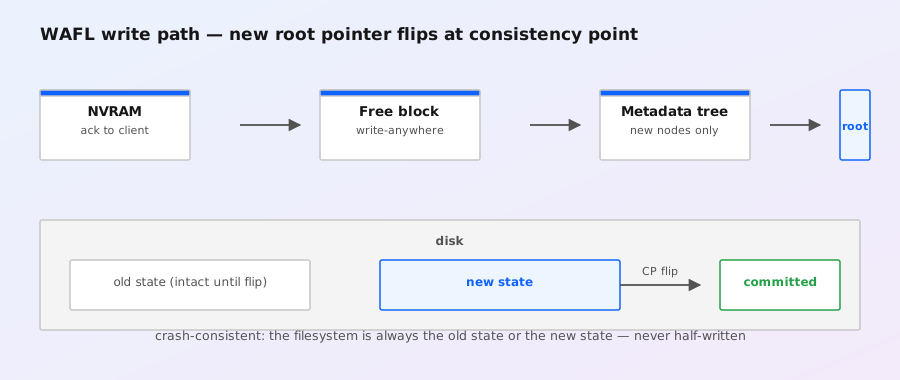
Covers the ONTAP 9 volume-level `maxdir-size` knob (`vol options <vol> maxdir-size <bytes>` and the modern `volume modify -vserver <vs> -volume <vol> -max-dir-size <MiB>` form). The setting controls the maximum directory size in the WAFL inode file; hitting it is a classic cause of `No space left on device` errors on SMB/NFS shares even when `df` shows the volume still has free space. Useful when running legacy Windows file-server workloads with millions of files in a single directory — NetApp recommends against bumping the value above ~512 MB without TAC involvement. Applies to ONTAP 9.x (9.7+ preferred path via `volume modify`; older 9.x uses the `vol options` form).

Open source
Docs

Configuring S3 Access Points for Amazon FSx for NetApp ONTAP with Active Directory (AWS Storage Blog)

Source: https://aws.amazon.com/blogs/storage/enabling-ai-powered-analytics-on-enterprise-file-data-configuring-s3-access-points-for-amazon-fsx-for-netapp-ontap-with-active-directory/

AWS Storage Blog walk-through of attaching S3 Access Points to FSx for ONTAP file shares joined to AWS Managed Microsoft AD so that AI/ML services (Athena, SageMaker, EMR) can consume SMB/NFS file data through an S3-compatible interface with per-application credentials and policies. S3 Access Points provide per-application scoped endpoints with their own IAM policies, which removes the need to share a single wide-open S3 alias between teams — a key governance pattern for regulated AI workloads. The architecture diagram shows the FSx for ONTAP file system mounted by EC2-based AI clients while S3 Access Points present the same data through the S3 API, all fronted by the Active Directory join for identity. Reference for anyone building hybrid analytics where file-system and object-store access must coexist without copying data.

Open source
Docs

2026-09-05-kb-ontap-volumes-aggregates-free-space-recommendation

Source: https://kb.netapp.com/on-prem/ontap/Ontap_OS/OS-KBs/What_is_the_recommended_free_space_to_maintain_in_ONTAP_volumes_and_aggregates_for_optimal_operation

Documents NetApp's published minimum-free-space thresholds for both volumes and aggregates (the so-called WAFL reserve) — historically 10% for aggregates (5% on modern AFF with WAFL reserve reduction) and 10% per volume — and explains what breaks when each threshold is crossed: aggregate full blocks new writes, overwrites and triggers `wafl_vol_blocked`, while volume-level fullness breaks Snapshot reserve calculations and dedupe metadata. The KB also covers the difference between `volume show -fields percent-used,available` thresholds versus the system-level `aggr show_space` WAFL reserve. Practical reading for capacity planners who are sizing new AFF/AFF-A800 / FAS deployments or troubleshooting why Snapshot copies are being auto-deleted at low overall utilization.

Open source
Docs

ONTAP Tools 10.4 full deployment walkthrough for VMware vSphere

Source: NetApp Docs / Virtualization community via Google News — https://news.google.com/rss/articles/CBMipwFBVV95cUxOa2NQU1BQdWZyM3BMcEgxaFRXbDlaY1VZMl9IeUNpY2k1aFh5ZUhFc0c0bzRMa25LbWliWjFrVDFFWUVEbzk1elVfcV9hb1QzQ0xibzhaZ29pTWM5LW56ejRxZXZQZjlPLTB2aEx0TVNzSWI0MHV5a2x2Y0prbWNWSkY5LUdsZDBXUW40eUMybXhBSl9oc2pQRnpzeDc5WGRTRzdoYW9Jcw?oc=5

Full deployment walkthrough for ONT Tools 10.4 on vSphere — VSC/SRA provisioning plug-in deployment covering OVA install, registration, and certificate handling. Reference for virtualization-focused admins.

Open source
Docs

Introducing NetApp BlueXP in 60 seconds or less (NetApp)

Source: https://www.netapp.com/blog/intro-netapp-bluexp-60-seconds/

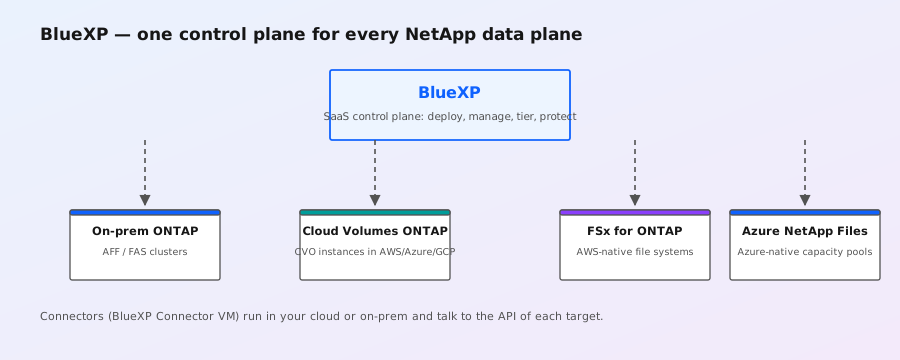
NetApp quick-reference page for BlueXP: the unified control plane that replaces Cloud Manager and consolidates management of ONTAP clusters (on-prem, AWS FSx, Azure NetApp Files, Google Cloud NetApp Volumes), Kubernetes (Trident), BlueXP backup/restore and tiering. Useful onboarding entry point for admins new to the NetApp cloud-portfolio vocabulary.

Open source
Docs

ONTAP hardware and software compatibility matrix

Source: https://docs.netapp.com/us-en/ontap-systems/supported-platforms.html

NetApp's supported-platform matrix provides the minimum ONTAP train for newer controllers: the A20/A30/A50 and C30/C60/C80 generation begins at 9.16.1, A1K/A70/A90 at 9.15.1, AFX 1K at 9.17.1, and AFX 2K at 9.19.1. It also maps ASA r2 and recent FAS generations to their starting releases.

Open source
Docs

2026-09-03-kb-ontap-upgrade-resolution-guide

Source: https://kb.netapp.com/on-prem/ontap/Ontap_OS/OS-KBs/ONTAP_Upgrade_Resolution_Guide

NetApp's official pre-upgrade resolution tree for ONTAP 9 — the canonical starting point whenever an ONTAP 9.x upgrade misbehaves. Indexes every documented upgrade blocker by failure stage (pre-upgrade validation, NDU takeover/giveback, post-upgrade verification) and links to the matching symptoms, EMS messages, and remediation KBs. Public index confirms 19,221+ views and pairs directly with the ONTAP Upgrade Post Upgrade Resolution Guide. For ONTAP 9 admins this is the "before you open a TAC case" checklist that maps symptoms to root-cause articles. (Full content is gated behind NetApp Support login; this entry captures the public index and related-article links visible to all readers.)

Open source
Docs

2026-09-03-kb-ontap-switch-unreachable-management-ip

Source: https://kb.netapp.com/on-prem/ontap/Ontap_OS/OS-KBs/SwitchUnreachable_Alert_Due_to_Cluster_Switch_wrong_management_IP_configured

ONTAP 9.x cluster-switch troubleshooting for Broadcom BES-53248 switches (the most common cluster-network switch in modern AFF deployments). Diagnoses the `SwitchUnreachable_Alert on CLUSTER_NAME (SWITCH_1 | SWITCH_2)` EMS event when `system switch ethernet show` returns `IsMonitored: false / Reason: IP address not reachable` and `network device-discovery show` shows the switch is still being CDP-discovered on the data port but the management IP no longer matches. The trigger: management-IP change (firmware upgrade, IP-reclaim, or operator error) without re-running ONTAP's switch-health monitor configuration. Shows expected output for both healthy and unhealthy states. Resolution: reconfigure the switch-health monitor (`system switch ethernet modify -switch-ip`) to the new IP and confirm reachability. Useful for any site that just did a switch firmware update.

Open source
Docs

2026-09-03-kb-ontap-reclaim-aggregate-space

Source: https://kb.netapp.com/on-prem/ontap/Ontap_OS/OS-KBs/How_to_reclaim_space_in_an_aggregate_that_is_full

Classic ONTAP operational KB — when an aggregate reports full, your first move is to figure out whether the space is actually consumed by user data, snapshot reserve, WAFL metadata overhead, or space-optimized metadata. The guide walks through the diagnostic commands (`aggr show_space`, `volume show-space`, `df -h` against the aggregate, examining `percent-used` vs `physical-used`), the difference between space reservation modes (volume guarantee none/file/full) and snapshot policies that hold old copies you can prune. Then the reclaim playbook: deleting snapshots, resizing volumes down, turning on volume-level autogrow with a higher maximum, moving a volume to a less-full aggregate, deleting unused FlexClone parents/LUNs, and finally raising the aggregate size if there is spare spare disk or free LUNs in the disk pool. Important caveat: increasing the aggregate's snap reserve or volume guarantee is rarely the right answer; usually you need to free data.

Open source
Docs

2026-09-03-kb-ontap-pci-nmi-umce-panics

Source: https://kb.netapp.com/on-prem/ontap/OHW/OHW-KBs/How_to_troubleshoot_PCI_NMI_UMCE_and_nested_machine_check_exception_panics

Hardware-level panic troubleshooting for ONTAP nodes that hit a PCI Express NMI, an Uncorrectable Machine Check Exception (UMCE), or nested machine-check panics — the kind of crash that takes a controller down and triggers HA takeover. The KB explains how to read the panic string (`PCI: NMI...`, `MCE: ...`, bank/socket/MCA registers), how to collect the SP-core/buddy dump and pair it with the matching AutoSupport, and the difference between a CPU-side MCE (often firmware/microcode) and a PCIe device-side error (link degradation, bad slot, IO card firmware). Then the resolution flow: identify which PCI device logged the error (NIC, FC HBA, NVMe shelf), reseat or move the card to a different slot, update the card/CPLD firmware via the service image, and confirm no upstream switch or shelf port issues. A solid field reference for TAC cases on FAS/AFF takeovers where the panic root-cause isn't immediately obvious.

Open source
Docs

2026-09-03-kb-ontap-nse-sed-fips-unlock

Source: https://kb.netapp.com/on-prem/ontap/Ontap_OS/OS-KBs/How_to_unlock_SED_and_FIPS_disks_using_NSE

NetApp Knowledge Base how-to for unlocking Self-Encrypting Drives (SED) and FIPS-validated disks using NetApp Storage Encryption (NSE) before disabling the Onboard Key Manager (OKM). Stepwise procedure: requires authenticating to OKM, exporting the authentication keys for the disk shelves, and re-issuing unlock commands at the SP/BMC level so each disk's KAS (Key Authentication Server) accepts the cluster's KMIP-style key. Article is part of the OKM↔NSE migration playbook — must be performed BEFORE OKM is turned off or all encrypted data on the disks becomes permanently inaccessible. Tag list includes SED, FIPS, OKM, NSE, and storage encryption; specialty is core ONTAP 9. Public index visible; detailed procedure gated behind NetApp Support login.

Open source
Docs

2026-09-03-kb-ontap-metrocluster-svm-kek-mismatch

Source: https://kb.netapp.com/on-prem/ontap/Ontap_OS/OS-KBs/SVM-KEK_key_mismatch_warning_in_ONTAP_MetroCluster_with_Onboard_Key_Manager

Diagnostic walk-through for the `km.okm.key.missing` EMS event and the `Internal Error. The local and partner clusters do not have the same list of SVM-KEKs` warning returned by `metrocluster check cluster show -check onboard-key-management -instance`. In a MetroCluster IP/FC setup with Onboard Key Manager (OKM) enabled, SVM-KEKs (the per-SVM key-encryption keys) must exist on both clusters or encrypted volumes at the surviving site cannot be unlocked after a site failover. Public-visible content shows the EMS message, the metrocluster check output columns (Result of the Check, Additional Information/Recovery Steps), and the actual event timestamp from August 2026 (8/18/2026). Article references the underlying MCC + OKM + SVM-KEK recovery workflow which TAC runs to re-mirror the SVM key set to the surviving cluster — critical content for anyone running MetroCluster with NVE/NAE at both sites.

Open source
Docs

2026-09-03-kb-ontap-ktls-handshake-limit-913

Source: https://kb.netapp.com/on-prem/ontap/Ontap_OS/OS-KBs/Repeating_ktls.cnxnHandshakeLimit_message_after_ONTAP_Upgrade_to_9.13

Specific ONTAP 9.13+ post-upgrade failure mode: EMS log fills with `[nodename: kernel: ktls.cnxnHandshakeLimit:notice]: ONTAP reached the maximum limit of N concurrent TLS connection handshakes. If this limit is reached, subsequent TLS connections will fail.` Often paired with `ems.engine.suppressed:debug: Event 'ktls.cnxnHandshakeLimit' suppressed N times in last NNN seconds`. Root cause is the kernel TLS (kTLS) handshake concurrency cap (170 by default) — typically hit when many NFS-over-TLS, SMB-over-TLS, or LDAP-over-TLS clients reconnect simultaneously after the upgrade. Public EMS excerpt and article framing are visible; the actual tunables and remediation steps are behind NetApp Support login. Tag the KB when triaging post-9.13-upgrade incidents where TLS connections intermittently fail.

Open source
Docs

2026-09-03-kb-ontap-flexvol-inode-max

Source: https://kb.netapp.com/on-prem/ontap/Ontap_OS/OS-KBs/How_to_increase_the_maximum_inode_count_or_files_for_a_flexible_volume

Canonical 167,502-view ONTAP KB for the dreaded `wafl.vol.outOfInodes` / `file system is out of inodes` error. Walks through inspecting current settings with `set advanced` then `volume show -vserver svm1 -volume vol1 -fields size,files,files-used,files-maximum-possible` and shows the relationship between FlexVol size and `files-maximum-possible` (typically 1 inode per 32KB of volume size by default). The procedure to increase the inode ceiling is `volume modify -vserver svm1 -volume vol1 -files <new-count>` — and the KB warns that the max possible is bounded by current volume size unless you grow the volume at the same time. Critical context: shrinking a FlexVol below its current `files-used` is blocked; you can only grow inodes, never reduce. (Public preview shows the diagnostic commands; full step list behind NetApp Support login.)

Open source
Docs

2026-09-03-kb-ontap-failover-io-interruption-vmware

Source: https://kb.netapp.com/on-prem/ontap/Ontap_OS/OS-KBs/What_is_the_expected_I_O_interruption_time_during_storage_failover

NetApp's official sizing guidance for the I/O gap during ONTAP storage failover (SFO) when running VMware ESXi on NFS or block datastores. Confirms the I/O interruption is "typically limited to a few seconds up to approximately 15 seconds" — well under VMware's default NFS datastore timeout of 60s and the typical FC HBA timeout of 30s. Practical consequence: datastores stay mounted, VMs do not power off, in-flight I/O is briefly queued and resumes once the partner node is serving LIFs. Admins should expect short latency spikes inside guest OSes and brief application slowness but no fault tolerance events. Sets expectations correctly so the failover doesn't get escalated as a fault — useful for VMware/NetApp converged stack SREs.

Open source
Docs

2026-09-03-kb-ontap-cluster-recovery-failure-cases

Source: https://kb.netapp.com/on-prem/ontap/Ontap_OS/OS-KBs/What_are_the_main_failure_cases_that_require_cluster-level_recovery_in_an_ONTAP_environment

Definitive NetApp answer on when ONTAP needs cluster-level recovery (RDB + root aggregate restoration), as opposed to node-level or aggregate-level recovery. Two representative cases: (1) multiple simultaneous disk failures in aggr0 exceeding RAID-DP/RAID-TEC tolerance — typically more than three disks failing at once or a shelf-level power loss that takes root disks down. aggr0 holds the ONTAP OS image and the replicated database (RDB), so RDB quorum can't be re-established. (2) simultaneous power outage in both HA pair nodes causing a dirty shutdown that leaves RDB inconsistent. Cluster recovery is rare but disruptive — knowing the exact triggers helps admins plan dual-PSU, dual-feed, and battery-backed cache strategies for their root shelves.

Open source
Docs

2026-09-03-kb-ontap-autosupport-smtp-delivery-failure

Source: https://kb.netapp.com/on-prem/ontap/Ontap_OS/OS-KBs/ONTAP_AutoSupport_Transport_SMTP_Delivery_Failure_Resolution_Guide

NetApp's official resolution path for "AutoSupport emails aren't reaching NetApp" — the SMTP transport branch of the ASUP troubleshooting tree. Starts with `autosupport show -node <node> -instance` to verify mailhost/from/to, then `system node autosupport check show` to validate the four ASUP delivery channels (HTTPS, HTTP, SMTP, OnDemand). If SMTP fails, walks through checking SMTP reachability to the mailhost, reviewing `notifyd.log` for SMTP errors, and inspecting `autosupport history` for delivery timestamps. A 13,169-view / 2-vote KB rated as core-specialty ONTAP 9 material — used by every TAC case where the customer can't tell whether AutoSupport was even attempted.

Open source
Docs

2026-09-03-kb-ontap-9-performance-resolution-guide

Source: https://kb.netapp.com/on-prem/ontap/Perf/Perf-KBs/ONTAP_9_Performance_Resolution_Guide

NetApp's official performance troubleshooting tree for ONTAP 9 — the canonical starting point whenever a customer reports slow I/O, latency spikes, or throughput regressions. The guide organizes the investigation into the standard ONTAP 9 perf flow: confirm whether the bottleneck is on the client/network path, the protocol layer (NFS, SMB, iSCSI, FC), the storage virtual machine, the volume/FlexVol, the aggregate/WAFL, or the disk/RAID layer. Each branch points to the specific KB article, EMS message, and PerfStat/Statistics counter families to look at next (e.g. `statistics show`, `qos statistics`, ` wafl_hya_perf`, `nfs3_histogram`, WAFL read/write latency histograms, object-store offload latency if FabricPool is involved). Tells you which ONTAP 9 commands to run before you open a support case so your ASUP bundle has the data TAC actually needs.

Open source
Docs

Elevating data privacy in Generative AI with NetApp (NetApp)

Source: https://www.netapp.com/blog/elevating-data-privacy-generative-ai/

NetApp technical blog on data-privacy architecture for generative AI workloads: ONTAP features (encryption, WORM/SnapLock, role-based access control, audit logging) that customers need to enforce when grounding LLMs in enterprise data. Includes sample policy mappings for GDPR/HIPAA and a reference architecture for SnapMirror-based RAG index replication between regions.

Open source