AutoSupport, EMS and Active IQ
AutoSupport carries diagnostic telemetry, EMS records what the cluster is saying now, and Active IQ turns received data into proactive guidance. This guide connects those layers without blurring their security and operational boundaries.
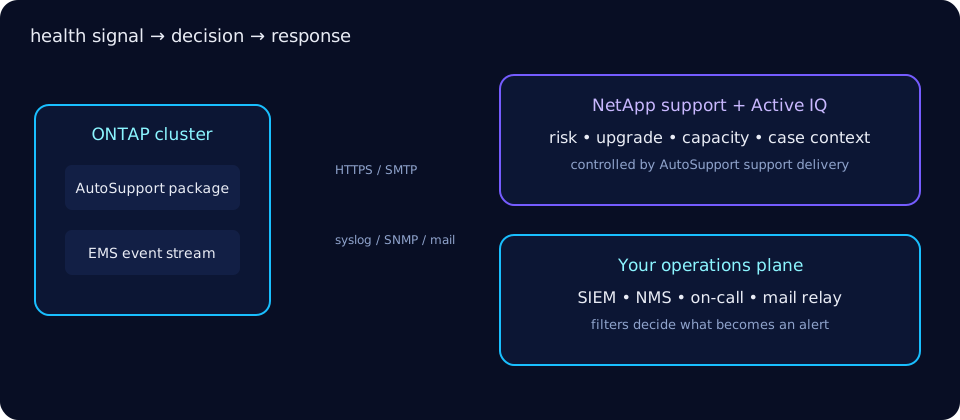
Three observability layers
AutoSupport packages system health data and sends it to NetApp technical support and configured internal recipients. Active IQ Digital Advisor uses received telemetry for risk, upgrade, capacity and lifecycle guidance. EMS is the on-cluster event stream: it records operational events and routes selected messages to alerts, SNMP or syslog. These are complementary, not interchangeable.
Typical AutoSupport content includes configuration inventories, health state, logs and diagnostic/performance context. Exact payload varies by message type and ONTAP release; inspect a generated message if policy requires a field-level review.
Configure AutoSupport
Prefer HTTPS to NetApp when egress policy permits. SMTP is useful for internal recipients and environments with a mail relay. -state enable turns generation on; -support enable permits delivery to NetApp support. Parameter spelling and accepted values can vary, so use system node autosupport modify ? on your release.
cluster::> system node autosupport modify -node * -state enable   -support enable -transport https
2 entries were modified.
cluster::> system node autosupport modify -node * -mail-hosts 192.0.2.25 -to storage-ops@example.com
cluster::> system node autosupport show -fields state,support,transport,mail-hosts
node state support transport mail-hosts
node1 enable enable https 192.0.2.25
node2 enable enable https 192.0.2.25Test and on-demand messages
Invoke a test before assuming delivery works. A descriptive message helps operators correlate it with a change or case.
cluster::> system node autosupport invoke -node * -type test   -message "post-firewall-change"
AutoSupport message queued on 2 nodes.
cluster::> system node autosupport history show -fields status,destination,subject
node seq-num destination status subject
node1 4182 http sent TEST: post-firewall-change
node2 4077 http sent TEST: post-firewall-changeEMS events and severity
EMS severity runs from EMERGENCY, ALERT, ERROR, NOTICE, INFORMATIONAL to DEBUG. Filter early: debug and informational output can bury actionable faults.
cluster::> event log show -time >1h -severity EMERGENCY,ALERT,ERROR
Time                Node   Severity Event
------------------- ------ -------- --------------------------------
8/27/2026 13:42:18 node1  ERROR    monitor.volume.nearlyFull: ...
cluster::> event log show -node node1 -event "raid.*" -time >24h
Time Node Severity Event
------------------- ------ -------- --------------------------------
8/27/2026 04:10:02 node1 NOTICE raid.rg.scrub.summary: ...Watch families such as callhome.*, monitor.*, raid.* and scsi.*, but route only the severities/events your responders can act on.
Routing, alerts, SNMP and syslog
event config show displays global event settings. Current ONTAP releases configure syslog destinations with event notification destination create and filters with event notification create; older releases may expose route/destination terminology. Use command completion for your version. event config modify configures EMS mail-server behavior and suppression; it is not universally a -syslog switch.
cluster::> event config show
Mail From: ontap@example.com
Mail Server: 192.0.2.25
Proxy URL: -
Message Suppression: on
cluster::> event config modify -mail-server 192.0.2.25 -mail-from ontap@example.com
  (command completed successfully)
cluster::> event notification destination create -name siem -syslog 192.0.2.50
cluster::> event notification create -filter-name important-events -destinations siem
(command completed successfully)SNMP trap destinations are configured under the SNMP command family, while EMS filters decide which events are forwarded. Some releases also provide event alert commands; check your version before scripting them.
Active IQ Digital Advisor
Digital Advisor turns AutoSupport telemetry into proactive health risks, recommended actions, upgrade planning, capacity trends and support context. Recommendations remain inputs to change control: validate hardware, workload and interoperability constraints before acting.
Privacy and control
AutoSupport sends information outside the cluster when support delivery is enabled. Document the destination, transport, proxy, internal recipients and permitted content under your data-governance policy. Disabling support delivery reduces proactive support visibility; disabling AutoSupport entirely also removes event-triggered diagnostic packages.
# Keep generation/internal delivery but stop NetApp support delivery
cluster::> system node autosupport modify -node * -support disable
# Disable generation only after an approved risk decision
cluster::> system node autosupport modify -node * -state disable
2 entries were modified.
Pair telemetry decisions with the security hardening checklist and port reference.
Troubleshooting runbook
| Symptom | Prove | Fix |
|---|---|---|
| AutoSupport not sending | History status, DNS, route, proxy, TLS/time | Correct egress/proxy and invoke a test |
| SMTP relay rejects | Relay logs, sender/recipient, port reachability | Allow cluster addresses and valid envelope sender |
| EMS log flooded | Group by event name and node | Fix root cause; tune suppression/routing, not the evidence |
| No Active IQ updates | Support delivery enabled and recent messages sent | Restore HTTPS delivery and entitlement association |
cluster::> system node autosupport check show
Node   Category          Status  Detail
------ ----------------- ------- --------------------------
node1  http-https        ok      Connectivity check passed
node1  smtp              failed  Connection timed out
cluster::> network route show -vserver Cluster
Vserver  Destination Gateway
Cluster  0.0.0.0/0   192.0.2.1
Official ONTAP sources
Commands and behaviors in this guide were checked against NetApp's ONTAP documentation. Always select your installed ONTAP and host-software release before making a production change.