Home / Reference / Security hardening checklist
ONTAP security hardening checklist
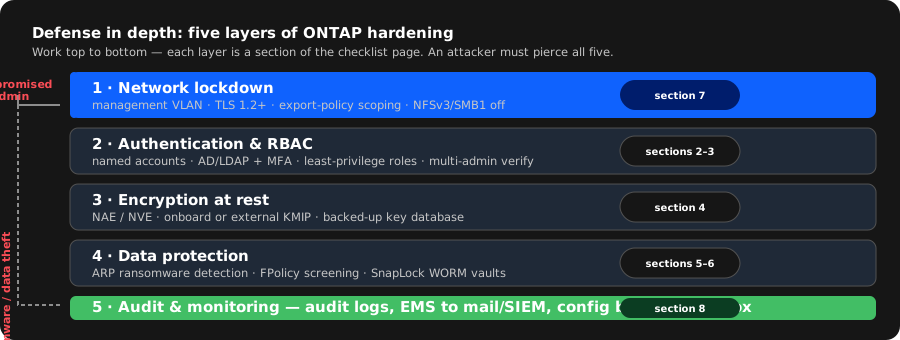
ONTAP ships secure-by-default in many ways (no open services on public interfaces, SMB1 off, local admin locked behind the console), but a production cluster still needs deliberate hardening: least-privilege RBAC, multi-admin approval for dangerous commands, encryption at rest, WORM retention for the ransomware case, and audit logs that leave the box. This page is the checklist — each section is a layer, each layer ends with the commands that implement it. Work top to bottom, then run the baseline audit at the end.
1. The threat model, in one paragraph
ONTAP is a network-attached storage operating system; the realistic threats are (a) compromised or careless administrators — including a single stolen admin credential, (b) ransomware reaching shared folders and encrypting or deleting data, (c) data theft of a lost or returned disk, and (d) a lateral move from a compromised client network onto management interfaces. Hardening therefore has four layers, in order of leverage:
- Limit who can do what (authentication + RBAC + multi-admin verification).
- Protect the data itself (encryption at rest, WORM retention, ransomware detection).
- Shrink the network surface (management access control, TLS versions, disabled legacy protocols).
- Make it observable (audit logs, EMS notifications, configuration backups off-box).
Everything below is a concrete implementation of one of those four layers. The NCDA security notes cover the concepts; this page is the operational version.
2. Authentication: local accounts, AD/LDAP, and locks
Start by knowing every account that can log in and how:
security login show
security login show -vserver vs1
Inventory rules of thumb:
- Disable the built-in
adminaccount on the admin SVM (or lock it) once your break-fix account is in place — or at minimum stop using it for daily work. Lock withsecurity login lock; a locked account cannot authenticate via any application. - Every human gets an individual account. Shared accounts destroy the audit trail that layer 4 depends on. If you need named access via AD, map an AD group to a role instead of creating local users per person.
- Prefer public-key SSH for service accounts and console-only access for the true break-glass admin.
security login create -vserver vs1 -user-or-group-name backup-svc \
  -application ssh -authmethod publickey
security login lock -vserver vs1 -user-or-group-name admin
For AD/LDAP-backed authentication, ONTAP talks to the directory via LDAP and can authenticate SSH/console logins against AD groups:
vserver services name-service ldap create -vserver vs1 \
  -servers dc01.corp.example -schema AD-IDMU
vserver services name-service ldap configure -vserver vs1 \
  -client-enabled true
security login create -vserver vs1 -user-or-group-name CORP\storage-admins \
  -application ssh -authmethod domain
Multi-factor: ONTAP supports SAML SSO for the management plane, and later releases add TOTP for local users — if your ONTAP version supports it, put SSH behind SAML or TOTP for humans. Exact MFA capability depends on the release; check security login show -application and your release notes. (Flagged for doc re-verification in RESEARCH.md.)
3. RBAC: least privilege that survives audit
ONTAP's RBAC model is role → command (or command directory) → access level. Predefined roles (admin, vsadmin, backup, none) are a starting point; the power is in custom roles scoped to exactly what a team does. A role that can only manage snapshots:
security login role create -vserver vs1 -role snap-operator \
  -command "volume snapshot*" -access all
security login role create -vserver vs1 -role snap-operator \
  -command "volume show" -access readonly
security login create -vserver vs1 -user-or-group-name jenny \
  -application ssh -authmethod password -role snap-operator
Rules that keep RBAC honest:
- Restrict the default
vsadminrole if tenants need less; clone the role and remove command directories rather than grantingall. - Use
-access readonlyfor anything a team only needs to read — dashboards and daily checks need zero write capability. - CLI roles also gate REST/ONTAPI access via the same command strings, so a locked-down role protects API automation too.
- Re-audit quarterly:
security login show -vserver vs1 -fields user-or-group-name,role,application,authmethod.
Multi-admin verification (9.9+): the single highest-leverage control in modern ONTAP. It requires a second (or third) approver for a configurable list of destructive commands — cluster image update, volume delete, aggregate offline, SnapMirror break, RBAC changes, and so on. A stolen credential alone can no longer destroy a cluster:
security multi-admin-verify enable -vserver vs1
security multi-admin-verify approval-groups create \
  -vserver vs1 -approval-group-name storageteam \
  -approval-users CORP\storage-admins
security multi-admin-verify show
The approver list must be in a different group than the requester, and the approval group must contain at least two people — otherwise you have a ceremony, not a control. Requests wait for approval by default; you can also set a timeout (-request-expiration-time) so an unattended request lapses instead of hanging automation.
4. Encryption at rest: NVE, NAE, and key management
ONTAP offers two at-rest encryption models. NVE (NetApp Volume Encryption) encrypts individual volumes with per-volume keys; NAE (NetApp Aggregate Encryption) encrypts the whole aggregate and lets ONTAP move volumes across it without re-encrypting — the newer, operationally cleaner model (9.6+). AFF platforms aimed at the compliance market (e.g. ASA AFF with factory-enabled encryption) may arrive with NAE already on; verify with storage aggregate show -fields encrypt.
# NAE — encrypt an aggregate; every volume on it is encrypted
storage aggregate modify -aggregate aggr1 -encrypt true
storage aggregate show -fields aggregate,encrypt

# NVE — encrypt a single volume
volume encryption enable -vserver vs1 -volume vol1
volume encryption show -vserver vs1 -volume vol1
Both models encrypt before data hits disk, so no client-side changes are needed and performance impact on modern AFF is minimal. The critical operational step is key management:
- Onboard key manager (per-cluster, self-contained) is fine for most environments:
security key-manager onboard showto check status,security key-manager onboard enableto enable. - External KMIP key servers (e.g. Thales, or a KMIP appliance) are required for compliance environments where keys must be escrowed off-box:
security key-manager external enablewith the key-server addresses and certificates, thensecurity key-manager external show. - Back up the key database, always. Losing the keys is losing the data — encryption without a recoverable key is just a very fast secure-erase.
security key-manager backup createwrites an encrypted backup file; store it outside the cluster (and keep the passphrase somewhere the next admin can find it).
5. Ransomware defense: ARP and FPolicy
Autonomous Ransomware Protection (ARP) (9.11.1+) profiles normal file activity per volume, then detects entropy/anomaly patterns typical of mass encryption and automatically creates a recovery snapshot the moment it suspects an attack. It starts in learning mode, builds a baseline (typically ~30 days), then moves to active mode. Do not skip the learning phase — it is what makes detection accurate:
vserver security ransomware-protection enable -vserver vs1
vserver security ransomware-protection show -vserver vs1
# per-volume state and the snapshots ARP takes on suspected attacks:
volume ransomware-protection show -vserver vs1
FPolicy is the policy engine that can screen file operations in real time — either with an on-box native engine or an external screening server (e.g. a vendor's anti-malware engine). A simple native-engine policy that blocks known-bad extensions is a common baseline:
vserver fpolicy engine create -vserver vs1 -engine-name native-rtp \
  -primary-servers localhost -port 0
vserver fpolicy policy create -vserver vs1 -policy-name rtp \
  -events file-ops -engine native-rtp
vserver fpolicy policy attach -vserver vs1 -policy-name rtp -protocol cifs
vserver fpolicy policy enable -vserver vs1 -policy-name rtp
Practical notes:
- FPolicy synchronous screening adds latency per file operation — screen only the extensions/paths you actually distrust, and prefer asynchronous monitoring for the rest.
- ARP + FPolicy + snapshots form the three legs: detect (ARP), block (FPolicy), recover (snapshot restore from a clean point). Test the recovery leg quarterly — restore a file from the ARP snapshot and time it.
- External FPolicy servers need their own hardening; the external engine is a new trust boundary, not just a new feature.
6. SnapLock: WORM retention for the compliance case
For records that must be immutable — audit logs, contracts, anything with a legal retention requirement — ONTAP's SnapLock makes volumes write-once-read-many. There are two flavors: Compliance (regulatory; even the cluster admin cannot delete a locked file before retention expires) and Enterprise (admin override allowed — cheaper to manage, not a regulatory control).
volume create -vserver vs1 -volume vault-records -type ls \
  -snaplock-type compliance -snaplock-retention-limit 7years
volume modify -vserver vs1 -volume vault-records \
  -snaplock-autocommit-period 1hour
snaplock show -vserver vs1 -volume vault-records
Operational rules:
- Compliance volumes cannot be deleted while they hold locked files — that is the entire point. Capacity planning must include the locked-forever floor.
- Legal hold overrides even retention:
snaplock legal-hold add -volume vault-records -file-name contract-2026.pdf, andsnaplock legal-hold showto list holds. Review holds; they are manual and easy to forget. - SnapLock is a volume type (
-type ls), decided at creation. A volume cannot be converted after creation — plan the vault layout up front. - Watch interplay with SnapMirror: replicated SnapLock volumes preserve WORM semantics on the destination only when configured as SnapLock destination volumes; verify your DR copy actually enforces retention before you need it.
7. Network lockdown: management access, TLS, legacy protocols
Every cluster has a cluster management LIF (cluster-scope) and per-SVM management LIFs on the admin SVM (or data SVMs with mgmt services). Lockdown checklist:
- Put management LIFs on a dedicated VLAN/subnet reachable only by admins — not on the same broadcast domain as client NFS/CIFS traffic.
- Restrict which protocols listen on management interfaces to what you actually use (SSH, HTTPS, and maybe ONTAPI/REST):
security protocol showlists them per application. - Pin TLS versions to 1.2+ for management applications:
security protocol show
security protocol modify -application ontapi -tls-version TLSv1.2
security protocol modify -application http -tls-version TLSv1.2- Disable legacy data protocols you don't use. NFSv3 and SMB1 are the usual suspects:
vserver nfs modify -vserver vs1 -v3 disabled
vserver cifs options modify -vserver vs1 -smb1-enabled false
vserver nfs show -vserver vs1 -fields v3,v4,v41- Export policies are the NAS firewall. A default export-policy rule of
nfs -clientmatch 0.0.0.0/0 -rorule sys -rwrule sysis the classic misconfiguration — scope by subnet and requirekrb5p/sysdeliberately:
vserver export-policy rule create -vserver vs1 -policy-name default \
  -protocol nfs -clientmatch 10.20.0.0/24 \
-rorule sys -rwrule sys -superuser sys- SSH config: prefer key auth, and disable password auth for SSH logins once keys are deployed (
security login modify -application ssh -authmethod password -is-locked trueper user, or manage via the ssh service settings in later releases).
8. Audit, EMS, and config backups off-box
Hardening you cannot observe is hope. Three outputs need to leave the cluster:
- File-access audit logs — who touched what, per SVM:
vserver audit create -vserver vs1 -destination /audit_log \
  -events file_ops -rotate-size 100m -rotate-hour 2
vserver audit enable -vserver vs1
vserver audit show -vserver vs1- EMS events — ONTAP's internal event stream. Forward critical/major events to mail or syslog so failures and security events (e.g. takeover, key-manager errors, failed logins) land in your SOC:
event config show -node *
event notification destination create -name critical-mail \
  -mail -destination storage-alerts@corp.example \
  -filters "severity.critical,severity.major"
event notification destination create -name siem-syslog \
-syslog -destination 10.20.1.50 -filters "severity.*"- Configuration backups — the cluster config is itself data worth protecting and recovering:
system configuration backup create -node node1 -backup-type full
system configuration backup show
system configuration backup restore -node node1 -backup-type full \
  -backup-name backup.2026-08-23.12_00_00
Also: schedule snapshot copies of the audit volume itself (the audit volume is normal storage — if an attacker wipes volumes, the audit trail should survive on SnapLock or in a snapshot chain that predates the incident).
9. The baseline audit: run these monthly
| Check | Command | What "good" looks like |
|---|---|---|
| Who can log in, how | security login show -vserver * | No shared accounts; admin locked or reserved; only needed authmethods |
| Locked/disabled accounts | security login show -vserver * -is-locked true | Locked accounts are the exception you can name |
| Role coverage | security login role show -vserver * | Custom least-privilege roles in use, not blanket vsadmin |
| Multi-admin verification | security multi-admin-verify show | Enabled; approval group ≥2 distinct people |
| Encryption status | storage aggregate show -fields aggregate,encrypt | All aggregates encrypted (NAE) or per-volume NVE where intended |
| Key manager health | security key-manager onboard show / external show | Reachable, backups recent, no degraded state |
| ARP state | vserver security ransomware-protection show | Active mode on business-critical volumes; snapshots being taken |
| SnapLock compliance | snaplock show | Retention limits set; legal holds reviewed |
| TLS versions | security protocol show | No TLS 1.0/1.1 on management applications |
| Legacy protocols | vserver nfs show -fields v3, vserver cifs options show | NFSv3/SMB1 off unless a named workload needs them |
| Audit enabled | vserver audit show | All data SVMs audited; logs rotating and leaving the box |
| EMS forwarding | event notification destination show | Critical/major reaching mail and/or SIEM |
| Config backups | system configuration backup show | Recent full backup exists, off-box copy current |
admin as the daily driver; a default export policy open to 0.0.0.0/0; NVE without a backed-up key database; SnapLock Enterprise volumes masquerading as compliance; audit configured but never read; and multi-admin verification enabled with a single approver. Fix those five and you are ahead of most production clusters.
Related guides
- Autonomous Ransomware Protection & Cyber Vault — deep-dive on ARP heuristics, SnapLock WORM, MAV, and air-gapped recovery.
- NCDA: HA, security & QoS concepts — the theory behind these controls.
- Copy-on-write and snapshots — snapshot recovery, the ransomware safety net.
- ONTAP backup and restore — SnapVault retention, NDMP tape backup, and recovery paths.
- SnapMirror troubleshooting — DR copies of SnapLock and audit volumes.
- StorageGRID SSE with external KMS — object-side encryption, KMIP details.
- ONTAP REST API — OAuth2 / Entra ID auth for automation (9.16.1+).
- Glossary — NVE, NAE, SnapLock, FPolicy, RBAC and friends.
- Troubleshooting index — when hardening changes behavior unexpectedly.