Home / Reference / StorageGRID
StorageGRID: NetApp's scale-out object storage platform
StorageGRID is NetApp's purpose-built object storage: a grid of nodes that pool capacity, erasure-code every object, and replicate it across sites — with an S3 API on top. It is a separate product from ONTAP, aimed at the workloads ONTAP's built-in S3 server was never designed for. This guide covers what it is, when it beats ONTAP S3, and the encryption story that trips up most newcomers (SSE-S3 vs SSE-KMS vs SSE-C).
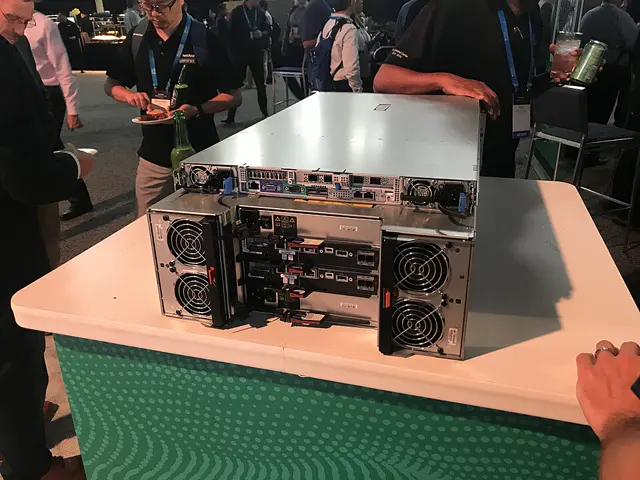
What StorageGRID is
- A grid, not a cluster: StorageGRID nodes (storage, gateway, admin, archive) join into a grid. Storage nodes hold data; gateway nodes serve S3/Swift/NFS-to-object front ends; admin nodes host the management UI and APIs.
- Erasure coding by default: objects are split and parity-protected across nodes and sites (like RAID spread across a WAN). You can survive node or even site loss with far less overhead than 2x replication — typical policies are 2+1, 4+2, or 6+3 across sites.
- ILM (Information Lifecycle Management): the heart of StorageGRID. ILM rules decide where copies live, how many, on what media, and for how long — you can tier hot copies to fast storage and archive copies to cold media automatically.
- S3 and Swift APIs: S3 is the primary interface (S3 API compatibility is a headline feature); OpenStack Swift is also supported for legacy tenants.
- Deployment shapes: dedicated SG-series appliances (e.g. SG6060, SG5712), or StorageGRID as software on VMware, KVM, and container platforms — the same software either way.
StorageGRID vs ONTAP S3
Both speak S3, but they solve different problems. The short version: ONTAP S3 is a feature of the NAS box you already own; StorageGRID is a separate object platform built for object workloads at scale. See the S3 on ONTAP guide for the ONTAP-side details.
| Dimension | ONTAP S3 | StorageGRID |
|---|---|---|
| What it is | Object-store server running inside ONTAP | Standalone scale-out object platform |
| Data protection | RAID + snapshots/SnapMirror | Erasure coding + cross-site replication (ILM) |
| Scale | Capacity of the cluster's aggregates | Grids scale to hundreds of nodes, multi-site |
| Geographic resilience | Manual SnapMirror relationships | Automatic multi-site copies via ILM policies |
| Metadata search | Minimal | Built-in object metadata search (Elasticsearch-based) |
| Compliance | SnapLock for NAS | Object lock (S3 retention), compliance modes |
| Best for | Backup targets, NAS+S3 dual protocol on one box | Archive, Veeam/S3 backup at scale, cloud-tiering targets, multi-site object stores |
You'll often see both in one shop: ONTAP for file data, StorageGRID as the object tier — e.g. as the FabricPool tiering target for ONTAP cold blocks (see the hardware lineup page for FabricPool's role).
S3 bucket encryption: SSE-S3 vs SSE-KMS vs SSE-C
This is where StorageGRID newcomers get confused — the three S3 encryption models behave very differently:
| Mode | Who holds the keys | API | Notes |
|---|---|---|---|
| SSE-S3 | StorageGRID manages keys internally | AES256 | Zero setup; StorageGRID encrypts objects with its own key material. Default for most deployments. |
| SSE-KMS | An external key management server (KMIP) or StorageGRID-managed | aws:kms | Per-bucket or per-object keys, key rotation, and a single policy point. External KMS adds a dependency — if the KMS is unreachable, operations needing keys fail. |
| SSE-C | The client supplies the key on every request | custom headers | StorageGRID never stores the key; the client must present it for reads and writes. Highest control, most operational friction. |
The classic field problem: teams hit contradictory KBs about whether SSE-KMS with an external KMS is supported on their StorageGRID version/platform. The general model: StorageGRID supports external KMS servers for SSE-KMS via the Key Management Interoperability Protocol (KMIP) — the KMS server is added in Grid Manager, and SSE-KMS requests reference keys on that server. Support details are version- and deployment-specific, so confirm against the NetApp documentation for your release (docs.netapp.com → StorageGRID → S3 → S3 server-side encryption) and your product matrix before designing around it.
Setting up SSE-KMS with an external KMS
High-level flow (Grid Manager + AWS CLI; exact menu names vary by release):
- Deploy/reach a KMIP-compliant KMS (e.g. Thales KeySecure-class appliance) reachable from the grid on the KMIP port (5696 by default).
- In Grid Manager, register the KMS server under Configuration → Security → Key Management Servers: hostname/IP, port, and the server certificate. StorageGRID and the KMS must trust each other's certificates.
- Create/import the master keys and tenant keys you'll reference in SSE-KMS requests.
- Enable encryption on the tenant/bucket, then upload with
aws:kmsand a key id (below).
# Enable default encryption on a bucket (all new objects get SSE-KMS)
aws s3api put-bucket-encryption --endpoint-url https://s3.grid.example.com \
  --bucket my-bucket \
  --server-side-encryption-configuration '{
    "Rules": [{"ApplyServerSideEncryptionByDefault": {
      "SSEAlgorithm": "aws:kms",
      "KMSMasterKeyID": "tenant-key-id"}}]
  }'

# Check what a bucket is configured for
aws s3api get-bucket-encryption --endpoint-url https://s3.grid.example.com --bucket my-bucket

# Upload a single object with SSE-KMS (overrides bucket default)
aws s3api put-object --endpoint-url https://s3.grid.example.com \
  --bucket my-bucket --key report.pdf --body ./report.pdf \
  --server-side-encryption aws:kms --ssekms-key-id tenant-key-id

# SSE-C: client-supplied key on every request (key never stored)
aws s3api put-object --endpoint-url https://s3.grid.example.com \
  --bucket my-bucket --key secret.bin --body ./secret.bin \
  --sse-customer-algorithm AES256 --sse-customer-key "$(openssl rand -base64 32)"
Bucket keys: newer StorageGRID releases support S3 bucket keys, which let StorageGRID wrap object keys with a bucket-level key and dramatically reduce calls to the external KMS for high-volume buckets. Enable via the bucket-encryption configuration (BucketKeyEnabled) or the tenant UI.
Operational gotchas
- KMS availability is data availability (for SSE-KMS). If the KMS is down, reads and writes of SSE-KMS objects fail — this is the #1 production surprise. Design the KMS for the same availability you promise the data; test a KMS outage in your DR plan.
- KMIP reachability and firewalls: every gateway/storage node that needs keys must reach the KMS. Locked-down grids often block 5696 and get confusing "key not found" style errors instead of a network error.
- Certificates: KMIP mutual TLS. A mis-trusted CA shows up as intermittent key failures, not a clean refusal — check both sides' cert chains first.
- ILM copies are encrypted too: encryption is applied to objects as they're written; ILM-created copies inherit the object's encryption state. You don't get a second chance to decide after the fact — plan SSE before loading data.
- Version support: external-KMS supportability for SSE-KMS (which KMS products, which StorageGRID versions, which deployment types) has changed over releases — this is exactly where the contradictory KBs come from. Always verify against docs for your exact version.
- Tenant vs grid scope: SSE-KMS keys are managed at the tenant level in StorageGRID; don't hunt for them under grid-level security settings.
Checking a grid's health
StorageGRID admin nodes expose a shell with a storagegrid command set for service-level checks (exact subcommands vary by release):
# From the admin node (SSH), check grid services / node status
storagegrid node list
storagegrid admin status

# Grid Manager REST API equivalent (HTTPS GET with a session token)
curl -sk -H "Accept: application/json" \
  https://grid-admin.example.com/api/v3/grid/nodes
The Grid Manager UI remains the authoritative health view: node status, ILM evaluation progress, and object-store health are all surfaced there. For S3-side errors, the S3 on ONTAP failure signatures still apply conceptually — most S3 clients surface the same HTTP codes.
Federated grids: one global namespace across StorageGRID systems
StorageGRID 11.7+ introduced grid federation: two (or more) independently managed grids can be joined into a federation so clients see a single global namespace with a single S3 endpoint, while each grid keeps its own ILM policies, admin accounts, and failure domain. Blocks & Files has covered NetApp positioning this as a way to grow object capacity and throughput across sites without merging grids operationally — useful for large AI data lakes and multi-region FabricPool tiering.
What it changes for administrators:
- Cross-grid access — buckets can be accessed through the federated endpoint regardless of which physical grid holds the objects; connection between grids uses tenant-signed trust rather than a shared directory.
- Independent upgrades and ILM — because each grid stays autonomous, you can upgrade or re-policy one grid without a maintenance window on the other. This is the main operational advantage over simply building one ever-larger grid.
- Placement still follows ILM — federation changes the namespace view, not where objects live. Cross-site placement, replication counts, and erasure-coding schemes remain ILM decisions; review your rules before federating so hot datasets aren't stranded on the slower grid.
- Tiering implication — a FabricPool or backup target pointed at the federation endpoint survives individual-grid maintenance, but verify latency to each grid's storage nodes: tiering traffic that crosses sites on every GET will show up as restore-time regressions.
Practical check before adopting: confirm your release supports federation (Support > Grid federation in the Grid Manager, or the equivalent /api/v4 endpoint), audit tenant accounts you'll expose across the trust boundary, and test S3 client behavior during a per-grid restart — clients should fail over within the namespace rather than hard-fail.