Home / Reference / Hardware lineup
NetApp hardware lineup: AFF, FAS, ASA and the model numbers
NetApp's product naming looks cryptic until you know the pattern. This guide decodes the platform families — AFF, FAS, ASA — and explains what the letters and numbers in a model name actually mean, so you can read a spec sheet (or a used-systems listing) with confidence.
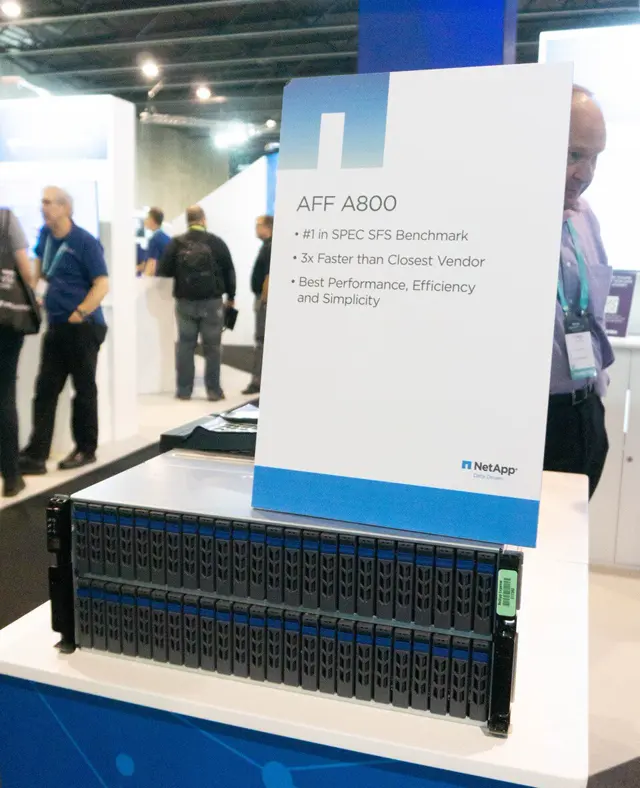
The three families
| Family | What it is | Best for |
|---|---|---|
| AFF (All-Flash FAS) | All-flash systems running full ONTAP (SAN + NAS + object + MetroCluster + SnapMirror everything) | Primary workloads, databases, VDI, any latency-sensitive mixed workload |
| FAS | Hybrid systems — flash (or NVMe) for hot data plus HDD capacity tiers via Flash Pool / FabricPool-style tiering | Capacity-oriented mixed workloads, backup targets, archive |
| ASA (AFF SAN Array) | AFF hardware locked into SAN-only mode (FC/NVMe/iSCSI, no NAS protocols, no FlexGroup) | Teams that want a simple, predictable SAN array without NAS complexity |
All three run the same ONTAP operating system. The difference is the drive mix (AFF/ASA: all flash; FAS: hybrid) and, for ASA, a simplified feature set presented by ONTAP itself: ASA systems run in a SAN-only personality where NAS protocol configuration is not available at all.
Model naming: AFF A250, FAS C400, ASA A90…
Since the 2021 refresh, NetApp uses a two-tier naming scheme:
- Letter series = performance tier. A-series = all-flash performance (NVMe drives), C-series = all-flash capacity-optimized (QLC flash / high-density), F-series (older) = hybrid. The letter is the same across AFF and FAS: AFF A250 and FAS A250 share the same chassis.
- Number = relative size/positioning. Roughly, higher = more controllers/expansion and higher performance. A20/A30/A50/A70/A90 span entry to high-end in the current AFF line; C30/C60/C80/C400 span the capacity line (C400 is the big one).
Older generations used a different scheme you will still see on the used market: AFF A200/A220/A300/A320/A400/A700/A800 and FAS 8300/8700/9000 (and before that FAS 27xx/8xxx/9xxx). The current A/C-series naming (A20, A70, C400, …) is the pattern to learn; older numbers carry no "one rule" — treat them as model numbers, not a code.
Quick decoder: AFF A70 = all-flash, performance tier, mid-high range. FAS C400 = hybrid-capable chassis in the capacity tier, biggest of the C line. ASA A90 = SAN-only all-flash, high end. The "A" in ASA is the A-series chassis; the "A" in AFF is the flash tier — don't conflate them.
AFF A-series: the performance line
- AFF A20 — entry all-flash, 2-node HA pair, small footprint; for branch/remote offices and modest primary workloads.
- AFF A30 / A50 — mid-range all-flash; the workhorses for typical enterprise NAS/SAN consolidation.
- AFF A70 — high-performance; NVMe front and back end, large scale-out options.
- AFF A90 — flagship performance; for the largest, most latency-sensitive consolidated estates.
All A-series models use NVMe SSDs (NVMe U.2/EDSFF drives in recent generations) and support scale-out to multi-node clusters; entry models typically start as 2-node HA pairs.
FAS and the C-series: capacity-optimized
- FAS C30 / C60 / C80 — all-flash capacity systems (QLC) for large primary capacity and backup targets.
- FAS C400 — the big capacity system; high drive counts, large effective capacity, still full ONTAP.
- Hybrid FAS (older, e.g. FAS 8300/8700) — mix of flash and HDD; expect Flash Pool caching (or FabricPool tiering to object storage) for hot/cold separation.
A practical rule of thumb: if the workload is mostly sequential bulk data (backup, archive, media, data lakes), the C-series gives the best capacity per dollar; if it is latency-sensitive and transactional, the A-series.
ASA: SAN-only mode
ASA (SAN Array) systems are AFF hardware running ONTAP in a SAN-only personality:
- Protocols: FC, NVMe/FC, iSCSI only. No NFS, no SMB, no S3, no FlexGroup.
- Why it exists: storage teams that want array simplicity — predictable LUN provisioning, no NAS namespace to secure — while keeping ONTAP's data protection (SnapMirror, snapshots) and efficiency.
- Which one: the ASA line maps to A-series hardware (ASA A20/A50/A70/A90, and ASA C-series for capacity).
You cannot switch an AFF system to ASA mode or back without a fresh configuration — the personality is set when the system is initialized (the system initialize / configuration-assistant flow asks you to pick). If you see "ASA" in an ONTAP system node show output, the node runs the SAN-only personality.
Checking what you have: the commands
# What family/model is this node?
system node show -fields node,model,is-san-array
system node show -instance | grep -E "Model|System Serial"

# Controller details, memory, CPU
system node hardware show

# Drive inventory — flash vs HDD, capacity, type
storage disk show -fields disk,type,usable-size,container-type

# Is the system in ASA (SAN-only) mode?
system node show -fields node,is-san-array
is-san-array shows true on ASA nodes and false on full AFF/FAS nodes. The model string (e.g. AFF-A70 or FAS-C400) tells you the family at a glance.
Related terms you'll meet in spec sheets
| Term | Meaning |
|---|---|
| HA pair | Two controllers that fail over to each other; the basic ONTAP building block (see the HA & security guide) |
| Scale-out cluster | 2–24 nodes sharing one namespace/pool; more nodes = more performance and capacity in one system |
| EDSFF / U.2 / NVMe | Drive form factors and interface of current AFF A-series (EDSFF and U.2 are the physical shapes; NVMe the protocol) |
| Flash Pool | Legacy SSD-cache-in-front-of-HDD feature (mostly superseded by all-flash or FabricPool tiering) |
| FabricPool | ONTAP tiering of cold blocks to object storage (S3/StorageGRID) — see the S3 on ONTAP guide |
| OAM / O9 | Field jargon for the operating system + management versions (OAM = "ONTAP and Management"; O9 = ONTAP 9) — mostly internal NetApp terminology |
How to pick a platform
- Protocols first: need NAS? Full AFF/FAS (or C-series). SAN-only is fine? ASA is simpler.
- Workload profile: transactional/latency-sensitive → A-series. Bulk/sequential/capacity → C-series.
- Growth path: check maximum cluster size and max drives for the model — entry models scale up (add shelves) but high-end models also scale out (add nodes).
- Efficiency maths: run the numbers on usable capacity before choosing — a capacity-optimized model with RAID-TEC and dedupe can beat a bigger raw number on another platform.
For a worked example of raw-to-usable math, see the aggregate capacity explainer.