Home / Reference / Copy-on-write & snapshots
Copy-on-write and snapshots: the ONTAP mechanics
ONTAP snapshots are nearly free because of copy-on-write (CoW): a snapshot is a saved root pointer, and blocks are only duplicated when they change after the snapshot exists. This page covers the mechanics, the space accounting (including why deleted files can still consume space), the snapshot reserve, policies and schedules, restore and FlexClone, and the exact commands to manage all of it.
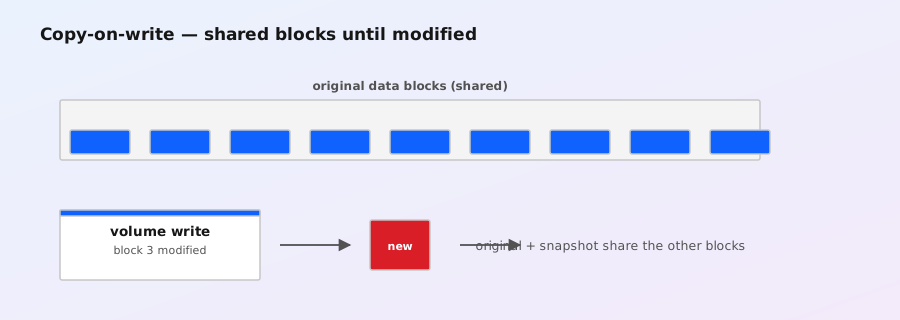
How CoW makes a snapshot instant
On the WAFL page you saw that every metadata update builds a new tree and flips a root pointer atomically at a consistency point (CP). A snapshot creation uses exactly that machinery:
- ONTAP forces a CP so the filesystem is quiescent on disk.
- The current root of the volume's WAFL tree is marked as a snapshot and kept alive.
- The filesystem continues from a new root.
Nothing is copied. Creation time is a few seconds at most (the CP), regardless of volume size — a 100 TB volume snapshots as fast as a 1 GB one. The space cost shows up only later, when blocks change:
- Overwrite a block that a snapshot references → WAFL writes the new data to a new block and keeps the old block for the snapshot. Both versions now exist: snapshot cost = one block.
- Delete a file that a snapshot references → the file's blocks stay allocated because the snapshot's tree still points at them. Space is freed only when the snapshot is deleted.
- Write new data → no snapshot impact at all; new blocks aren't referenced by old roots.
So the real cost of snapshots is a function of your change rate, not your capacity: an overwrite-heavy database volume with long snapshot retention burns far more snapshot space than a static archive volume.
Snapshot cost tracks your change rate, not your capacity — an overwrite-heavy database volume burns far more snapshot space than a static archive.
Field Notes — Copy-on-write & snapshots
Reading the space: what's snapshot vs live
ONTAP reports snapshot space at both volume and aggregate level:
volume show -vserver vs1 -volume vol1 -fields used,used-percent,snapshot-used,\
  snapshot-reserve,percent-snapshot-space
df -h                                    # from a node shell: capacity + snapshot reserve
volume snapshot show -vserver vs1 -volume vol1   # list snapshots + size
Two concepts that trip people up:
- Snapshot reserve (
percent-snapshot-space): the slice of the volume's logical size reserved so snapshots can't consume the entire volume. Snapshot usage over the reserve is allowed but eats into the volume's writable space — the volume just reports less available capacity. The default is 5%. - Snapshot-used vs used:
usedincludes snapshot blocks for capacity planning in some views; thesnapshot-usedfield is the snapshot-only portion. The total physical consumption of a volume = live data + snapshot blocks, and that's what matters to the aggregate.
Common surprise: you delete 2 TB of files, and df barely moves. Check volume snapshot show — snapshots are holding the old blocks. This is the number-one "where did my space go" investigation on real systems, and the fix is usually retention policy, not a panic.
Policies and schedules
Snapshots are driven by snapshot policies — named sets of schedules + retention counts that you attach to volumes:
snapshot policy create -vserver vs1 -policy prod_backup \
  -schedule hourly -count 12 -schedule daily -count 7 -schedule weekly -count 4
snapshot policy show -vserver vs1 -policy prod_backup
volume modify -vserver vs1 -volume vol1 -snapshot-policy prod_backup \
  -percent-snapshot-space 10
Notes from the field:
- Default policy is "default": hourly (6), daily (2), weekly (2). Plenty of sites never change it and are fine; regulated sites tune it.
- Schedules are ONTAP schedules, not cron: create a schedule first (
job schedule cron create -name nightly -hour 2 -minute 0) if you need something custom. - Retention counts, not ages: a count of 12 hourly = keep the 12 most recent hourly snapshots; older ones are deleted automatically by the policy.
- Reserve sizing: 5% is fine for steady workloads; overwrite-heavy volumes want more. Watch
percent-snapshot-spaceand the actual snapshot-used trend, then adjust.
Autodelete: the safety net
When snapshots push the volume against its space limits, ONTAP can delete them automatically — if you've enabled it and set the commitment level:
volume snapshot autodelete show -vserver vs1 -volume vol1
volume snapshot autodelete modify -vserver vs1 -volume vol1 \
  -enabled on -commitment try -delete-order oldest_first -trigger volume
Key parameters:
-commitment:try(delete only if it doesn't break anything) vsdestroy(delete even snapshots marked for SnapMirror/SnapVault as a last resort).tryis the sane default.-trigger:volume(when the volume runs out of space) orsnap_reserve(when the snapshot reserve is exhausted).-delete-order: oldest first is typical;newest_firstexists for specific compliance shapes.
Autodelete is a last-line defense, not a retention strategy — if it's firing regularly, your policy or reserve is wrong.
Restore: file-level and volume-level
Restores come in three flavors:
# 1. Client-visible: browse the ~snapshot directory (NAS) and copy files back
#    (e.g. \\server\share\~snapshot\hourly.0\... or /vol/.snapshot/hourly.0/...)

# 2. File-level restore via CLI
volume snapshot restore-file -vserver vs1 -volume vol1 -snapshot snap1 \
  -path /dir/file.txt -restore-path /dir/file.txt.restored

# 3. Volume-level rollback (destructive: volume is rolled back to the snapshot)
volume snapshot restore -vserver vs1 -volume vol1 -snapshot snap1- ~snapshot directory: every volume exposes its snapshots read-only to clients (SMB:
Previous Versions/~snapshot; NFS:.snapshotat the volume root). Zero admin involvement, instant file recovery — enable it and tell your users. snapshot restore-file: single-file restore without touching the rest of the volume (ONTAP 9.x). Non-disruptive.snapshot restore(volume): rolls the whole volume back. It is destructive to everything after the snapshot (the "current" tree is discarded — this is a rollback, not a merge) and it replaces the current filesystem, so do it from a console session, with a current snapshot taken first, and never over NFS where clients hold state.
For "restore that file from 3 hours ago," the ~snapshot directory or snapshot restore-file is the answer 95% of the time. Volume restore is for disasters.
FlexClone: CoW's productivity trick
FlexClone is the same CoW machinery pointed at a snapshot: a clone volume shares all its blocks with the parent snapshot and only copies blocks it writes to afterward:
volume snapshot create -vserver vs1 -volume vol1 -snapshot pre_patch
volume clone create -vserver vs1 -flexclone vol1_patch_test -type flexclone \
  -parent-volume vol1 -parent-snapshot pre_patch
volume clone split start -vserver vs1 -flexclone vol1_patch_test   # optional full split
Practical uses: instant test/dev copies of production volumes, patch-test environments, per-branch database clones, and safe pre-change baselines. The clone consumes only changed blocks until you run volume clone split, which physically copies everything (that's the expensive, hours-long operation — avoid it unless you truly need independence).
Snapshots and the bigger picture
- SnapMirror/SnapVault replicate snapshot trees, which is why replication is efficient and why destination volumes keep snapshot copies — see the backup and restore guide.
- NDMP backups can dump from a snapshot for consistent point-in-time backups; the backup and restore guide covers the tape workflow and restore paths.
- Deletion of a snapshot is a background process — the blocks become free gradually, not instantly; don't expect
dfto move the moment the command returns. - Snapshots are per-volume, not per-aggregate: an aggregate-level "snapshot" isn't a thing; snapshots live in each FlexVol's tree (FlexGroup: per-constituent, presented as one logical set).
Command quick reference
| Task | Command |
|---|---|
| Create a snapshot | volume snapshot create -vserver vs1 -volume vol1 -snapshot snap1 |
| List snapshots + size | volume snapshot show -vserver vs1 -volume vol1 |
| Delete a snapshot | volume snapshot delete -vserver vs1 -volume vol1 -snapshot snap1 |
| Set the policy + reserve | volume modify -vserver vs1 -volume vol1 -snapshot-policy prod -percent-snapshot-space 10 |
| Restore one file | volume snapshot restore-file -vserver vs1 -volume vol1 -snapshot snap1 -path /d/f -restore-path /d/f.new |
| Roll back a volume | volume snapshot restore -vserver vs1 -volume vol1 -snapshot snap1 |
| Clone from a snapshot | volume clone create -vserver vs1 -flexclone cl1 -type flexclone -parent-volume vol1 -parent-snapshot snap1 |
| Autodelete safety net | volume snapshot autodelete modify -vserver vs1 -volume vol1 -enabled on -commitment try |
This closes the "How ONTAP actually works" series — start again at WAFL or continue with the FlexGroup deep-dive for the scale-out angle.