WAFL deep-dive: how ONTAP's filesystem actually writes
WAFL — Write Anywhere File Layout — is the filesystem at the bottom of every ONTAP system. It is not a journaling filesystem with a bit of copy-on-write bolted on: the whole design — write-anywhere allocation, delayed metadata updates, and a single root pointer that gets flipped at each consistency point — is what gives NetApp storage its crash consistency, its cheap snapshots, and its tolerance for a node dying mid-write. This page explains the mechanics that matter for day-to-day administration and for the NCDA exam.
The one-paragraph mental model
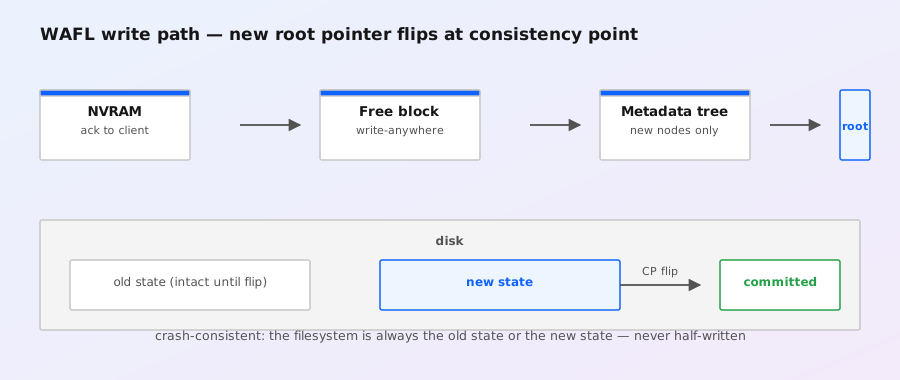
Think of WAFL as a tree of blocks with a single root. When data is written, WAFL picks any free block on disk (that's the "write anywhere" part) and records the new block in a metadata tree. The metadata is never updated in place — every change creates a new version of the affected tree nodes, right up to a new root. At a consistency point (CP), the new root pointer is written and the filesystem atomically flips from the old consistent state to the new one. Because the previous root stays intact until the flip, the filesystem is always either the old state or the new state — never something half-written.
Consequences you'll feel as an admin:
- Snapshots are free-ish: a snapshot is just the old root pointer, kept alive. Blocks still referenced by it are never freed until it's deleted.
- No fsck after a crash: a power loss or takeover can't leave the metadata tree half-updated, because metadata updates only land atomically at CPs.
- Writes are batched: data blocks accumulate in memory and hit disk in large sequential groups at CPs — which is why NetApp arrays are famous for absorbing random-write workloads.
- Free space accounting includes snapshots: a deleted file can keep consuming space because a snapshot still references its blocks.
Write-anywhere allocation, step by step
A client write (say an NFS write) follows this path:
- Receive into memory: ONTAP accepts the write into the node's memory buffers. For NFS, the reply to the client can be sent once the write is durable — see the NVRAM page in this series for that step.
- Pick free blocks: when the data is eventually written to disk, WAFL allocates free blocks anywhere in the aggregate — not near the file's existing blocks, not in any fixed position. This is the fundamental difference from in-place filesystems (like ext4 or NTFS) where a file's blocks are placed once and updated in place.
- Build new metadata: WAFL constructs the new indirect blocks and inode entries that point at the freshly written data blocks, as a new tree rooted at a new root block.
- Consistency point: at a CP, the new root is written and the atomic flip happens. Until then the new blocks are not part of the on-disk filesystem — they're "dirty" in memory.
Because allocation is decoupled from any particular disk location, WAFL can:
- Coalesce writes: accumulate many small random writes from clients and flush them as large sequential writes per disk (grouping by RAID stripe). This is the classic "random in, sequential out" property that lets NetApp systems do heavy small-block OLTP-style workloads on spinning disk.
- Spread writes across the RAID group: the WAFL layout logic writes full stripes, so every disk in a RAID-DP group gets the same amount of new data — no hot disks, no write hotspots.
- Use all disks evenly: free space is managed aggregate-wide, not per-volume, so volumes inherit whatever capacity the aggregate has.
Consistency points: the atomic flip
A CP happens when:
- A timer fires (a few seconds of accumulated writes, tuned by the system),
- The NVRAM log approaches its size limit,
- A snapshot is created (snapshots force a CP so the new root is on disk),
- Certain administrative operations demand one (e.g. before some takeover/restart flows).
At the CP, ONTAP flushes the dirty data blocks, then the metadata tree, then writes the new root. The flip is atomic — a reader (or a crash) sees either the old root or the new one. This is why WAFL filesystems need no journal and no fsck: there is never an intermediate on-disk state to repair. If the system dies between CPs, the write data is still safe if it was in NVRAM (replayed on restart); the on-disk filesystem simply rolls back to the last CP.
No journal, no fsck: the on-disk filesystem is always either the old consistent state or the new one — never something half-written.
Field Notes — WAFL deep-dive
Exam angle: "How does ONTAP survive a crash without a journal?" — WAFL's copy-on-write metadata + atomic root flip at CPs means the on-disk filesystem is always consistent; NVRAM replay covers the data that was acknowledged but not yet on disk. Journaling filesystems protect against metadata corruption; WAFL's design makes the question of metadata corruption mostly moot.
WAFL and the storage hierarchy
WAFL sits at the aggregate layer, not the volume layer. In ONTAP:
- Aggregate = one WAFL filesystem spanning a RAID group (or several). It owns all physical space: data blocks, metadata, and the free-block bitmap.
- FlexVol = a subtree of the aggregate's WAFL tree, with its own root, inode file, and settings (snapshot reserve, space guarantee, etc.). Volumes are carved out of the aggregate's free space.
- Snapshots = saved roots of a FlexVol's WAFL tree.
You can see the space split from the CLI — the aggregate shows metadata overhead before any volume is full:
storage aggregate show -fields aggregate,size,used,available
storage aggregate show-space -aggregate aggr1     # breakdown: metadata, snapshots, volumes
In ONTAP 9 the old 7-Mode "WAFL reserve" tuning knob is gone: the system manages filesystem metadata space internally, which is why an aggregate can show a few percent used with no user data in it. Don't try to reclaim it, and don't size aggregates to the last byte — metadata, snapshot blocks, and dedupe metadata need headroom.
Why snapshots are nearly free (the CoW tie-in)
Because every metadata update creates a new tree rather than modifying the old one, the old tree is always complete and readable. A snapshot creation is therefore just: "keep this root alive and stop freeing blocks it references." No data copying happens at creation time — the cost appears later, only for blocks that change after the snapshot exists (each changed block must keep its old version around for the snapshot). This is copy-on-write from the snapshot's point of view:
- First snapshot: essentially instant, near-zero space.
- Heavy overwrite workload after the snapshot: every overwritten block consumes an extra copy until the snapshot is deleted.
- Delete the snapshot: the old blocks become free again (background process).
The full picture — snapshot policies, reserves, restore, and FlexClone — is the third page of this series: Copy-on-write and snapshots.
What WAFL means for your day-to-day
| Situation | What WAFL does | What you should do |
|---|---|---|
| Heavy small random writes (databases, VDI) | Batches them into large sequential disk writes at CPs | Trust the aggregate; use fast tiers (Flash Cache / AFF) for the hot data |
| Power loss / node crash | Filesystem stays consistent; NVRAM replay restores acknowledged writes | Verify takeover/giveback behavior, check storage failover show health |
| Aggregate shows "used" with empty volumes | Metadata overhead is normal | Account for it in sizing; don't run aggregates > ~90% used |
| Deleted files don't free space | A snapshot still references the blocks | Check volume snapshot show; prune old snapshots |
| Snapshots eating capacity after a big overwrite burst | CoW keeps old block versions per snapshot | Set snapshot autodelete and a sane retention policy |
Useful commands
version                              # OS + system version
df -A                                # aggregate space, from a node shell
storage aggregate show -fields aggregate,size,used,available
storage aggregate show-space -aggregate aggr1
system node run -node node1 sysconfig -r      # RAID/disk layout (nodeshell)
volume show -fields files,files-used -vserver vs1 -volume vol1   # inode use
And the filesystem-side sanity checks live in the other pages of this series: NVRAM and write logging, and copy-on-write and snapshots.