Home / Reference / Backup & Restore
ONTAP backup & restore: SnapVault and NDMP, the practical parts
ONTAP has two backup mechanisms that are easy to confuse with replication: SnapVault, which copies snapshots to a second volume with long, policy-controlled retention (disk-to-disk), and NDMP, which streams data to tape or virtual tape libraries through third-party backup software. SnapMirror, by contrast, keeps a *replica* for disaster recovery — same data, short history. This guide covers when to use which, the exact commands for each, and how restores actually work.
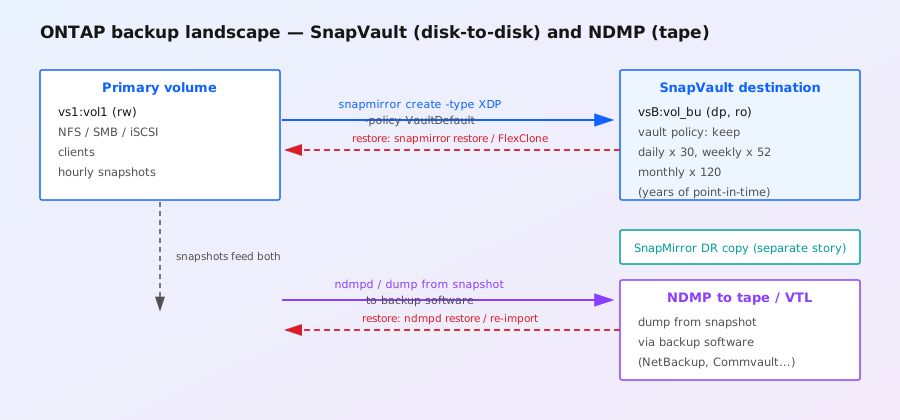
The three-copy confusion: mirror vs vault vs tape
The single biggest source of misconfiguration is treating SnapMirror, SnapVault, and NDMP as interchangeable. They are not:
| Mechanism | What it keeps | Retention | Recovery point | Best for |
|---|---|---|---|---|
| SnapMirror (XDP, mirror policy) | A replica of the volume, updated on a schedule | Short — a handful of snapshots at the destination | Minutes (async) / zero (sync) | Disaster recovery, failover, cloning at the DR site |
| SnapVault (XDP, vault policy) | Snapshots copied from the source, *accumulated* at the destination | Long — days/weeks/months/years, per retention rules | As scheduled (often hourly/daily) | Compliance, versioned backup, ransomware recovery point |
| NDMP | A dump/restore stream, typically to tape or VTL | As long as the tape media lasts | As scheduled by backup software | Off-site media, air-gapped copies, archives, regulatory tape |
Both SnapVault and NDMP backups are snapshot-based under the hood — the data streamed is taken from a snapshot, so the backup is crash-consistent even while the volume is hot. That is the key ONTAP design fact: backup reads snapshots, never live blocks.
SnapVault: what it is and how it differs from SnapMirror
SnapVault is SnapMirror with a vault policy. The relationship type is still XDP (extended data protection) — the difference lives entirely in the policy. A mirror policy tells the destination to keep a small, rolling set of snapshots; a vault policy tells it to keep whatever the retention rules say, accumulating them over time.
- Mirror policy (e.g.
MirrorAllSnapshots): destination keeps the latest snapshot — it is a *copy*, not a backup. - Vault policy (e.g.
VaultDefault): destination keeps snapshots per retention rules (for example, 24 hourly, 30 daily, 52 weekly, 120 monthly) — a *backup* with a point-in-time history. - XDP vs DP: older 7-mode used DP volumes; modern ONTAP uses XDP relationships for both mirror and vault. A vault destination is a DP volume and cannot be mounted directly — you restore from it, or clone from it.
You can even mix: one source volume can have a SnapMirror relationship to a DR site and a SnapVault relationship to a backup volume — they are independent relationships with independent schedules and policies.
SnapVault setup, step by step
Setup mirrors SnapMirror, with two differences: the policy is a vault policy, and you normally let the relationship own its own snapshots rather than inheriting source snapshots.
# 1. Peer the clusters (one-time)
cluster peer create -peer-cluster backup-cluster -peer-addresses 10.0.20.2 -peer-username admin
vserver peer create -vserver vs1 -peer-vserver vsB -peer-cluster backup-cluster -applications snapmirror

# 2. Create a vault policy with explicit retention (or use VaultDefault)
snapmirror policy create -vserver vsB -policy VaultHourly \
  -transfer-priority normal \
  -is-policy-restricted true
snapmirror policy add-rule -vserver vsB -policy VaultHourly \
  -snapmirror-label hourly -keep 24
snapmirror policy add-rule -vserver vsB -policy VaultHourly \
  -snapmirror-label daily -keep 30

# 3. Create the vault relationship (XDP type, vault policy)
snapmirror create -source-path vs1:vol1 -destination-path vsB:vol_bu \
  -type XDP -policy VaultHourly -schedule hourly

# 4. First transfer — full baseline
snapmirror initialize -destination-path vsB:vol_bu

# 5. Watch it
snapmirror show -destination-path vsB:vol_bu -fields state,status,lag-time,last-transfer-end
Two details that trip people up:
- Labels must match. The snapshot label applied at the source (
snapmirror labelon the snapshot, or a SnapMirror label rule in a source policy) must match a rule label in the vault policy. Unlabeled snapshots are skipped, and a skipped snapshot means a gap in your backup history. - The destination schedule is what transfers. The schedule on the relationship tells the *destination* cluster when to pull. The source just needs snapshots to exist at those times — so a matching snapshot schedule on the source is part of the design.
Vault destination volumes are usually created empty by snapmirror create (the destination path's volume must exist or be creatable — with ONTAP 9.7+, you can use SnapMirror create with data protection to let ONTAP create and size the destination from the source's guarantees).
Restoring from a SnapVault backup
There are three restore paths, in increasing order of surgical precision:
# 1. Full-volume restore — overwrite the source volume from a backup snapshot
snapmirror restore -source-path vsB:vol_bu -destination-path vs1:vol1 \
  -from-snapshot daily.2026-08-20_0005

# 2. Whole-volume restore to a *new* volume (safer: keeps the original)
snapmirror restore -source-path vsB:vol_bu -destination-path vs1:vol1_restored \
  -from-snapshot daily.2026-08-20_0005

# 3. File-level recovery — mount a FlexClone of the backup snapshot
volume clone create -vserver vsB -volume vol_bu -snapshot daily.2026-08-20_0005 \
  -junction-path /clones/vol_bu_0820
# then copy individual files out of /clones/vol_bu_0820 over NFS/SMB
snapmirror restorerequires the relationship to be broken (or it performs a vault restore which re-syncs afterward in newer releases). For an emergency full restore,snapmirror breakthe relationship first, restore, then re-establish withsnapmirror resync.- FlexClone file recovery is instant and does not touch the production volume — it is the default answer for "a user deleted a folder last Tuesday".
- Restoring to the source volume of an active relationship destroys the relationship state — expect to re-initialize. Plan for it in your runbook, don't discover it at 3am.
NDMP: ONTAP's tape protocol
Network Data Management Protocol is how ONTAP talks to backup software (NetBackup, Commvault, Veeam with NDMP connectors, Backup Exec, etc.) for tape and virtual tape library (VTL) backups. ONTAP's NDMP implementation is a dump/restore engine: the backup software issues an NDMP dump of a volume or path, ONTAP streams the data, and the software writes it to tape. Restores are the reverse (restore from tape back into a volume).
Key facts to get right:
- NDMP operates per-SVM. You enable the NDMP service on a vserver, and backup software talks to the SVM's data LIF or a dedicated NDMP LIF.
- Authentication: ONTAP supports NDMP user accounts (local users with the
backuprole) and, in modern releases, NDMP over SSH for control connections. Clear-text NDMP (port 10000) is a security smell — prefer SSH if your backup software supports it. - Snapshot-based consistency: the standard practice is a dump from snapshot: take a snapshot, run the dump against it, delete the snapshot when the backup job finishes. This gives a consistent backup with zero application quiesce on the live volume.
- Three-way vs direct: NDMP supports direct-to-tape (ONTAP streams straight to the library) and three-way (ONTAP streams through the backup server). Direct is faster and offloads the media handling to the filer.
# Enable NDMP on the SVM
vserver services ndmp modify -vserver vs1 -is-enabled true

# Create an NDMP user (backup role)
security login create -vserver vs1 -user-or-group-name ndmpuser \
  -application ndmp -authmethod password -role backup

# Create a dedicated NDMP data LIF (recommended for three-way setups)
network interface create -vserver vs1 -lif ndmp-lif -role data \
  -data-protocol ndmp -home-node node1 -home-port e0c \
  -address 10.0.30.5 -netmask 255.255.255.0

# Verify the service state
vserver services ndmp show -vserver vs1

# When a dump job is running, watch it
vserver services ndmp status -vserver vs1
The actual dump and restore commands are issued by the backup software, not typed at the ONTAP CLI — but you can test an NDMP environment end-to-end with ndmpcopy (the built-in file-based copy tool) before the backup admins arrive.
NDMP restore: the gotchas
- Restores land in a mounted volume. The destination must exist and be mounted (or creatable) — you cannot restore into a DP volume that is offline. Create a restore-target volume and junction first if the original is gone.
- Path semantics: dump records paths relative to the volume root or a subdirectory, depending on the dump scope (volume-level vs path-level backup). Restoring a path-level backup into the wrong root quietly produces a nested-directory mess.
- Permissions: NDMP restores over NFSv3-era dump data may lose ACLs; SMB ACLs are restored with the data stream, but check your backup software's options for NTFS ACL handling.
- Don't restore over a live export: clients hitting the volume mid-restore will see half-written files. Unmount or quiesce the junction, restore, then re-export.
SnapVault vs NDMP: how to choose
| Consideration | SnapVault | NDMP |
|---|---|---|
| Restore speed | Near-instant (clone) to fast (block-level) | Slow — full stream from tape |
| Media | Disk (another ONTAP volume) | Tape, VTL, or disk-staging via backup software |
| Off-site / air-gap | Only via a second relationship or copy | Tape leaves the building naturally |
| Granularity | Any point-in-time snapshot, file-level via clone | Whatever the backup software catalogued |
| Management | Pure ONTAP CLI/REST | Third-party backup suite (and its licensing) |
| Cost model | Disk capacity on the destination | Media + backup software licenses + library |
The mainstream design is both: SnapVault for fast, frequent, disk-based recovery points, and NDMP to tape (or a VTL that replicates off-site) for the compliance/archive copy. SnapCenter is NetApp's orchestration layer on top of these — it schedules the application-consistent snapshots that both mechanisms consume.
Operational checklist
- Test restores on a schedule. A backup that has never been restored is a hypothesis. Restore one file, one volume, one clone per quarter, and log it.
- Watch lag, not just state.
snapmirror show -fields lag-timetells you how stale the vault copy is; a failed transfer that recovers still leaves a gap in retention. - Size the destination for growth. Vault retention grows monotonically;
volume show -fields usedon the DP volume should trend, and capacity planning must assume the full retention window is eventually populated. - Lock down NDMP. Disable NDMP on SVMs that don't need it, use NDMP users with the minimal
backuprole, prefer SSH, and restrict the NDMP LIF to backup-server subnets (firewall rules — ONTAP has no per-LIF ACL for NDMP itself). - Ransomware consideration: a SnapVault destination with retention-locked snapshots (SnapLock-backed vault policies) survives even if the primary is encrypted — that is the modern defense-in-depth answer, and it is why the security hardening guide pairs ARP with vault retention.
Related guides: SnapMirror troubleshooting, snapshots & copy-on-write, security hardening, CLI cheat sheet. Commands verified against ONTAP 9.x CLI conventions; check man snapmirror / vserver services ndmp help on your exact release.