Home / Reference / CLI Cheat Sheet
ONTAP CLI Cheat Sheet
The commands admins type daily, grouped by job. Targets ONTAP 9.x. Use man <command> on the system for full flags; set -privilege advanced unlocks the rest.
Try the ONTAP command decoder — paste a CLI line and get every flag explained.
Find a command
Filter the reference by command, flag, or job. Press / anywhere on this page to focus the search.
No matching commands. Try fewer words or choose all categories.
cluster1::> help
Welcome to the ONTAP CLI simulator. Type help for the command list, or tap a suggestion below. Output is simulated for learning — it won't change your real systems.
Enable JavaScript to use the interactive simulator.
cluster1::>
cluster show
volume show
network interface show
storage failover show
snapmirror show
help
On this page Cluster & node
Command What it does
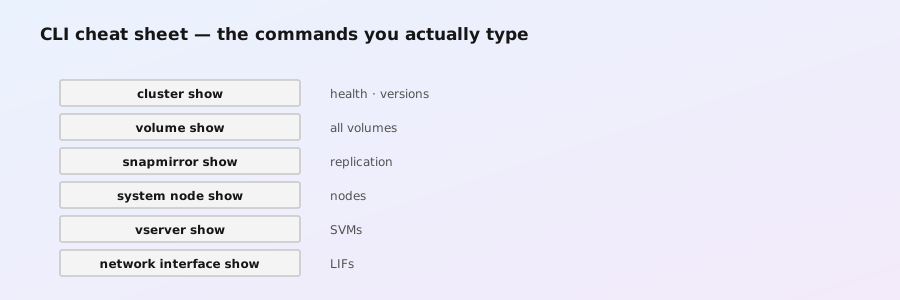
cluster showCluster name, version, nodes, UUID node showList nodes and their state node show -fields model,serial-number,ownerHardware identity cluster remove-node -node node2Remove a node from cluster membership (decommission) system configuration backup create -node * -type fullFull config backup — copy it off-box system node autosupport modify -node * -state disabledStop AutoSupport on retiring systems cluster peer create -peer-cluster X -peer-intercluster-lifs a,bPeer two clusters (prerequisite for SnapMirror) cluster peer showPeering status system node image show / cluster image showInstalled ONTAP images/versions system license showLicensed features
SVM (vserver)
Command What it does
vserver showAll SVMs, type (admin/data), state vserver create -vserver vs1 -rootvolume rootvol1 -rootaggregate aggr1 -allowed-protocols nfsCreate a data SVM vserver modify -vserver vs1 -allowed-protocols nfs,smbAdd protocols to an SVM vserver add-protocols -vserver vs1 -protocols smb / vserver remove-protocols -vserver vs1 -protocols smbAdd or remove allowed protocols vserver services dns create -vserver vs1 -domains corp.example.com -name-servers 10.0.0.53,10.0.0.54Configure DNS for an SVM vserver services ldap create -vserver vs1 -client-config CORP-LDAP -servers ldap01.corp.example.comConfigure LDAP for an SVM vserver export-policy rule create -vserver vs1 -policy default -clientmatches 10.0.0.0/8 -rorule sys -rwrule sysCreate an NFS export rule vserver migrate start -vserver vs1 -destination-cluster cluster02 / vserver migrate show -vserver vs1Start and monitor an SVM migration vserver delete -vserver vs1Delete an SVM (must be empty first)
Aggregates & disks
Command What it does
storage aggregate showAggregates: size, used, raid type, disks storage aggregate show -fields percent-usedUtilization (capacity monitoring) storage aggregate create -aggregate aggr1 -diskcount 11 -raidtype raid_dpCreate aggregate (data disks + spares auto) storage aggregate add-disks -aggregate aggr1 -diskcount 4Grow an aggregate online storage aggregate online/offline/destroyLifecycle control (destroy = data loss) storage aggregate show-status -aggregate aggr1RAID state: degraded/reconstructing/resyncing (post-power-loss triage) storage disk show -brokenBroken disks (after dirty shutdown) storage disk secure-erase -disk <list>Advanced (9.7+): destroy data before decommission storage disk reassignRe-home foreign disks to this cluster (9.9.1+) storage disk showDisk inventory/state storage shelf showShelf/disk-shelf state
Volumes
Command What it does
volume create -vserver vs1 -volume vol1 -aggregate aggr1 -size 1tCreate FlexVol (add -type flexgroup + -aggregate-list for FlexGroup) volume show -fields volume,aggregate,size,used,percent-usedVolume inventory + utilization volume modify -vserver vs1 -volume vol1 -size 1.5tGrow (or shrink) a volume online volume move start -vserver vs1 -volume vol1 -destination-aggregate aggr2Nondisruptive volume move volume move show -vserver vs1 -volume vol1Monitor move phase, progress, and cutover status volume move trigger-cutover -vserver vs1 -volume vol1Request cutover during the next eligible window volume create -vserver vs1 -volume records -aggregate aggr1 -size 1t -snaplock-type complianceCreate a SnapLock Compliance volume volume clone create -vserver vs1 -clone clone1 -parent-volume vol1Instant space-efficient clone volume offline/online/destroyLifecycle control volume show -fields junction-pathNamespace mount point
Snapshots
Command What it does
snapshot create -vserver vs1 -volume vol1 -snapshot pre_patchManual snapshot snapshot show -vserver vs1 -volume vol1List snapshots + sizes snapshot delete -vserver vs1 -volume vol1 -snapshot oldDelete (frees space) snapshot restore -vserver vs1 -volume vol1 -snapshot pre_patchRoll volume back (destructive to newer data) snapshot policy showSchedules + retention volume modify -vserver vs1 -volume vol1 -snapshot-reserve 10Change snapshot reserve snapshot autodelete show -vserver vs1 -volume vol1Autodelete config (space safety net)
Networking
Command What it does
network interface showLIFs, roles, addresses, failover state network interface create -vserver vs1 -lif data1 -role data -data-protocol nfs -home-node node1 -home-port e0c -address 10.0.0.5 -netmask 255.255.255.0Create data LIF network interface modify -vserver vs1 -lif data1 -home-node node2Change home/failover target network route show -vserver vs1SVM routing network port show -fields link,duplex,speedPhysical port health ifgrp create -node node1 -ifgrp a0a -mode multimode_lacpCreate port channel (then add ports) vlan create -node node1 -vlan-name e0c-100Create VLAN on a port network ping-lif -vserver vs1 -lif data1Test LIF reachability from the cluster
NFS
Command What it does
vserver nfs show -vserver vs1NFS state + versions enabled vserver nfs enable -vserver vs1Enable NFS on the SVM vserver export-policy rule show -vserver vs1 -policy defaultExport rules vserver export-policy rule create -vserver vs1 -policy default -v4client 10.1.0.0/16 -protocol nfs -rorule sys -rwrule sysAllow a subnet to mount vserver export-policy check-access -vserver vs1 -client-ip X -volume vol1 -authentication-method sysTest what a client can do (golden troubleshooting command) vserver nfs modify -vserver vs1 -v4-id-domain corp.example.comNFSv4 identity domain (owner strings) vserver nfs modify -vserver vs1 -v3 enabled -v4.1 enabledEnable NFSv3 and NFSv4.1 for VMware datastores vserver name-mapping create -vserver vs1 -direction win-unix -pattern "CORP\\*" -replacement "\\1"Map Windows ↔ UNIX names vserver services name-service ns-switch modify -vserver vs1 -database passwd -sources ldap,filesWhere ONTAP looks up users/groups vserver security file-directory show -vserver vs1 -volume vol1 -path /Effective ACL on a path (NTFS/NFSv4)
SMB/CIFS
Command What it does
vserver cifs create -vserver vs1 -cifs-server FS1 -domain ad.example.comJoin SVM to AD vserver cifs show -vserver vs1CIFS server status vserver cifs share create -vserver vs1 -share-name data -path /dataCreate a share vserver cifs share show -vserver vs1List shares vserver cifs share access-control show -vserver vs1 -share dataShare-level ACLs
S3
Command What it does
vserver object-store-server create -vserver vs1 -object-store-server-name s3svm -root-user root -root-password P@ssCreate S3 object store server vserver object-store-server showStatus/config vserver object-store-server bucket create -vserver vs1 -bucket backupsCreate a bucket vserver object-store-server bucket showList buckets
SAN (FC / iSCSI / NVMe)
Command What it does
vserver fcp create -vserver vs1 / vserver iscsi create -vserver vs1Enable SAN protocol on SVM lun create -vserver vs1 -volume lunvol -lun /vol/lunvol/lun0 -size 2t -ostype linuxCreate a LUN lun showLUN inventory igroup create -vserver vs1 -igroup host1 -protocol iscsi -initiator iqn.1994-05.com.example:host1Create initiator group lun map -vserver vs1 -path /vol/lunvol/lun0 -igroup host1 -lun-id 0Map LUN to host iscsi initiator show / fcp initiator showConnected initiators vserver iscsi connection show -vserver vs1Active iSCSI sessions
Data protection (SnapMirror / SnapVault)
Command What it does
vserver peer create -vserver vs1 -peer-vserver vsB -peer-cluster clusterBPeer SVMs (after cluster peering) snapmirror create -source-path vs1:vol1 -destination-path vsB:volB -type XDP -policy DPDefault -schedule hourlyAsync replication relationship snapmirror initialize -destination-path vsB:volBFirst full transfer snapmirror show -fields state,status,lag-time,last-transfer-endHealth + lag (monitoring staple) snapmirror update -destination-path vsB:volBManual incremental transfer snapmirror break -destination-path vsB:volBMake destination writable (DR failover) snapmirror resync -destination-path vs1:vol1Re-establish after break (watch direction!) snapmirror restore -source-path vsB:volB -destination-path vs1:vol1Restore destination data to source snapmirror policy showReplication/vault policies snapmirror policy create -vserver vsB -policy VaultHourlyCreate a SnapVault retention policy snapmirror policy add-rule -vserver vsB -policy VaultHourly -snapmirror-label daily -keep 30Add a retention rule (keep 30 daily snapshots) vserver services ndmp modify -vserver vs1 -is-enabled trueEnable NDMP for tape backup on the SVM snapmirror create -source-path vs1: -destination-path vsDR: -type XDP -policy MirrorAllSnapshots -vserver-dr-protection protectedCreate an identity-preserving SVM DR relationship
Storage efficiency
Command What it does
volume efficiency on -volume vol1Enable dedupe/compression volume efficiency show -volume vol1Savings + scan status volume efficiency modify -volume vol1 -schedule sun@2:00Reschedule scans volume show -fields logical-used,logical-space-usedLogical vs physical (savings view) volume modify -vserver vs1 -volume vol1 -space-guarantee noneThin-provision a volume
QoS
Command What it does
qos policy-group create -policy-group pg1 -vserver vs1 -max-throughput 10000IOPS,500MBpsFixed limits qos adaptive-policy-group create -name apg1 -vserver vs1 -expected-iops-per-tb 500 -peak-iops-per-tb 1000Size-scaled limits (AQoS) volume modify -vserver vs1 -volume vol1 -qos-policy-group pg1Assign to volume qos statistics volume show -interval 5Per-volume latency/throughput
Security & access
Command What it does
security login create -vserver vs1 -user-or-group-name ops -application ssh -authmethod passwordCreate a user security login showUsers + auth methods security role show -vserver vs1RBAC roles security key-manager onboard showOnboard key manager status (encryption) volume show -fields encryptionWhich volumes are encrypted (NVE/NAE) security multi-admin-verify enableRequire approvers for destructive commands (9.9+) security multi-admin-verify approval-groups createDefine who can approve those commands volume encryption enable -vserver vs1 -volume vol1Encrypt one volume (NVE) storage aggregate modify -aggregate aggr1 -encrypt trueEncrypt an aggregate (NAE) vserver security ransomware-protection enable -vserver vs1Turn on ARP ransomware detection snaplock legal-hold add -volume vault1 -file-name fPin a SnapLock file beyond retention vserver export-policy rule createScope NFS client access (the NAS firewall) vserver audit enable -vserver vs1Start file-access audit logging
FPolicy, audit & licensing
Command What it does
vserver fpolicy create -vserver vs1 -policy-name screen -events file_ops -engine nativeCreate an FPolicy policy vserver fpolicy show -vserver vs1Show configured policies and sequence numbers vserver fpolicy enable -vserver vs1 -policy-name screen -sequence-number 1Apply and enable an FPolicy policy vserver fpolicy status show -vserver vs1Check policy and external-engine status vserver audit create -vserver vs1 -destination /audit -format evtxCreate NAS auditing configuration vserver audit show -vserver vs1Show audit destinations, formats, and rotation settings vserver audit enable -vserver vs1Enable NAS audit event consolidation vserver audit rotate-log -vserver vs1Close the active audit log and start a new one system license add -license-code <code>Install a license code system license delete -serial-number <serial> -package <package>Remove a package license system license show-statusShow package entitlement status system license capacity showShow capacity-based license consumption
AutoSupport, EMS & diagnostics
Command What it does
system node autosupport show -node *Show AutoSupport delivery configuration system node autosupport modify -node * -transport https -support enableEnable HTTPS delivery to NetApp support system node autosupport invoke -node node1 -type testSend a test AutoSupport message system node autosupport history show -node *Review generated messages and delivery status event log show -time >1h -severity <=NOTICEReview recent EMS events at NOTICE or higher severity event alert create -filter-name important-events -destinations admin@example.comSend matching EMS events to an alert destination event alert showList EMS alert mappings event route showShow legacy EMS event routes statistics catalog object showList available performance counter objects statistics show -object volume -instance vol1 -counter read_ops|write_opsDisplay selected live counters system node run -node node1 -command sysstat -x 1Extended one-second node performance view
HA & MetroCluster
Command What it does
storage failover showHA pair state storage failover takeover -ofnode node2Planned takeover (maintenance) storage failover giveback -ofnode node2Return storage to home node metrocluster showMetroCluster configuration metrocluster check runValidate readiness (pre-maintenance) metrocluster switchover / metrocluster switchbackSite failover / return
Operations & monitoring
Command What it does
event log show -severity ERROR -time ">now-24h"Recent errors system health alert showHardware alerts job showRunning/completed jobs system node run -node node1 -command sysstat -M 1 10Live node perf (CPU/ops/disk util) statistics start -sample-id s1 -object system:node … statistics show -sample-id s1 … statistics stop -sample-id s1Collect perf counters autosupport show / autosupport invoke -node node1 -type testAutoSupport status / send test man <command>Built-in man pages — always available, always current
REST API (automation)
CLI command REST equivalent
volume show -vserver vs1GET /api/storage/volumes?svm.name=vs1volume createPOST /api/storage/volumesvolume modify -sizePATCH /api/storage/volumes/{uuid}snapshot createPOST /api/storage/volumes/{uuid}/snapshotsjob showGET /api/cluster/jobs/{uuid}vserver showGET /api/svm/svmssystem license showGET /api/cluster/licensing/licensessystem node autosupport showGET /api/support/autosupportevent log showGET /api/support/ems/eventssnapmirror showGET /api/snapmirror/relationshipsqos policy-group showGET /api/storage/qos/policiesstorage failover showGET /api/cluster/nodes?fields=ha
For authentication, complete examples, and automation clients, see the REST API guide .
Pro tip
set -showallfields true shows every field in * show output — great for scripting; set -units GB changes display units. And ? after any command shows available options.
← Reference index