Home / Reference / ONTAP REST API
ONTAP REST API: the automation path
Since ONTAP 9.6 the cluster has spoken JSON over HTTPS on the management LIF: every object the CLI can touch — SVMs, volumes, snapshots, aggregates, jobs — is a REST resource under /api/. This guide shows the calls you will actually script: authentication, curl one-liners, Ansible playbooks, PowerShell, and the async job model that keeps long operations honest.
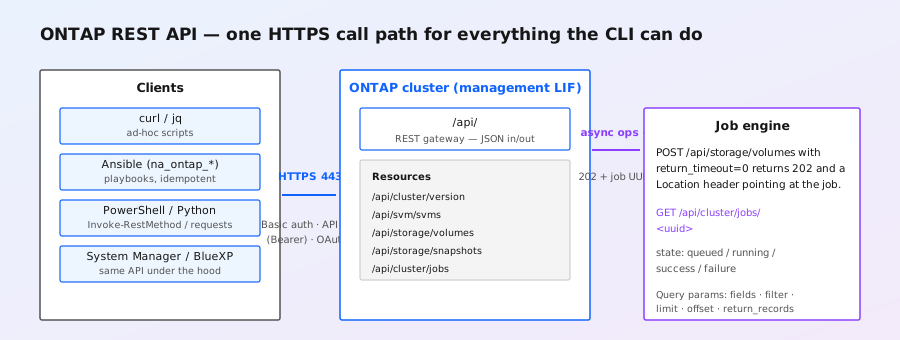
What the REST API is (and what replaced)
The ONTAP REST API is the modern programmatic interface to the cluster, shipped since ONTAP 9.6. Every endpoint lives under https://<management-LIF>/api/, speaks JSON, and maps one-to-one onto the same objects the CLI manages — there is no separate "API copy" of your configuration. System Manager, BlueXP, and most NetApp tooling talk to this API under the hood, so a script you write against /api/ is doing exactly what the GUI does.
It replaces the older ZAPI XML interface. ZAPI still answers on modern releases for backward compatibility, but it is in maintenance mode: new features land as REST endpoints first (or only). New automation should target REST; see the CLI cheatsheet if you are translating CLI habits instead.
https://<management-LIF>/docs/swagger-ui/index.html (ONTAP 9.9 and later). The full OpenAPI specification is also published in the ONTAP Automation documentation for each release. When in doubt about a field name or endpoint, read it there — the API surface grows every release (see what's new below).
Authentication: three ways in
Everything is HTTPS. ONTAP ships with a self-signed server certificate on the management LIF, so your first curl against a fresh cluster needs -k (or the client CA configured) until you install a proper certificate.
| Method | Since | How it works | Best for |
|---|---|---|---|
| Basic auth | 9.6 | Cluster or SVM admin user + password, standard HTTP Basic header | Quick tests, interactive scripts |
| API key | 9.8 | Long-lived generated key used as a Bearer token; scoped to a role, created per user | Automation that must run unattended |
| OAuth 2.0 | Later releases | Token exchange against an identity provider (e.g. Microsoft Entra ID); group-to-role mapping added in 9.16.1 | Enterprise environments with centralized identity |
Creating an API key is a CLI or REST call itself — the key is shown once, so capture it at creation time:
# create a dedicated automation user with an API key (ONTAP 9.8+)
security login create -vserver cluster1 \
  -user-or-group-name svc-automation \
  -application ontapi -authmethod apikey \
  -role readonly

# output includes:  API Key: api-key-XXXX...  (shown once — save it)

# or the equivalent REST call, as the cluster admin:
curl -ks -u admin:'PASSWORD' -X POST \
  "https://10.0.0.2/api/security/authentication/keys" \
  -H "Content-Type: application/json" \
-d '{"user": {"name": "svc-automation", "owner": {"name": "cluster1"}}, "role": {"name": "readonly"}}'curl: the read pattern that covers 90% of questions
Reads are GETs. The two query parameters you will use constantly are fields (only return the properties you want) and filter (server-side filtering, so you do not pull the whole cluster over the wire and filter client-side):
MGMT=10.0.0.2          # cluster management LIF
USER=admin
PASS='PASSWORD'

# 1. cluster identity + version
curl -ks -u "$USER:$PASS" \
  "https://$MGMT/api/cluster/version"
# {"version":{"full":"NetApp Release 9.16.1","generation":9,"major":16,"minor":1}}

# 2. all SVMs, only name + uuid
curl -ks -u "$USER:$PASS" \
  "https://$MGMT/api/svm/svms?fields=name,uuid"

# 3. volumes on SVM vs1, with real used/available space, filtered server-side
curl -ks -u "$USER:$PASS" \
  "https://$MGMT/api/storage/volumes?svm.name=vs1&fields=name,state,size,space.available&limit=50"

# 4. snapshots of one volume (needs the volume UUID from the record above)
curl -ks -u "$USER:$PASS" \
  "https://$MGMT/api/storage/volumes/0a1b2c3d-.../snapshots?fields=name,create_time,size"

# 5. every aggregate with its usable capacity, sorted
curl -ks -u "$USER:$PASS" \
  "https://$MGMT/api/storage/aggregates?fields=name,space&order_by=name"

# 6. current jobs — useful before you panic about a hung operation
curl -ks -u "$USER:$PASS" \
  "https://$MGMT/api/cluster/jobs?fields=uuid,name,state,message&state=running"
Note the ? query in call 3: svm.name=vs1 is a filter on a related object's property — ONTAP's filter syntax lets you reach into child fields with dot notation (space.available, svm.name). The response envelope is always {"records": [...], "num_records": N} for collections.
Creating things: POST, and the async job model
Writes are POST/PATCH/DELETE. Short operations complete inline (HTTP 200/201) but anything that moves data or takes time — volume creation, resizes, deletions, SnapMirror updates — is a job: ONTAP answers 202 Accepted with a Location header pointing at the job, and you poll until it reaches success or failure.
# create a 2 TB rw volume on aggregate aggr1 of SVM vs1
curl -ks -u "$USER:$PASS" -X POST \
  "https://$MGMT/api/storage/volumes?return_records=false" \
  -H "Content-Type: application/json" \
  -d '{
    "name": "web1",
    "svm": {"name": "vs1"},
    "aggregates": [{"name": "aggr1"}],
    "size": "2t",
    "type": "rw",
    "guarantee": {"type": "volume"},
    "snapshot_policy": {"name": "default"}
  }'
# → HTTP 202, Location: /api/cluster/jobs/1a2b3c4d-...
# volume is NOT necessarily ready yet — poll the job:

curl -ks -u "$USER:$PASS" \
  "https://$MGMT/api/cluster/jobs/1a2b3c4d-..."
# {"uuid":"1a2b3c4d-...","name":"vol_create","state":"running",
#  "message":"job is running","elapsed_time":4}

# a small script-friendly poll loop (3 s interval, 60 s budget):
for i in $(seq 1 20); do
  s=$(curl -ks -u "$USER:$PASS" "https://$MGMT/api/cluster/jobs/1a2b3c4d-..." \
      | sed -n 's/.*"state":"\([a-z]*\)".*/\1/p')
  [ "$s" = success ] && echo CREATED && break
  [ "$s" = failure ] && echo FAILED && exit 1
  sleep 3
done
You can force the inline behavior with return_timeout=0 — the call then returns immediately with the job reference instead of blocking. The default is to wait (up to a timeout), which is why a slow volume create curl can appear to hang; it is not hanging, it is waiting on the job. For scripting, prefer explicit polling: it is interruptible and gives you a real error message (message + code) on failure.
Modifying and deleting
# resize (grow) volume web1 to 4 TB — PATCH, target by UUID
curl -ks -u "$USER:$PASS" -X PATCH \
  "https://$MGMT/api/storage/volumes/0a1b2c3d-..." \
  -H "Content-Type: application/json" \
  -d '{"size": "4t"}'

# take a snapshot of web1 — POST to the volume's snapshots collection
curl -ks -u "$USER:$PASS" -X POST \
  "https://$MGMT/api/storage/volumes/0a1b2c3d-.../snapshots" \
  -H "Content-Type: application/json" \
  -d '{"name": "before-deploy"}'

# delete a snapshot
curl -ks -u "$USER:$PASS" -X DELETE \
  "https://$MGMT/api/storage/volumes/0a1b2c3d-.../snapshots/before-deploy"

# delete the volume (async — poll the returned job)
curl -ks -u "$USER:$PASS" -X DELETE \
"https://$MGMT/api/storage/volumes/0a1b2c3d-..."uuid in every record when you ask for fields=uuid. Most object endpoints (volumes, SVMs, aggregates) address by UUID, not name, and the same UUID stays valid for the object's lifetime — cache it instead of re-resolving by name on every call.Ansible: the idempotent path
NetApp's Ansible collection (netapp.ontap) wraps the REST API in modules that are idempotent by design — running a playbook twice does not create two volumes. The module names are na_ontap_*; for REST-native operation use na_ontap_rest_info for reads and the resource modules (na_ontap_volume, na_ontap_snapshot, ...) for writes. Each module needs hostname, username, password (or api_key), and https: true.
# playbook: ensure web1 exists at 4 TB with a nightly snapshot
- name: Manage web volume
  hosts: localhost
  gather_facts: false
  vars:
    mgmt: 10.0.0.2
    user: admin
    api_key: "{{ lookup('env', 'ONTAP_API_KEY') }}"
  tasks:
    - name: Query existing volumes
      netapp.ontap.na_ontap_rest_info:
        hostname: "{{ mgmt }}"
        username: "{{ user }}"
        api_key: "{{ api_key }}"
        https: true
        validate_certs: false
        api: storage/volumes
        params:
          fields: name,size,state
      register: vols

    - name: Create web1 if absent
      netapp.ontap.na_ontap_volume:
        hostname: "{{ mgmt }}"
        username: "{{ user }}"
        api_key: "{{ api_key }}"
        https: true
        validate_certs: false
        state: present
        name: web1
        vserver: vs1
        aggregate_name: aggr1
        size: 4
        size_unit: tb

    - name: Ensure snapshot policy allows the nightly snap
      netapp.ontap.na_ontap_snapshot_policy:
        hostname: "{{ mgmt }}"
        username: "{{ user }}"
        api_key: "{{ api_key }}"
        https: true
        validate_certs: false
        state: present
        name: nightly
        schedule:
          - schedule: daily
count: 7validate_certs: false is the same story as curl's -k — fine against a lab with the default self-signed certificate, wrong for production. Install a CA-signed certificate on the management LIF (or use a private CA the playbook trusts) and keep validation on.PowerShell and Python for Windows/Linux automation
The same calls map directly onto Invoke-RestMethod and Python's requests. PowerShell's automatic JSON conversion makes the response objects immediately usable:
# PowerShell — list volumes on vs1 with their used space
$h = @{ "Authorization" = "Bearer $env:ONTAP_API_KEY" }
$r = Invoke-RestMethod -Method Get -Uri `
  "https://10.0.0.2/api/storage/volumes?svm.name=vs1&fields=name,size,space.available" `
  -Headers $h -SkipCertificateCheck
$r.records | Select-Object name, size, @{n='avail';e={$_.space.available}}
# name  size        avail
# ----  ----        -----
# web1  2199023255552  1744830464000

# PowerShell — create a snapshot
$body = @{ name = "before-patch-tuesday" } | ConvertTo-Json
Invoke-RestMethod -Method Post -Uri `
  "https://10.0.0.2/api/storage/volumes/0a1b2c3d-.../snapshots" `
  -Headers $h -ContentType "application/json" -Body $body -SkipCertificateCheck
# Python (requests) — poll a job to completion with a clean timeout
import requests, time
BASE = "https://10.0.0.2/api"
KEY = "api-key-XXXX..." # or basic auth: auth=("admin", password)
HDRS = {"Authorization": f"Bearer {KEY}"}
r = requests.post(f"{BASE}/storage/volumes", headers=HDRS,
json={"name": "web2", "svm": {"name": "vs1"},
"aggregates": [{"name": "aggr1"}],
"size": "1t"},
params={"return_timeout": 0}, verify=False)
job = r.headers["Location"].rsplit("/", 1)[-1]
for _ in range(30): # up to ~5 minutes
j = requests.get(f"{BASE}/cluster/jobs/{job}", headers=HDRS,
verify=False).json()
if j["state"] in ("success", "failure"):
print(j["state"], j.get("message", ""))
break
time.sleep(10)Keep verify=False out of production scripts — it is a lab/testing convenience for ONTAP's default self-signed certificate. Use the CA bundle or the installed cluster certificate instead.
What is new in 9.16.1 (and the ASA r2 trap)
ONTAP 9.16.1 added more than two dozen REST calls, notably: Microsoft Entra ID group and role mappings (map AD groups straight onto ONTAP roles), WebAuthn administration, ARP package management (Autonomous Ransomware Protection policies and packages), optional qtree performance metrics, and S3 bucket snapshots — snapshot an S3 bucket through the API exactly as you would a FlexVol.
General rule for automation that outlives a single release: check /api/cluster/version (or the version field on any collection response) at startup, gate feature calls on major/minor, and never assume endpoint parity between ONTAP-based products.
Error handling and the envelope
Errors are JSON, not HTML. The shape is consistent, so you can parse it in one place:
{"error": {"message": "Volume \"web1\" with uuid \"...\" already exists",
"code": 131076, "target": "name"}}message— human-readable explanation; this is what you should log.code— numeric error code (same numbering family as the CLI'seventcodes); stable across releases, use it for programmatic decisions.target— the field or object the error is about, when relevant.
HTTP status codes do the coarse work: 200/201 success, 202 accepted-as-job, 400 bad request (your JSON or filter is wrong), 401 authentication, 403 authorization (role lacks the privilege), 404 wrong UUID/path, 409 conflict (e.g. object exists or is busy), 422 validation, 429 rate-limited, 5xx cluster-side. Retry 429/503 with exponential backoff; do not retry 400/401/403/404 without changing something.
limit, often 20–50). If your script processes "all volumes" and you forget to page, you silently process a fraction. Loop on next (the response carries a _links.next href when more records exist) or use limit=0 semantics where supported — better: set limit explicitly and page by offset.
CLI → REST quick map
| You used to type | REST equivalent |
|---|---|
volume show -vserver vs1 | GET /api/storage/volumes?svm.name=vs1 |
volume create -vserver vs1 -volume web1 -aggregate aggr1 -size 2t | POST /api/storage/volumes (JSON body) |
volume modify -volume web1 -size 4t | PATCH /api/storage/volumes/{uuid} |
volume delete -volume web1 | DELETE /api/storage/volumes/{uuid} |
snapshot create -volume web1 -snapshot before-deploy | POST /api/storage/volumes/{uuid}/snapshots |
vserver show | GET /api/svm/svms |
job show -id 123 | GET /api/cluster/jobs/{uuid} |
aggr show | GET /api/storage/aggregates |
network interface show | GET /api/network/interfaces |
Checklist for production automation
- Pin the version contract. Record the target ONTAP version; gate new endpoints behind version checks. Do not let a 9.16.1 playbook run blind against 9.13.
- Use API keys, not shared admin passwords. One key per service/team, least-privilege roles (
readonlyfor watchers, scoped roles for writers). Rotate keys like any credential. - Request only the fields you need.
fields=shrinks payloads dramatically on big clusters — a full volume record is kilobytes per volume. - Filter server-side, never client-side.
?svm.name=vs1beats fetching 5,000 volumes to keep 12. - Poll jobs properly. Use
return_timeout=0+ explicit job polling with backoff. Parse the job'smessageon failure — it usually names the exact problem. - Validate certificates.
-k/verify=Falseis for labs. Install a CA-signed cert on the management LIF. - Log the error envelope. Log
code+message+targettogether; the numeric code is what your alerting rules should match. - Idempotency is your job, not the API's. The REST API creates on POST; a retry after a timeout can double-create. Wrap writes in a GET-first check (or use Ansible modules, which do this for you).
Further reading on this site
When API automation is part of a release change, pair the release overview with the supported ONTAP upgrade paths so the workflow accounts for required intermediate hops and mixed-version limits.
- ONTAP CLI cheatsheet — the command line equivalent of everything above
- ONTAP release guide — 9.16.1 and other current versions
- S3 on ONTAP — includes REST calls for the object-store server
- BlueXP / Cloud Volumes ONTAP — the same REST/CLI parity story in the cloud
- ONTAP error messages index — what those numeric codes tend to mean