Home / Reference / BlueXP & CVO
BlueXP & Cloud Volumes ONTAP: NetApp's cloud control plane
BlueXP is NetApp's SaaS-based control plane for everything storage — on-prem ONTAP clusters, cloud VMs, and the managed services like FSx for ONTAP and Azure NetApp Files. Cloud Volumes ONTAP (CVO) is the software-defined ONTAP that BlueXP deploys into your cloud account as VMs. This guide explains who does what, how the licensing works, and when to pick CVO over the fully-managed services.
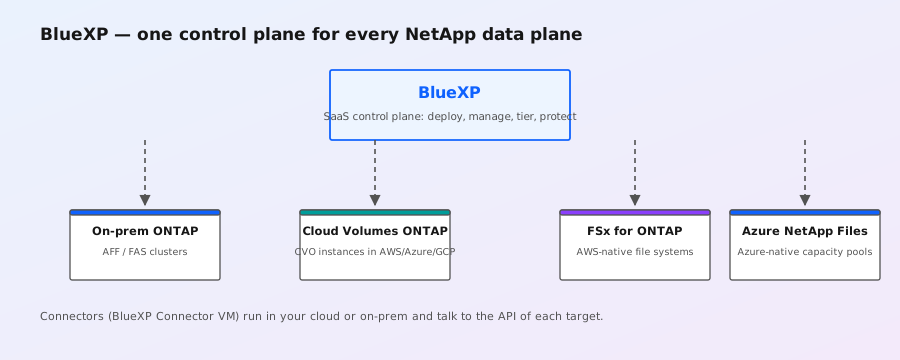
BlueXP: the control plane
- SaaS service (bluexp.netapp.com): no software to install for the control plane itself — you sign in and add your storage systems as working environments.
- What it manages: on-prem ONTAP clusters (via a Connector), CVO instances, and — in later releases — FSx for ONTAP and Azure NetApp Files environments. One pane of glass across on-prem + all three clouds.
- Beyond provisioning: BlueXP adds copy/tiering services (e.g. tiering cold data to object storage, cross-cloud replication), backup, ransomware detection, and cost analytics. It's NetApp's bet on "one data fabric" — the same idea ONTAP's SnapMirror fabric was built for, extended across clouds.
- The Connector: BlueXP deploys a small Connector VM (in your cloud account or on-prem) that talks to the cloud APIs and to your clusters. Think of it as the on-ramp for the SaaS plane into your environment — it's what holds the cloud credentials.
Cloud Volumes ONTAP (CVO): the software-defined ONTAP
- What it is: ONTAP packaged as a VM image (KVM-based) that runs in AWS, Azure, or GCP on standard compute — a full ONTAP cluster (HA pair or single node) that you own and patch.
- Where it fits: when you want the complete ONTAP feature set (FlexGroup, MetroCluster, advanced CLI, node shell) in the cloud but the managed services are too restrictive — or when you need to run ONTAP in a region the managed services don't cover.
- Deployment: normally via BlueXP (point-and-click, it provisions the VMs, networking, and storage), or manually via marketplace images. Under the hood the VM runs a KVM-based ONTAP — the same virtualization lineage as ONTAP Select.
- Operations: you manage it with the normal ONTAP CLI/System Manager — unlike ANF/FSx, you get SSH access and can run
system node show, upgrades, etc. You also handle ONTAP upgrades yourself.
# CVO looks like any other ONTAP cluster to your tooling:
system node show
# Same automation works — REST API, Ansible, PowerShell:
curl -u admin -k https://cvo-mgmt.example/ \
  -H "Accept: application/json" \
  "https://cvo-mgmt.example/api/storage/volumes"
Licensing: the part everyone asks about
- BlueXP itself: free to use for management (it's a SaaS control plane; you pay for the storage systems it manages, not the plane).
- CVO licensing: pay-as-you-go via the cloud marketplace (hourly, metered) or bring-your-own-license (BYOL) with existing NetApp capacity licenses. Marketplace PAYGO is the zero-commitment default for test/dev.
- Managed services (FSx/ANF): billed by the cloud provider — no separate NetApp license. See the FSx and ANF guides.
- On-prem clusters: managed free in BlueXP; your existing NetApp support/licensing applies. Some BlueXP services (backup, tiering) have their own metering — check the service's pricing page before enabling.
BlueXP vs the managed services
| Dimension | Cloud Volumes ONTAP | FSx for ONTAP / ANF |
|---|---|---|
| Who operates the ONTAP | You (patches, upgrades) | Cloud provider |
| Access | Full CLI, node shell, REST | Managed API; limited/no node shell |
| Feature set | Full ONTAP (FlexGroup, MetroCluster, etc.) | Core ONTAP feature set |
| Billing | Compute + storage + ONTAP license (PAYGO/BYOL) | All-in cloud pricing |
| Best for | Max control, unusual regions, full feature needs | Lowest operational overhead, cloud-native teams |
Rule of thumb: if the managed service covers your region and feature needs, use it — you don't want to patch ONTAP in the cloud if you don't have to. CVO earns its keep when you need the full feature set, a specific region, or a consistent hybrid fleet managed from one BlueXP plane.
Getting started with BlueXP
- Sign in at BlueXP with a NetApp account (free) and create a working environment.
- Deploy a Connector into your cloud account (BlueXP walks you through the IAM role/subscription permissions) or an on-prem connector.
- Add your on-prem cluster (via ONTAP REST/SSH credentials) or deploy a new CVO.
- Connect cloud volumes: FSx for ONTAP and ANF working environments appear in later BlueXP releases — one dashboard, one set of policies.
Note: exact menu paths, supported ONTAP versions, and which managed services BlueXP can manage change release to release — confirm against the current BlueXP documentation before planning migrations around it.