Home / Reference / Azure NetApp Files
Azure NetApp Files: ONTAP as an Azure-native service
Azure NetApp Files (ANF) is Microsoft's first-party file service that runs the same ONTAP software under the hood — the same WAFL filesystem, snapshots, clones, and protocols — but as an Azure resource you provision in minutes. This guide covers the parts that confuse people coming from on-prem ONTAP: capacity pools and QoS tiers, the delegated-subnet networking model, protocol support, and how ANF stacks up against FSx for ONTAP and your own hardware.
What Azure NetApp Files is
- Real ONTAP under the hood: ANF is built on NetApp ONTAP (Azure runs the controllers in its own datacenters). You get ONTAP's data services — snapshots, clones, cross-region replication, efficiency — without touching a cluster.
- First-party Azure resource: you create and manage it in the Azure portal/CLI/ARM like any other service; billing goes through your Azure subscription.
- Not your own cluster: there is no ONTAP CLI or node shell. Management is via Azure APIs, portal, and the ANF REST API — ONTAP-level automation (the ONTAP CLI,
sshto a node) is not available. This is the biggest mindset shift for on-prem admins. - Protocols: NFSv3, NFSv4.1, SMB 3.x (including dual-protocol), and iSCSI on newer configurations — served from capacity pools that you size up front.
Capacity pools and service levels (the mental model that matters)
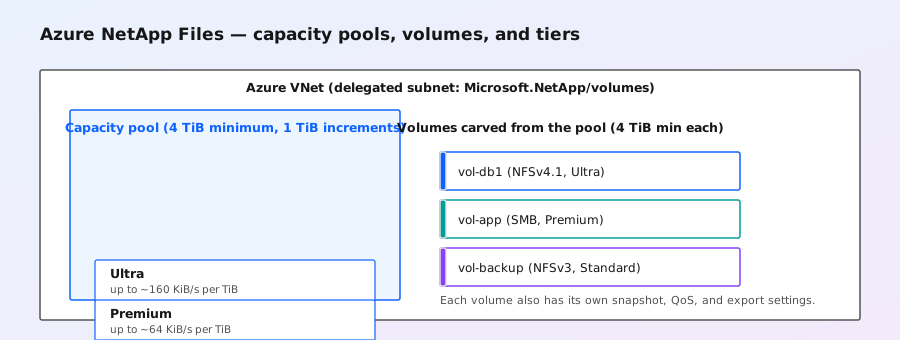
Everything in ANF lives inside a capacity pool: a chunk of provisioned, billed storage with a fixed service level (performance tier). You then carve volumes out of the pool. Two pool types exist:
- QoS pools (manual QoS): you assign each volume an explicit throughput cap (MiB/s). Predictable per-volume performance; typical for production.
- Auto QoS pools: throughput is shared and assigned automatically based on volume size and tier — simpler, but a noisy neighbor can affect you.
| Service level | Typical throughput | Use case |
|---|---|---|
| Ultra | Highest (up to ~160 KiB/s per TiB provisioned) | Databases, latency-sensitive OLTP, HPC |
| Premium | ~64 KiB/s per TiB | General enterprise workloads, VDI, app data |
| Standard | ~16 KiB/s per TiB | File shares, backup targets, dev/test, archives |
Note: the classic ANF pitfall is under-sizing the pool. Your volume's effective throughput is a function of pool tier × provisioned size — a small volume on Standard is genuinely slow, not just slow "for the tier". Right-size the pool and pick the tier for the workload's IOPS/throughput, exactly as you would when buying AFF vs FAS hardware.
Networking: the delegated subnet model
ANF does not use public endpoints or load balancers. Each volume lives on a delegated subnet inside your Azure VNet:
- One delegated subnet per VNet (delegated to
Microsoft.NetApp/volumes), typically a small CIDR (e.g. /26) that Azure fills with the ANF network interfaces for your volumes. - Private IPs only: clients reach volumes over VNet peering, VPN, or ExpressRoute — no internet path, no public IPs.
- Subnet gotchas: the delegated subnet can't be a gateway subnet or have certain NSG/service-endpoint combinations; check the current Azure constraints before deployment, because they change over time.
- Cross-premises: VNet peering + ExpressRoute is the standard way on-prem clients mount ANF volumes — latency follows your network, so keep workloads and volume in the same region (same story as FSx for ONTAP region reality).
ANF vs FSx for ONTAP vs on-prem ONTAP
| Dimension | Azure NetApp Files | FSx for ONTAP | On-prem ONTAP |
|---|---|---|---|
| Cloud | Azure-only | AWS-only | Your datacenter |
| Management surface | Azure portal/CLI/API | AWS console/CLI + ONTAP CLI | Full ONTAP CLI + System Manager |
| Capacity model | Capacity pools with service levels | Per-file-system SSD tier + throughput | Aggregates/RAID groups |
| Protocols | NFSv3/v4.1, SMB 3.x, iSCSI | NFS 3/4.x, SMB, iSCSI, NVMe/TCP | Everything ONTAP supports |
| Replication | Cross-region replication (ANF→ANF); on-prem via SnapMirror VM/cloud sync | SnapMirror to FSx, on-prem, or ANF | Full SnapMirror |
| Low-level access | None (no node shell) | Limited (no node shell) | Node shell, advanced privilege |
All three run ONTAP underneath. The real decision drivers: which cloud you're in, whether you need direct SnapMirror to on-prem (FSx's strength), and whether you need the Azure-native resource model (ANF's strength — it integrates with Azure AD, Azure Backup, and Azure policy).
Data services you get for free
- Snapshots: instant, near-free point-in-time copies of volumes (same copy-on-write mechanics as ONTAP), managed via Azure policies or on-demand.
- Clones: writable point-in-time copies — great for dev/test and CI pipelines.
- Cross-region replication: ANF's volume-to-volume async replication for DR, with RPO measured in minutes.
- Backup: Azure NetApp Files backup (snapshot-based, stored in Azure Backup) for a simple restore story.
- Efficiency: the ONTAP efficiency stack (dedupe/compression) is on by default where supported — see the storage efficiency guide for how it works.
When ANF is the right call (and when it isn't)
Right call: you're Azure-native and want enterprise NAS (NFS+SMB, snapshots, clones) without running storage; you need Azure AD integration for SMB; you want per-volume QoS control; you need a cloud DR target for an Azure-centric environment.
Not the right call: you need the full ONTAP feature set (FlexGroup, MetroCluster, node shell, advanced QoS) — then CVO/ONTAP Select or on-prem hardware is the better fit; you need to replicate directly into an existing on-prem SnapMirror topology (FSx's SnapMirror story is stronger); or you're on AWS/GCP (use their equivalents — see the FSx guide).