Home / Certifications / ONTAP Fundamentals
ONTAP Fundamentals
The object model of ONTAP: how disks become aggregates, aggregates become volumes, and volumes become data services — and the two-node pairs that keep it all available.
What ONTAP is
ONTAP is NetApp's storage operating system, a clustered, scale-out design (up to 24 nodes in a cluster) where every node can serve data and every node protects its HA partner. Three things make ONTAP fundamentally different from a generic RAID box:
- WAFL (Write Anywhere File Layout) — a copy-on-write filesystem. Writes land anywhere on disk; metadata is updated in place afterwards.
- NVRAM/NVMEM — writes are logged to non-volatile RAM on the node before being acknowledged, then written to disk in the background. This gives crash-consistency and low write latency, and is the basis of HA takeover.
- Copy-on-write snapshots — point-in-time images that cost almost nothing until data changes, and power SnapMirror, FlexClone, and backup.
Clusters, nodes, and HA pairs
- Node — a storage controller (e.g., AFF A-Series, FAS, ASA). Each node owns its aggregates, volumes, and LIFs.
- HA pair — two nodes paired via a dedicated interconnect (plus NVRAM mirroring). If one fails, the partner takes over its storage ("storage failover" / takeover) with no data loss — writes were mirrored in NVRAM.
- Cluster — 1–24 nodes (typically deployed as HA pairs) joined by a cluster interconnect network. One cluster = one management domain.
- Admin SVM (a.k.a. cluster SVM /
Clustervserver) — the built-in management SVM. Data SVMs are separate (next section).
# See cluster and node state
cluster show
node show
# HA state of the pair
storage failover show
SVMs (Storage Virtual Machines)
An SVM (also called a vserver) is the logical container that isolates tenants on a cluster. Each data SVM has its own:
- namespace (volumes joined under junctions)
- protocols (NFS, SMB, S3, iSCSI, FC, NVMe) and their configuration
- network (LIFs, routing) and security (export policies, shares, RBAC, AD/Kerberos)
- data protection (its own SnapMirror relationships, snapshot policies)
An SVM is the unit of isolation, not of performance — volumes from many SVMs can live on the same aggregate. SVMs are where most protocol configuration happens.
# List SVMs and their protocols
vserver show
vserver show -fields allowed-protocols,aggregates
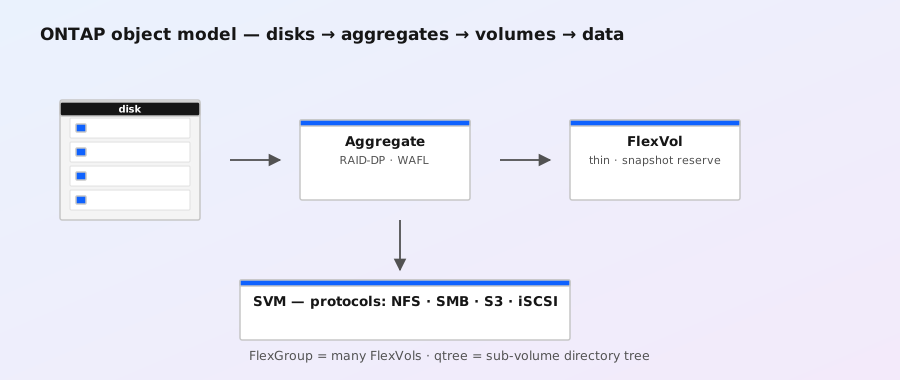
The storage hierarchy
Bottom to top:
- Disk — SSD (all-flash) or HDD. Disks are grouped into RAID groups.
- RAID group — a set of data disks plus parity (RAID-DP = 2 parity disks, the default; RAID-TEC = 3; RAID 4 = 1; RAID 0 = none).
- Aggregate — one or more RAID groups forming a single pool of raw capacity. An aggregate is a WAFL filesystem: it owns the physical space. Root aggregates hold the OS; data aggregates hold user data.
- FlexVol — a flexible, resizable volume inside an aggregate. This is the unit you create, size, snapshot, and replicate. FlexVols can be thin-provisioned (overcommit the aggregate).
- FlexGroup — a scale-out volume whose data is striped across multiple nodes/aggregates (many constituent FlexVols). Used for large NAS namespaces needing more performance or size than one node can serve.
- Namespace — the SVM's root (
/) with volumes attached at junction paths (/data,/home, …). NFS exports and SMB shares point into this namespace.
# Storage inventory
storage aggregate show
storage aggregate show -fields raid-type,disk-count,usable-size
volume show -vserver vs1
# Volume → aggregate placement
volume show -fields volume,aggregate,size,used,percent-used
WAFL and snapshots
WAFL writes data anywhere (hence "write anywhere"), grouping writes for efficiency. Because metadata is updated copy-on-write, a snapshot is nearly free: it's just a saved root pointer. Only blocks that change after the snapshot are copied (each version of a changed block consumes space).
- Snapshots live in a hidden
.snapshotdirectory, readable by clients (if enabled). - Every volume has a snapshot reserve (default 5%) protecting snapshot space so they can't fill the volume.
- Deleted files that are still referenced by a snapshot continue to consume space — a classic "where did my space go" gotcha (see the volume space guide).
- Snapshot schedules (hourly/daily/weekly) and retention are defined by snapshot policies; policies can also be shared with SnapMirror.
# Snapshot basics
snapshot create -vserver vs1 -volume vol1 -snapshot snap_before_patch
snapshot show -vserver vs1 -volume vol1
snapshot delete -vserver vs1 -volume vol1 -snapshot snap_old
snapshot restore -vserver vs1 -volume vol1 -snapshot snap_before_patch
Thin provisioning and space guarantees
- A FlexVol can be larger than its aggregate has free space (thin provisioning / overcommitment).
- Space guarantee controls this:
volume(default for FlexVol — the aggregate must be able to hold the volume's size),none(thin — FlexGroup default), orsnapshot(guarantee data, not snapshot reserve). - Thin provisioning requires monitoring: an overcommitted aggregate that fills up affects every volume on it.
# Check guarantees and overcommitment
volume show -fields space-guarantee,space-slo
storage aggregate show -fields percent-used,percent-snapshot-reserve
Management surfaces
- System Manager — web UI for day-2 operations.
- CLI — full-featured;
man <command>is available on the system. Advanced commands requireset -privilege advanced. - ONTAP REST API — fully supported since ONTAP 9.6; the basis for Ansible, PowerShell (NetApp PowerShell Toolkit), and automation.
- BlueXP (formerly Cloud Manager) — NetApp's cloud management plane, can also manage on-prem ONTAP.
- Active IQ — telemetry/AI portal fed by AutoSupport; predictive alerts and health checks.
Exam traps to know
- Aggregates are physical; volumes are logical. You size aggregates and create volumes in them.
- Snapshot reserve is per volume (default 5%); aggregate reserve defaults to 0% in ONTAP 9.
- HA pairs fail over storage (takeover/giveback). Clusters scale out namespaces and load. They are different mechanisms.
- FlexVol is the unit of replication (SnapMirror) and cloning (FlexClone). FlexGroup is for scale-out NAS.
- SVM ≠ node. An SVM spans the whole cluster — its volumes can live anywhere.
- NVRAM is what makes takeover lossless. Without HA, a node failure means downtime; with HA, the partner serves both.
Deep dives: how ONTAP actually works
These three pages go one level under the fundamentals — the mechanics behind the acronyms:
- WAFL deep-dive — write-anywhere allocation, consistency points, and why the filesystem survives crashes without a journal.
- NVRAM/NVMEM deep-dive — the write log that makes acknowledgments fast and takeover lossless, and how to check it.
- Copy-on-write and snapshots — why snapshots are nearly free, snapshot space math, policies, restore, and FlexClone.