SnapCenter backup orchestration
SnapCenter coordinates the application, host, ONTAP snapshot, replication, restore, and clone steps that must happen in the right order. It turns storage-efficient recovery points into repeatable, application-aware jobs with policy, audit, and role boundaries.
1. What SnapCenter does — and does not do
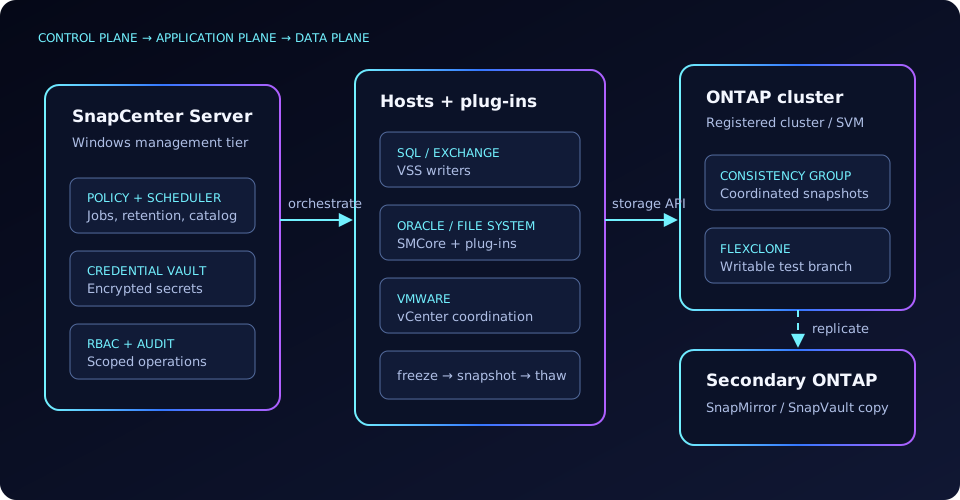
ONTAP can create a crash-consistent snapshot without SnapCenter. The missing piece is application intent: draining writes, freezing a database, capturing logs, grouping dependent volumes, cataloguing recovery points, and reversing those steps safely. SnapCenter supplies that orchestration plane. Data remains on ONTAP; the server stores configuration, job history, and metadata rather than streaming every backup byte through Windows.
| Capability | Owns | Use it when | What it does not replace |
|---|---|---|---|
| Built-in snapshot schedule | ONTAP | A crash-consistent volume image is enough | Application quiesce, log handling, catalogues |
| SnapCenter | Application + storage workflow | You need application-consistent backup, restore, clone, RBAC, and reporting | Off-site replication or independent backup media |
| SnapMirror / SnapVault | ONTAP replication | A recovery point must have a secondary cluster copy | Application coordination on the source |
| SnapManager family | Legacy per-application products | Only while an older supported estate is being retired | The consolidated SnapCenter control plane |
2. Architecture and trust boundaries
- SnapCenter Server: the Windows-hosted management and scheduling tier. Its repository holds resource, policy, topology, job, and catalogue state.
- Application plug-ins: workload-specific code runs close to SQL Server, Exchange, Oracle, VMware, or file-system resources. It discovers objects and executes prepare, quiesce, snapshot, unquiesce, restore, and clone phases.
- SMCore: the host-side SnapCenter management service coordinates plug-in work on Windows and Linux hosts and reports progress to the server. Package names and deployment details vary by release.
- Storage connections: registered ONTAP clusters or SVMs expose the APIs used for Snapshot, clone, and SnapMirror operations. Prefer SVM-scoped credentials where the workflow permits.
- Credential vault: stored credentials are encrypted at rest (documented as AES-256 in supported SnapCenter releases). Treat the SnapCenter host, its repository, certificate, and backup as privileged infrastructure.
- RBAC: roles constrain which users can see resources, run policies, restore, or clone. Application authorization and ONTAP authorization still apply; SnapCenter RBAC does not erase either boundary.
The job engine is phase-driven. A plug-in failure before snapshot creation should leave no recovery point; a failure after snapshot creation may leave a valid ONTAP snapshot whose catalogue or secondary-copy phase is incomplete. That distinction determines whether to retry, import/reconcile, or clean up.
3. Resource groups, policies, schedules, and retention
A resource group is the protection unit: one database, several databases, or a coordinated set of application resources. A backup policy describes how that group is protected. Keep selection (“what belongs together”) separate from behavior (“how and how often”).
| Policy control | Design question | Operational effect |
|---|---|---|
| Schedule | Hourly, daily, weekly, or externally triggered? | Starts the workflow; overlapping windows can queue jobs. |
| Retention count | How many successful recovery points per schedule label? | Old SnapCenter-managed backups become eligible for expiry. |
| Auto-purge | May expiry remove the underlying snapshot and catalogue record? | Controls cleanup; secondary retention may remain independent. |
| Verification | Verify every backup or defer to another host/window? | Trades recovery confidence for compute and elapsed time. |
| Secondary update | Which SnapMirror/SnapVault label and destination? | Chains replication after the primary snapshot succeeds. |
Retention is label-aware and location-aware. A daily source backup retained for seven copies can feed a vault rule retaining thirty daily copies. Deleting or expiring the source copy does not imply that the destination has the same lifecycle. Reconcile SnapCenter policies with ONTAP snapshot policies and SnapMirror policy rules to avoid two schedulers creating similarly named, differently owned snapshots.
4. Application consistency and clone lifecycle
For Windows workloads, SnapCenter plug-ins commonly use Microsoft VSS; VMware workflows use VMware snapshot and storage integration often described as VSSR in SnapCenter contexts. The coordinator discovers every volume that contains data or logs, requests a freeze, creates snapshots as one consistency boundary, then thaws the application. An ONTAP consistency group aligns write-order across member volumes; it does not replace application quiescing.
- Pre-check: confirm resource ownership, storage mapping, free space, and quiesce provider health.
- Prepare/freeze: flush application buffers and pause or redirect writes.
- Snapshot: create coordinated ONTAP recovery points, ideally within one consistency group.
- Thaw and catalogue: resume I/O, record metadata, and apply retention.
- Protect: update any selected SnapMirror or vault relationship.
A clone is a writable branch of a selected backup, not a new independent full copy at creation. Define its owner, network isolation, database identity, expiration, and cleanup before provisioning. Refresh by destroying/recreating or by the workload-specific refresh method; when finished, unmount, detach the application, delete the clone through SnapCenter, and confirm its parent snapshot is no longer pinned.
5. CLI walkthrough
smc verbs below express the requested workflow and must be validated against the installed client’s smc help. Many current deployments use the SnapCenter PowerShell module and its Get-Sm*/New-Sm* cmdlets instead.# Store a named credential; omit secrets from shell history where supported
smc credential create -Name sc_ontap_prod -Type ONTAP \
-UserName svc_snapcenter -Password 'PROMPT_OR_SECRET_INPUT'
# Enumerate policy objects before starting an ad-hoc job
smc policy list -AppName SQL
smc policy list -AppName Oracle# Start a policy-driven backup for a named resource group
smc backup create -AppName SQL -ResourceGroupName RG_SQL_PAYMENTS \
-PolicyName SQL_HOURLY_LOGS -BackupType Full
# Poll the returned job identifier, then inspect phase-level detail
smc job show -JobId 18427
smc job show -JobId 18427 -Detailed
# Branch a validated recovery point for an isolated test instance
smc clone create -AppName SQL -BackupName RG_SQL_PAYMENTS_20260826_2200 \
-CloneHost sql-test-02 -CloneName PAYMENTS_UATPowerShell discovery should begin with Get-Command -Module SnapCenter and Get-Help <cmdlet> -Full. Pin the module version in automation, capture the returned job object, poll to a terminal state, and fail the pipeline on a partially successful secondary-copy phase—not merely on snapshot failure.
6. Workload and secondary-copy integration matrix
| Workload | Consistency mechanism | Protected objects | Restore / clone notes |
|---|---|---|---|
| SQL Server | SQL-aware VSS workflow | Databases, data/log volumes, availability-group resources | Database restore, log recovery, and isolated clones; preserve recovery model intent. |
| Oracle | Database plug-in, host-side scripts and archive-log coordination | Datafiles, control files, redo/archive logs | Linux/Unix host service dependencies and Oracle authentication are frequent gates. |
| Exchange | Exchange VSS writer | Databases and transaction logs | Writer health and log truncation behavior must be tested per DAG design. |
| VMware | vCenter/VM snapshot coordination plus ONTAP snapshot | Datastores and selected VMs | VM- or datastore-scoped recovery; avoid long-lived VMware helper snapshots. |
| Windows/Linux file systems | Host file-system quiesce or crash consistency | Volumes, LUNs, mounts | Application owners must supply pre/post scripts when no native plug-in exists. |
For secondary copies, the source volume must already have a healthy SnapMirror relationship and compatible policy labels. SnapCenter triggers an update after the primary backup, then records the secondary status. Diagnose transfer failures in ONTAP with snapmirror show -fields state,status,lag-time,last-transfer-error; do not rerun application quiesce repeatedly when only replication failed.
7. Troubleshooting matrix
| Symptom | Likely cause | Prove it | Corrective action |
|---|---|---|---|
| Consistency or quiesce failed | VSS writer/provider error, missing data/log volume, freeze timeout | vssadmin list writers; inspect job phase and plug-in log | Restore writer health, include every dependent volume, then retry once. |
| Plug-in registration fails | DNS, certificate trust, firewall, stale host identity, or service account rights | Resolve both directions; test required ports; inspect SMCore/service logs | Correct name/certificate mapping and least-privilege account, then re-add host. |
| Job hangs in running state | Lost server-to-host callback, frozen application, unreachable ONTAP API, queued scheduler | Compare central and host timestamps; test host and cluster connectivity | Confirm application is thawed before terminating; collect logs, then clear only the stale job. |
| Snapshot count keeps growing | Retention label mismatch, clone dependency, failed catalogue purge, or separate ONTAP schedule | snapshot show; inspect clone parents and policy labels | Remove the dependency through its owner; reconcile policies. Do not bulk-delete unknown snapshots. |
| Primary succeeds, secondary fails | Relationship unhealthy, label absent from vault policy, intercluster path failure | snapmirror show -detail | Repair replication, then retry the secondary-copy phase where supported. |
8. Production checklist
- Protect the SnapCenter repository and encryption material; rehearse server recovery separately from application restore.
- Use service accounts and custom roles; separate backup operators from restore/clone operators.
- Alert on job phase, secondary lag, and stale clones—not only the headline job status.
- Run quarterly restore drills that validate database open, log recovery, permissions, and cleanup.
- Record ownership for every snapshot producer so retention automation never deletes an unfamiliar recovery point.