Running databases on ONTAP
Database storage is a latency contract, not merely a capacity allocation. Keep the log path predictable, make every write durable, and build recoverability into the layout before the first production transaction.
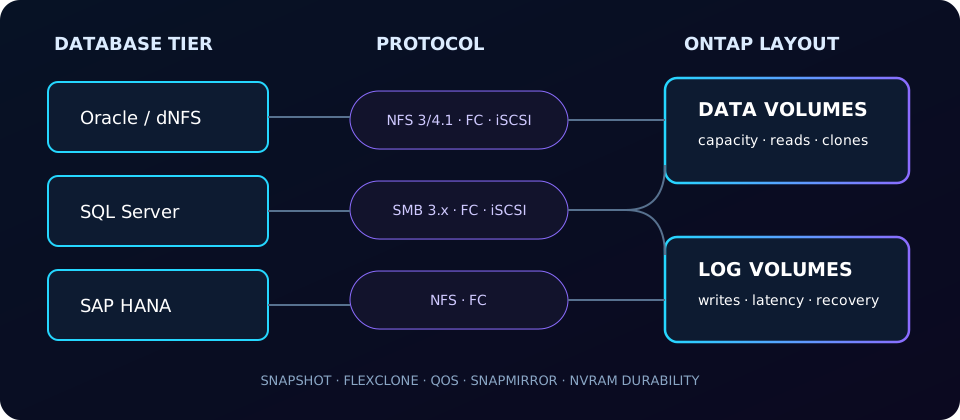
The database workload profile
OLTP commonly mixes random small-block reads with latency-sensitive writes. Redo, transaction, and write-ahead logs add sequential, sync-heavy writes whose tail latency can govern commit time. Analytics and backup streams can be large and sequential. Measure the real mix: database engine, cache, concurrency, checkpoints, temp space, protection copies, and recovery targets all change it.
ONTAP acknowledges protected writes after they reach mirrored NVRAM/NVMEM; consistency points later destage them into WAFL. This protects durability, but it does not excuse overloaded nodes, aggregates, paths, or a badly bounded workload.
Choose the protocol around the application
| Workload | File choice | Block choice | Decision notes |
|---|---|---|---|
| Oracle | NFSv3 or NFSv4.1; Oracle direct NFS (dNFS) can manage paths in the database client | FC or iSCSI LUNs | NFS simplifies file visibility and cloning; SAN follows ASM/host block practices. Validate Oracle and NetApp interoperability for exact versions. |
| SQL Server | SMB 3.x shares with continuously available capability where supported | FC or iSCSI LUNs with Windows MPIO | SMB integrates with Windows file semantics; SAN remains familiar for drive-letter/mount-point designs. Follow Microsoft's support matrix. |
| SAP HANA | NFS for data/log/shared paths when certified | FC LUNs | Use only combinations and mount parameters in the current SAP HANA on NetApp validation guide. |
No protocol is universally fastest. Host CPU, path count, network design, queueing, operational model, and vendor certification are usually more important than labels.
ONTAP features that matter
Snapshots and application consistency
ONTAP snapshots are crash-consistent unless the application is coordinated. SnapCenter plug-ins coordinate Oracle or SQL Server, create storage snapshots, manage retention, restore, and clone workflows. SnapManager is legacy; retain it only where the support matrix requires it.
FlexClone test/dev
A FlexClone starts as a writable, space-efficient child of a snapshot. Clone-heavy refresh workflows avoid full physical copies, but changed blocks consume capacity and the parent snapshot remains a dependency until split.
QoS isolation
Use fixed or adaptive QoS to stop backup, reporting, or test clones from becoming noisy neighbors. Review existing ceilings before blaming storage latency.
Efficiency, selectively
Inline deduplication can help repeated database and clone data. Compression may save little when database pages, backups, or columns are already compressed; benchmark savings, latency, and controller headroom. See storage efficiency.
cluster::> volume snapshot create -vserver db_svm -volume ora_data -snapshot pre_patch_20260827
cluster::> volume clone create -vserver db_svm -flexclone ora_test -type RW -parent-volume ora_data -parent-snapshot pre_patch_20260827
[Job 8841] Job succeeded: Successful
cluster::> qos policy-group show -policy-group db-prod -fields max-throughput,min-throughput
vserver policy-group max-throughput min-throughput
db_svm db-prod 80000iops 10000iopsLayout and host settings
Separate data, log, temp, and backup volumes when their capacity, snapshot, QoS, or recovery policies differ. Separation is an operational boundary—not a guarantee of separate physical media. Keep log free-space alerts and retention aggressive enough to survive database stalls.
cluster::> volume show -vserver db_svm -fields volume,aggregate,size,available,percent-used,snapshot-reserve
vserver volume   aggregate size available percent-used snapshot-reserve
db_svm  ora_data aggr1     8TB  3.1TB     61%          5%
db_svm  ora_log  aggr2     1TB  710GB     29%          0%
For an Oracle dNFS NFSv4.1 mount, a starting example is below. Oracle's dNFS client configuration and the OS mount used during startup are distinct concerns. Confirm every option against the current Oracle, OS, and NetApp guidance; do not paste a generic string blindly.
# /etc/fstab example — validate for your certified stack
ontap-nfs:/ora_data /u02 nfs rw,bg,hard,nointr,rsize=1048576,wsize=1048576,vers=4.1,timeo=600 0 0
# Verify the negotiated mount
$ nfsstat -m /u02
Never use an NFS soft mount for database data or logs: timed-out operations can surface as I/O errors and put correctness at risk. For FC/iSCSI, align partitions and filesystems on 4 KiB boundaries, configure ALUA-aware multipathing, and follow the host utilities/interop matrix in the SAN multipathing guide.
# Linux: prove alignment and multipath health before database creation
$ parted /dev/mapper/3600a098... unit s print
Number Start End    Size   File system
 1     1024s 100%   ...    xfs
$ multipath -ll 3600a098...
|-+- policy='service-time 0' status=active
| `- 2:0:0:1 sdb active ready running
Database-specific pitfalls
| Pitfall | Why it hurts | Control |
|---|---|---|
| Soft NFS mount | Transient delay may become an application-visible error. | Use hard mounts and validated timeout settings. |
| Efficiency enabled blindly on tempdb/temp | Short-lived, unique blocks may yield little saving and complicate attribution. | Measure first; isolate temp capacity and policy. |
| Snapshot reserve guessed | Change rate and retention can consume reserve or active filesystem space. | Size from observed change rate; alert on snapshot and volume usage. |
| Storage snapshot called a backup | Crash consistency may be insufficient; same-system copies do not cover site loss. | Use SnapCenter/application quiescence and secondary protection. |
| One volume for everything | Logs, data, temp, and backup inherit one retention and performance policy. | Separate by service-level and recovery boundary. |
cluster::> volume snapshot show -vserver db_svm -volume ora_data -fields snapshot,size,total
vserver volume   snapshot              size   total
db_svm  ora_data hourly.2026-08-27_1405 82GB   486GB
cluster::> volume show-space -vserver db_svm -volume ora_data
                         Used       Used%
User Data               4.72TB       59%
Monitor latency and headroom
Correlate database wait events with ONTAP latency, IOPS, throughput, queueing, CPU, aggregate utilization, network errors, and path state. statistics provides live counters; Perfstat is a deeper support capture, not a permanent observability system. Check command fields on your ONTAP version.
cluster::> qos statistics workload latency show -vserver db_svm -workload-volume ora_data
Workload            ID  Latency Network Cluster Data Disk QoS Max
db_svm:ora_data    214     1.3ms    0.2ms   0.0ms 0.3ms 0.8ms 0.0ms
cluster::> statistics show -object volume -instance ora_log -counter read_ops|write_ops|avg_latency
Instance  read_ops write_ops avg_latency
ora_log        120    18420       0.9ms
Official sources
Design points were checked against NetApp documentation and technical-report families. TR-4597 covers Oracle databases on ONTAP; TR-4636 and TR-4932 cover Microsoft SQL Server; NetApp's SAP HANA guides define certified designs. Technical reports evolve—select the version matching the database, host, and ONTAP release.