NetApp E-Series & EF-Series (SANtricity) Guide
A practical guide to NetApp E-Series and EF-Series block storage: SANtricity OS, Dynamic Disk Pools, RAID, NVMe connectivity, management, data services, and ONTAP comparisons.
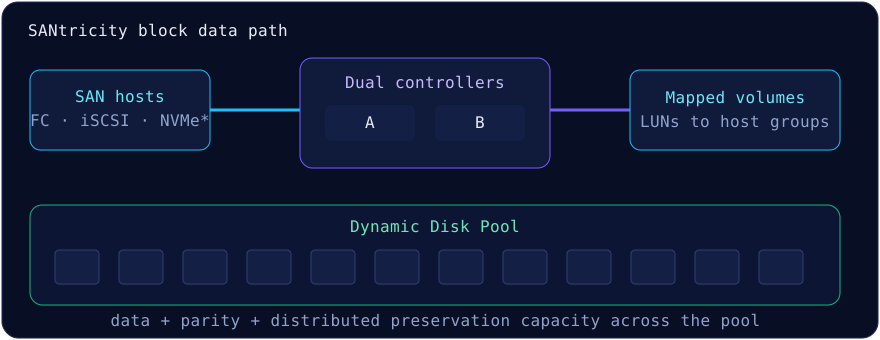
Portfolio position
E-Series and EF-Series are NetApp's SAN-focused block-storage systems. They run SANtricity OS, not ONTAP, and expose mapped volumes to hosts. EF identifies flash-focused systems. ONTAP SVMs, FlexVols, WAFL commands and NAS namespaces do not apply.
Hardware families and connectivity
| Family | Design center | Notes |
|---|---|---|
| E2800 / E5700 | General block, capacity and throughput | HDD/SSD and FC/iSCSI options vary |
| EF280 | Entry all-flash | Check current availability |
| EF300 / EF600 | NVMe performance | Official hardware docs list NVMe/FC and NVMe over IB/RoCE options |
Models and host-interface cards change. Verify current documentation. Do not assume NVMe/TCP on EF300/EF600 unless the exact controller, SANtricity release and HIC documentation confirms it.
Dynamic Disk Pools versus RAID groups
A SANtricity pool—often called Dynamic Disk Pool or DDP—spreads data, parity and preservation capacity across participating drives. System Manager uses RAID-6-style 8+2 virtual RAID sets and dynamically rebalances after drive changes. Preservation capacity is distributed rather than assigned to a dedicated spare.
Traditional volume groups bind selected drives to RAID 5, RAID 6 or another supported level and use hot spares. Choose DDP for broad distribution and simpler expansion; choose a volume group when explicit geometry or workload isolation is required.
| Choice | Protection | Behavior |
|---|---|---|
| DDP | Distributed RAID-6-style protection and sparing | Automatic redistribution; pool minimums apply |
| Volume group | Selected RAID level and hot spares | Fixed membership and geometry |
System Manager, REST and SMcli
SANtricity System Manager manages one array; Unified Manager provides a central view of supported arrays. Automation uses REST or SMcli. sanrc is not the documented array CLI.
SMcli 192.0.2.40 192.0.2.41 -c "show storageArray profile;"
SMcli 192.0.2.40 192.0.2.41 -c "show storageArray;"
SMcli 192.0.2.40 192.0.2.41 -c 'create diskPool driveType=SAS userLabel="ddp_prod" driveCount=24;'
SMcli 192.0.2.40 192.0.2.41 -c 'create volume diskPool="ddp_prod" userLabel="db01" capacity=2TB;'Read-only health and pre-change runbook
Use both controller management addresses so SMcli can reach the array if one path is unavailable. The checks below query configuration and health; they do not alter the array. Save the output with the change record and resolve Recovery Guru findings before proceeding.
# Concise inventory and overall health
SMcli 192.0.2.40 192.0.2.41 -c "show storageArray summary;"
SMcli 192.0.2.40 192.0.2.41 -c "show storageArray healthStatus;"

# Controller ownership, path reporting, and work already in progress
SMcli 192.0.2.40 192.0.2.41 -c "show storageArray volumeDistribution;"
SMcli 192.0.2.40 192.0.2.41 -c "show storageArray hostConnectivityReporting;"
SMcli 192.0.2.40 192.0.2.41 -c "show storageArray longRunningOperations;"| Signal | What to confirm | Why it matters |
|---|---|---|
| Health status | Array is Optimal; investigate any Needs Attention result in Recovery Guru | A second fault during maintenance can remove redundancy |
| Volume distribution | Current and preferred controller ownership are understood | Nonpreferred paths can obscure a fabric or controller-path problem |
| Host connectivity reporting | Expected host-to-controller connections are present | Array health alone does not prove every host has redundant paths |
| Long-running operations | No conflicting initialization, reconstruction, copy, or modification is active | Concurrent background work can change risk and completion time |
save storageArray supportData file="support-data.7z"; is the documented form. Collection can be resource-intensive and only one collection runs at a time; follow support guidance during an incident.Host mapping and multipath checks
A SANtricity host object associates initiator port identifiers with a host type. A host cluster groups hosts that intentionally share the same volume mappings. Mapping grants access and assigns a LUN number; it does not create a filesystem, coordinate shared writes, or prove failover.
| Layer | Verify before presenting storage | Common failure |
|---|---|---|
| Compatibility | Exact array, SANtricity, HBA/NIC, switch, OS, and multipath combination in NetApp IMT | A selectable host type is mistaken for a supported end-to-end stack |
| Initiators | WWPN, IQN, or NQN belongs to the intended host and appears once | A copied identifier exposes a LUN to the wrong server |
| Mapping | Volume is assigned to the correct host or host cluster with a unique LUN number | Cluster members receive inconsistent visibility |
| Host paths | Expected paths through both controllers are visible and managed by the supported multipath layer | A single working path is accepted as complete |
| I/O validation | For a new, disposable test LUN, write and read test data before production use | Discovery succeeds but application I/O fails |
Data services, performance and use cases
SANtricity provides snapshot images, synchronous/asynchronous mirroring on supported combinations, volume copy, and SSD read cache on supported HDD-backed configurations. EF arrays target low-latency, high-IOPS block workloads; E-Series can also target sequential throughput. Oracle, SQL Server, SAP, analytics and AI/ML staging are candidates, but performance depends on block size, mix, queue depth, drive count, multipathing and fabric design.
SANtricity versus ONTAP
| Dimension | E/EF | AFF/FAS/ASA |
|---|---|---|
| OS | SANtricity | ONTAP |
| Focus | Block SAN | Unified or block-optimized by platform |
| Objects | Pool/group → volume mapping | Local tier → FlexVol → share/LUN/namespace |
| Choose for | Focused SAN data path and workload-specific performance | ONTAP data services, NAS, replication and operational consistency |
Compare hardware lineup, architecture and ASA r2.
Official sources
Reviewed 9 September 2026. Command availability and required roles vary by array and SANtricity release; verify against the installed version.