NetApp FabricPool Cloud Tiering Deep-Dive
FabricPool is NetApp ONTAP's native hybrid storage tiering technology. It automatically moves cold, infrequently accessed 4KB data blocks from expensive, high-performance SSD/NVMe local aggregates to low-cost object storage (AWS S3, Microsoft Azure Blob, Google Cloud Storage, or on-premises NetApp StorageGRID)—freeing premium flash capacity without administrative intervention or client disruption.
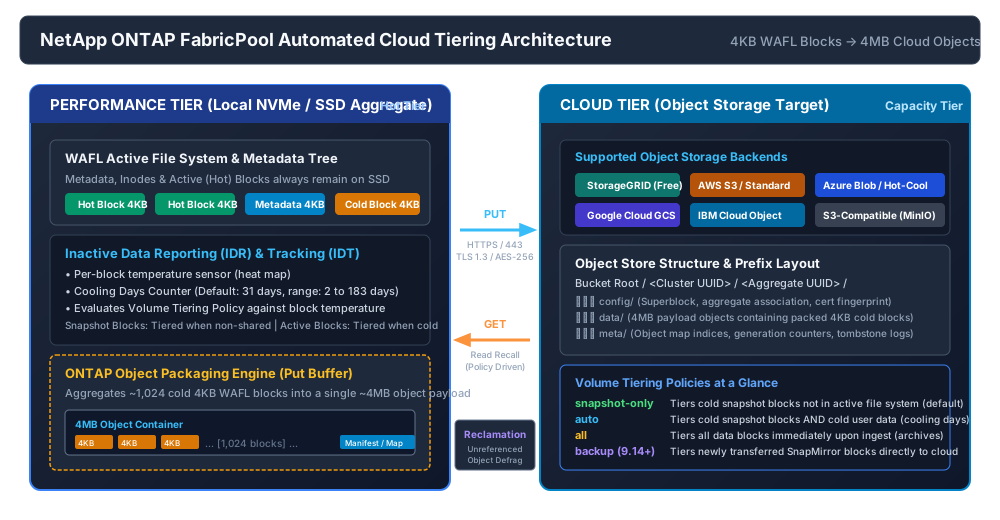
1. Architectural Principles & Block-to-Object Containerization
Traditional tiering solutions operate at the file level, requiring cumbersome stubs, file system crawl engines, or external data movers that introduce latency and break application compatibility. FabricPool operates natively inside the WAFL (Write Anywhere File Layout) kernel at the 4KB block level.
Key architectural characteristics include:
- Metadata Pinned to Flash: File system metadata, directory structures, inodes, and indirect block pointer trees always remain on the local performance tier (SSD/NVMe). Directory browsing (e.g.,
ls -laor Windows Explorer navigation) executes at local flash speeds with zero cloud egress or latency. - 4KB Block Granularity: Individual 4KB blocks within a single active file or snapshot are evaluated independently. If an application modifies only the first 50MB of a 1TB database, only the inactive 950MB is tiered to object storage.
- 4MB Object Container Packaging: ONTAP does not write individual 4KB blocks as discrete S3 objects (which would cause massive API rate-limiting and billing overhead). Instead, the ONTAP Put Buffer aggregates approximately 1,024 cold 4KB blocks into a single ~4MB compressed object container before executing an HTTPS
PUTto the cloud bucket. - Transparent Read Recalls: When a client reads a cold block, ONTAP issues an HTTPS
GETfor the specific byte range or object, serves the request to the client, and (depending on retrieval policy) either streams the block through cache or warms it back into the local flash aggregate. - Zero Inode or Path Changes: To NFS/SMB clients and SAN hosts (iSCSI/FCP/NVMe-oF), the volume appears entirely local and uninterrupted. No stub files or broken symlinks exist.
2. Tiering Policies & Inactive Data Reporting (IDR)
Tiering is configured per-volume, allowing fine-grained policy assignment across different application tiers hosted on the same aggregate.
| Tiering Policy | Target Data Types | Cooling Window | Best For / Workload Profile |
|---|---|---|---|
snapshot-only (Default) |
Snapshot blocks not shared with the active file system | 2 to 183 days (Default: 31 days) | General file shares, virtual machines, and databases with frequent snapshot schedules. |
auto |
Cold snapshot blocks and cold user data blocks in the active file system | 2 to 183 days (Default: 31 days) | Unstructured data repositories, home directories, project archives, and historical databases. |
all |
All user data blocks and snapshot blocks (tiered almost immediately) | Immediate (writes buffered locally, then tiered) | Secondary backup repositories, long-term compliance archives, read-rarely datasets. |
backup (ONTAP 9.14+) |
Newly transferred SnapMirror destination blocks | Immediate upon SnapMirror transfer completion | Disaster Recovery (DR) and secondary SnapMirror targets where local SSD consumption is minimized. |
none |
No blocks are tiered | N/A | Extreme low-latency workloads, transactional OLTP databases, critical boot LUNs. |
Inactive Data Reporting (IDR) & Inactive Data Tracking (IDT)
Inactive Data Reporting (IDR) runs a lightweight internal histogram that tracks 4KB block access timestamps across the aggregate. IDR is enabled by default on all SSD aggregates in ONTAP 9.4+ and incurs less than 1% CPU and memory overhead.
IDR allows administrators to view exactly how much capacity would be tiered under different cooling day thresholds (e.g., 14 days, 31 days, 60 days) before attaching a cloud target:
# Check Inactive Data Footprint across all volumes in an SVM
cluster1::> volume show -vserver svm_prod -fields volume,size,used,inactive-data

vserver   volume       size    used   inactive-data
--------- ------------ ------- ------ -------------
svm_prod  vol_eng_docs 10TB    7.8TB  5.9TB
svm_prod  vol_home_dir 25TB    19.4TB 14.1TB
svm_prod  vol_vms_gold 5TB     3.8TB  0.4TB

# Review aggregate-level inactive data potential
cluster1::> storage aggregate show -fields aggregate,size,usedsize,inactive-data-size
aggregate    size    usedsize inactive-data-size
------------ ------- -------- ------------------
aggr1_ssd_01 96.4TB 78.2TB 52.6TB-tiering-minimum-cooling-days) can be customized from 2 to 183 days (default is 31). For highly dynamic datasets where weekly batch jobs run, setting cooling to 14 or 21 days yields significantly higher flash capacity reclamation.
3. Supported Object Storage Backends & Licensing Rules
FabricPool supports both on-premises object storage and public hyperscaler cloud tiers. Depending on the target, different licensing structures apply.
| Object Store Target | Protocol / Endpoint | Storage Classes / Tiers | Licensing Requirement |
|---|---|---|---|
| NetApp StorageGRID | S3 (HTTPS / 443 or custom port) | StorageGRID ILM (Erasure Coded / Replicated) | Zero License Required (Free / Unlimited) |
| Amazon Web Services (AWS) | S3 REST API (HTTPS / 443) | S3 Standard, Standard-IA, Intelligent-Tiering, Glacier Instant Retrieval | FabricPool 10TB free tier, then capacity license (or BlueXP PayGo) |
| Microsoft Azure | Azure Blob REST (HTTPS / 443) | Hot, Cool | FabricPool capacity license (or BlueXP subscription) |
| Google Cloud Platform (GCP) | Google Cloud Storage (GCS) | Standard, Nearline, Coldline | FabricPool capacity license (or BlueXP subscription) |
| S3-Compatible Object Stores | Generic S3 API | MinIO, IBM Cloud Object Storage, Ceph, Alibaba Cloud OSS | FabricPool capacity license |
4. End-to-End CLI Configuration Runbook
Follow this step-by-step procedure to configure FabricPool on an ONTAP 9.x cluster.
Step 1: Install Public Root CA Certificate
ONTAP strictly validates the TLS certificate chain when connecting to cloud endpoints over HTTPS. Install the issuing Certificate Authority (CA) into the cluster admin SVM:
# Install Root CA certificate for AWS S3 / Azure / StorageGRID
cluster1::> security certificate install -vserver cluster1 -type server-ca

Please enter Certificate: Press <space>, then <enter> when done...
-----BEGIN CERTIFICATE-----
MIIDdzCCAl+gAwIBAgIEAgAAuTANBgkqhkiG9w0BAQsFADBaMQswCQYDVQQGEwJV
... [Paste Root CA Certificate PEM Content Here] ...
-----END CERTIFICATE-----
Step 2: Create Object Store Configuration
# Example A: AWS S3 Bucket
cluster1::> storage aggregate object-store config create \
  -object-store-name AWS_S3_Primary \
  -provider-type AWS_S3 \
  -server s3.us-east-1.amazonaws.com \
  -container-name netapp-fabricpool-primary-prod \
  -access-key AKIAIOSFODNN7EXAMPLE \
  -secret-password wJalrXUtnFEMI/K7MDENG/bPxRfiCYEXAMPLEKEY \
  -ssl-enabled true \
  -port 443

# Example B: On-Premises NetApp StorageGRID (No Capacity License Needed)
cluster1::> storage aggregate object-store config create \
  -object-store-name SG_OnPrem_Bucket \
  -provider-type StorageGRID_S3 \
  -server sgrid-gw.corp.netapp.local \
  -container-name fabricpool-tier1 \
  -access-key 8QWEXAMPLEACCESSKEY \
  -secret-password 9ZXEXAMPLESECRETKEY \
  -ssl-enabled true \
  -port 8082
Step 3: Attach Cloud Target to Local Aggregate
# Attach the object store configuration to an SSD/NVMe aggregate
cluster1::> storage aggregate object-store attach \
  -aggregate aggr1_ssd_01 \
  -object-store-name AWS_S3_Primary

# Verify attachment status and mirror state
cluster1::> storage aggregate object-store show -aggregate aggr1_ssd_01
Aggregate      Object Store Name  Availability State  Mirror Type
-------------- ------------------ ------------------- -----------
aggr1_ssd_01   AWS_S3_Primary     available           primary
Step 4: Configure Volume Tiering Policy & Minimum Cooling Days
# Set volume to auto tiering with a 14-day cooling threshold
cluster1::> volume modify \
  -vserver svm_prod \
  -volume vol_eng_docs \
  -tiering-policy auto \
  -tiering-minimum-cooling-days 14

# Set secondary DR destination volume to backup policy (ONTAP 9.14+)
cluster1::> volume modify \
  -vserver svm_dr \
  -volume vol_eng_docs_dr \
  -tiering-policy backup
Step 5: Configure Cloud Retrieval Policy (Optional)
ONTAP 9.8+ allows administrators to control what happens when a client reads tiered cold data:
# Options: default (promotes data on random reads), never (streams data from cloud without warming SSD), promote (promotes all reads)
cluster1::> volume modify \
  -vserver svm_prod \
  -volume vol_eng_docs \
  -tiering-object-retrieval-policy default
5. Space Reclamation, Defragmentation & Cloud Capacity Math
When snapshots are deleted or cold blocks are overwritten in the active file system, the corresponding 4KB entries inside the 4MB cloud object containers become invalid (unreferenced data).
Cloud Tier Defragmentation Engine (Vacuuming)
To avoid paying for fragmented cloud capacity, ONTAP runs an automated background defragmentation process:
- ONTAP tracks the percentage of unreferenced blocks within each 4MB object.
- When unreferenced space within cloud objects crosses the defragmentation threshold (typically ~20% unreferenced data), ONTAP reads the remaining valid blocks, packs them into fresh consolidated 4MB objects, writes the new objects to the cloud tier, updates the metadata tree, and deletes the sparse objects.
- This process ensures predictable cloud storage spend without manual intervention.
# Inspect aggregate cloud space utilization and reclamation efficiency
cluster1::> storage aggregate object-store show-space -aggregate aggr1_ssd_01

Aggregate: aggr1_ssd_01
Object Store Name: AWS_S3_Primary
Physical Used: 48.2TB
Logical Used: 58.4TB
Unreferenced Space: 2.1TB
Space Allocation Ratio: 1.21:1
Tiering Performance: Normal
6. Network Tuning, Bandwidth Throttling & Security
Bandwidth Throttling
To prevent heavy tiering transfers from saturating WAN or internet links, ONTAP supports cluster-wide bandwidth throttling for object stores:
# Restrict tiering throughput to 500 MBps for the cloud target
cluster1::> storage aggregate object-store modify \
  -object-store-name AWS_S3_Primary \
  -bandwidth-limit 500MBPS

# Remove throttle limit (unlimited)
cluster1::> storage aggregate object-store modify \
  -object-store-name AWS_S3_Primary \
  -bandwidth-limit -1
End-to-End Encryption
- In-Flight Encryption: All FabricPool communication occurs over TLS 1.2 or TLS 1.3 with strong AES-256 cipher suites.
- At-Rest Encryption (NVE / NAE): When NetApp Volume Encryption (NVE) or NetApp Aggregate Encryption (NAE) is enabled, blocks are encrypted before they leave the ONTAP controller. The data remains encrypted at rest inside the public cloud object store, protected by your on-premises Key Management Server (KMIP) or Onboard Key Manager (OKM).
7. Troubleshooting & Diagnostic Matrix
| Symptom / Error | Root Cause | Resolution Procedure |
|---|---|---|
Object store is unavailable / test failed |
DNS resolution failure, inter-cluster LIF firewall block, or network routing fault. | Verify DNS on admin SVM; test port 443 connectivity using network ping from inter-cluster LIFs; run storage aggregate object-store test. |
TLS certificate validation failed / SSL connect error |
Missing intermediate or root CA certificate in ONTAP certificate store, or clock skew. | Re-install server-ca certificate with security certificate install; verify cluster NTP time synchronization with cluster date show. |
Data is not tiering despite auto policy configured |
Blocks have not cooled past threshold, or performance aggregate is below 50% capacity. | Verify inactive data with volume show -fields inactive-data; lower -tiering-minimum-cooling-days; check aggregate watermark. |
Performance aggregate full during large client read |
Massive retrieval with promote policy caused flash aggregate to fill before tiering could catch up. |
Adjust retrieval policy to default or never with volume modify -tiering-object-retrieval-policy; expand aggregate. |
SignatureDoesNotMatch / S3 403 Forbidden |
Invalid AWS IAM access key / secret key, or IAM permissions policy missing required S3 actions. | Verify IAM credentials; ensure IAM policy grants s3:GetObject, s3:PutObject, s3:DeleteObject, s3:ListBucket, s3:GetBucketLocation. |
Essential Diagnostic Commands
# Test end-to-end connectivity, latency, and throughput to cloud target
cluster1::> storage aggregate object-store test \
  -object-store-name AWS_S3_Primary \
  -node cluster1-01

Node           Object Store Name  Ping Latency  Throughput  Status
-------------- ------------------ ------------- ----------- -------
cluster1-01    AWS_S3_Primary     12.4ms        420MB/s     passed

# Check volume tiering progress and savings breakdown
cluster1::> volume show-footprint -vserver svm_prod -volume vol_eng_docs

Volume Footprint in Aggregate:
  Total Footprint: 7.8TB
  Volume Data Footprint: 2.1TB (Local Performance Tier)
  Volume Object Store Footprint: 5.7TB (Cloud Capacity Tier)
  Snapshot Object Store Footprint: 1.4TB (Cloud Capacity Tier)
8. Production Best Practices Checklist
- Leverage StorageGRID for On-Premises Estates: Use NetApp StorageGRID as the FabricPool target to eliminate all capacity licensing costs and keep tiering traffic internal to your private datacenters.
- Select S3 Glacier Instant Retrieval for AWS Targets: In AWS environments with infrequent recalls, S3 Glacier Instant Retrieval provides sub-second retrieval latency with significantly reduced gigabyte-month storage pricing.
- Do Not Attach FabricPool to Fast-Churn Scratch Spaces: Avoid enabling FabricPool on high-churn temporary scratch volumes or database redo log volumes where data is overwritten every few hours.
- Monitor Cloud Egress Costs: Analyze application read patterns before setting
autopolicy across all enterprise volumes to prevent surprise egress billing from cloud providers during full dataset scans or antivirus crawls. - Maintain At Least 15% Free Space on Performance Aggregates: Ensure local aggregates have adequate buffer capacity for incoming writes, defragmentation staging buffers, and read recall allocations.