ONTAP FPolicy: file-access notifications and external policy engines
FPolicy observes selected NFS and SMB file operations on an SVM and sends structured notifications to one or more external policy servers. The server can audit, classify, or—when synchronous screening is configured—return a decision that affects the client request.
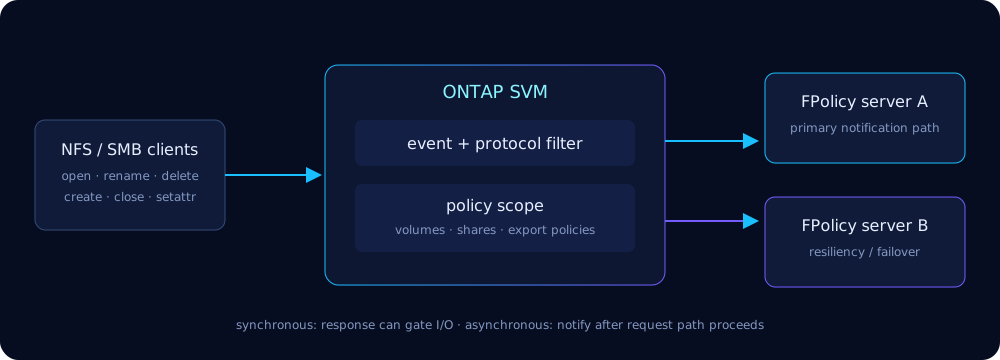
Architecture and use cases
The SVM is the policy boundary. Four objects form a working configuration: an event chooses protocol/file operations and filters; an external engine defines FPolicy server addresses, transport, authentication and timeouts; a policy joins events to the engine; and a scope narrows notifications to volumes, shares, export policies or extensions. The enabled policy then establishes node-to-server connections.
- File screening, data-loss prevention, compliance classification, auditing and ransomware telemetry.
- Backup or workflow orchestration triggered by file lifecycle events.
- Antivirus integrations. These may combine FPolicy-style notification with the purpose-built Vscan subsystem; vendor architecture decides which path is used.
FPolicy is not an export policy and does not replace NAS permissions. For SVM boundaries see the SVM guide; for layered controls see security hardening.
Operations and notification modes
Depending on protocol and release, event filters can cover open/read/write/close, create, delete, rename, directory changes, setattr/security changes and other NAS operations. Ask CLI help for the valid operation set—NFS and SMB do not expose identical semantics.
| Mode | Client path | Best fit | Failure concern |
|---|---|---|---|
| Synchronous | ONTAP can wait for the server response | allow/deny screening | server latency or outage can affect I/O |
| Asynchronous | notification is decoupled from the request decision | audit, telemetry, orchestration | queue pressure or lost visibility |
cluster1::> vserver fpolicy policy event show -vserver svm_files
Vserver    Event            Protocol  File Operations
---------- ---------------- --------- -------------------------------
svm_files ev_file_changes  cifs      create,delete,rename,close
Configuration runbook
1. Create an event
cluster1::> vserver fpolicy policy event create \
  -vserver svm_files -event-name ev_file_changes -protocol cifs \
  -file-operations create,delete,rename,close

cluster1::> vserver fpolicy policy event show -vserver svm_files -instance
2. Define redundant external engines
cluster1::> vserver fpolicy policy external-engine create \
  -vserver svm_files -engine-name eng_dlp \
  -primary-servers 10.20.30.41,10.20.30.42 -port 9876 \
  -extern-engine-type synchronous -ssl-option server-auth

cluster1::> vserver fpolicy policy external-engine show -vserver svm_files
Parameter names and TLS choices vary by ONTAP version. Build from ... external-engine create ?, validate certificates and use IPs/routes reachable from every data-serving node.
3. Join event and engine in a policy
cluster1::> vserver fpolicy policy create -vserver svm_files \
  -policy-name pol_dlp -events ev_file_changes -engine eng_dlp \
  -is-mandatory false -allow-privileged-access false

cluster1::> vserver fpolicy policy show -vserver svm_files -instance
4. Constrain the scope
cluster1::> vserver fpolicy policy scope create -vserver svm_files \
  -policy-name pol_dlp -volumes-to-include project_data \
  -shares-to-exclude ipc$,admin$ \
  -file-extensions-to-include docx,xlsx,pdf

cluster1::> vserver fpolicy policy scope show -vserver svm_files
5. Enable in deliberate sequence
cluster1::> vserver fpolicy enable -vserver svm_files \
  -policy-name pol_dlp -sequence-number 1
cluster1::> vserver fpolicy show -vserver svm_files
Vserver    Policy     Sequence  Status
---------- ---------- --------- -------
svm_files  pol_dlp    1         on
Modify objects while disabled when required, and delete in reverse dependency order:
vserver fpolicy disable -vserver svm_files -policy-name pol_dlp
vserver fpolicy policy scope delete -vserver svm_files -policy-name pol_dlp
vserver fpolicy policy delete -vserver svm_files -policy-name pol_dlp
vserver fpolicy policy event delete -vserver svm_files -event-name ev_file_changes
Native antivirus orchestration with Vscan
ONTAP Vscan offloads file inspection to external antivirus servers. NetApp Antivirus Connector registers and manages connectivity between ONTAP and supported vendor scanners; ONTAP applies an on-access policy to decide which files to scan. FPolicy and Vscan are related integrations but separate CLI families—do not create a generic FPolicy policy when the vendor requires Vscan.
cluster1::> vserver antivirus vscan-scanner-pool show -vserver svm_files
Vserver    Pool        Servers                     Privileged Users
---------- ----------- --------------------------- ----------------
svm_files  av_pool_1   10.20.40.11,10.20.40.12    DOMAIN\svc_vscan

cluster1::> vserver antivirus on-access-policy show -vserver svm_files
cluster1::> vserver antivirus connection-status show -vserver svm_files
Command nesting changed across releases; use vserver antivirus ? and the AV vendor’s Interoperability Matrix-qualified procedure. Scanner definitions alone do not activate scanning.
Performance and availability
- Subscribe only to operations, volumes, shares and extensions the application consumes. “Everything everywhere” multiplies network, queue and server work.
- Use at least two qualified FPolicy servers and test node-by-node connectivity. Primary/secondary ordering and resiliency behavior live in the external-engine object.
- Prefer asynchronous notifications unless the business rule must gate access. For synchronous policies, choose mandatory/fail-open behavior explicitly with security owners.
- Size servers for peak metadata rate, not average throughput; small-file workloads create many events per GiB.
- Roll out on one low-risk volume, measure client latency and queue behavior, then expand. Use QoS to protect unrelated workloads, not to hide an overloaded policy server.
Troubleshooting: no events or slow I/O
cluster1::> vserver fpolicy show-engine -vserver svm_files -policy-name pol_dlp
Vserver    Policy    Node    Server        Status       Disconnect Reason
---------- --------- ------- ------------- ------------ -----------------
svm_files  pol_dlp   node1   10.20.30.41   connected    -
svm_files  pol_dlp   node2   10.20.30.42   disconnected connection refused

cluster1::> event log show -messagename *fpolicy* -time >1h- Confirm policy is enabled and sequence number is unique.
- Confirm the client operation matches protocol, event operation and scope.
- Check every node-to-server connection with
show-engine; test routing, firewall, TLS identity and listening port. - Compare server logs and clocks with ONTAP EMS. If latency appears only with the policy enabled, inspect synchronous response time and server saturation.
Traps and mistakes
| Mistake | Consequence | Correction |
|---|---|---|
| Enable before scope exists | Too broad or no useful notifications | Create and show all four objects first |
| Monitor every operation | Event storm | Keep the smallest operation list |
| One external server | Maintenance becomes policy outage | Deploy and test a server pair |
| Synchronous for passive audit | Unneeded client latency | Use asynchronous notification |
| Wrong mandatory/fail-open choice | Either outage or bypass | Document security availability decision |
| Scope typo/regex surprise | Files silently omitted or flooded | Show scope and test positive/negative paths |
| Firewall tested only from management LIF | Data-serving node cannot connect | Validate every node path |
| TLS name/time mismatch | Engine stays disconnected | Fix CA chain, names and NTP |
| Confuse Vscan with generic FPolicy | Scanner never receives correct workload | Follow vendor’s Vscan design |
| Delete an enabled dependency | CLI rejects change | Disable; remove scope/policy/engine/event in order |