SVM administration: the storage virtual machine, inside and out
A Storage Virtual Machine (SVM) — the CLI calls it a vserver — is the unit of data services in ONTAP. One cluster can host many SVMs, and each one looks like a completely independent storage appliance to its clients: its own IP addresses, its own volumes and junctions, its own NFS exports or SMB shares, its own name services, even its own administrators. This guide walks through the lifecycle — create, configure protocols, wire networking, secure, migrate, and delete — with the commands you'll actually type.
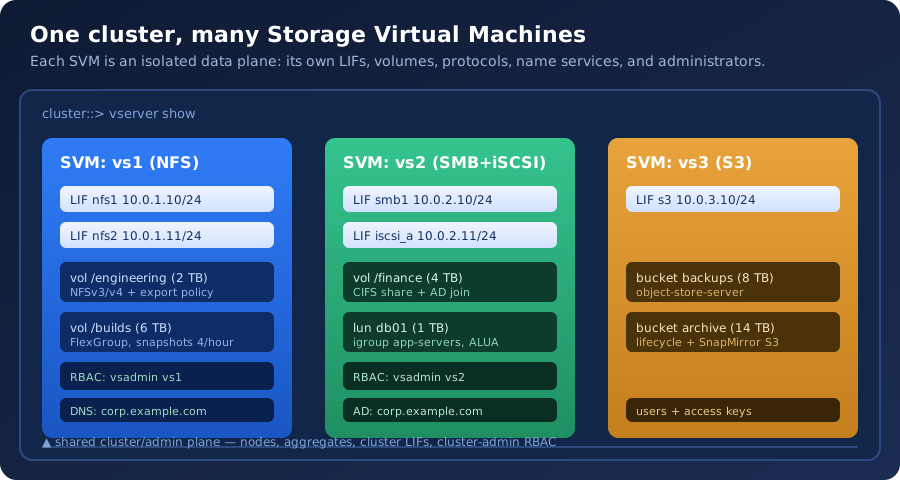
What an SVM actually is
The SVM is the data plane. Everything a client talks to — IP addresses, protocols, shares, exports, LUNs, buckets — belongs to an SVM. The nodes, disks, aggregates, and cluster LIFs form the shared control/management plane underneath it. That split is why ONTAP can present one physical cluster as many isolated "virtual appliances": tenant A's NFS clients never see tenant B's SMB shares, even though both are served by the same pair of nodes.
- SVM-scope resources (per-SVM): data LIFs, volumes + junction paths, export policies, shares, LUNs/igroups, buckets, name services (DNS/LDAP/AD/NIS), snapshot & quota policies, scoped RBAC roles and local users, SnapMirror relationships.
- Cluster-scope resources (shared): nodes, aggregates, disks, cluster management LIF, SVM-less services like
ontapi/REST endpoints, cluster-wide licenses and schedules.
Think of it as virtualization for storage: the aggregate is the "hypervisor pool", the SVM is the "VM", and the volumes inside it are the "filesystems". Isolation comes from the SVM boundary — a mistake or a security compromise in one SVM cannot reach another SVM's data by design.
The SVM family: data, admin, node, and system
Not every vserver you see in vserver show is one you manage. ONTAP creates several automatically, and knowing which is which prevents both fear (a "mystery" SVM) and mistakes (deleting something internal):
| Subtype | Who creates it | Purpose |
|---|---|---|
| data | You | Client-facing storage services — the SVMs you build and manage. |
| admin | ONTAP, at cluster setup | Serves the cluster-management LIF; hosts management endpoints (SSH, REST, System Manager). Don't delete. |
| node | ONTAP, per node | Internal per-node services (intercluster, SP, etc.). Normal to see one per node; don't touch. |
| system | ONTAP, 9.10+ | Newer internal system services hosted on the node SVMs. Visible in newer releases; not for admin use. |
vserver show -fields vserver,subtype,admin-state,operational-state
vserver show -subtype data                # just the SVMs you own
vserver show -is-internal true -fields vserver,subtype   # the hidden ones
Filter by -subtype data for day-to-day work; the internal SVMs are noisy but harmless.
Creating an SVM
Creation is one command; the interesting decisions are the allowed protocols and the root volume (every SVM gets a root volume with a / junction — its filesystem root, so to speak).
vserver create -vserver vs1 \
  -data-services nfs,smb \
  -rootvolume root_vs1 -aggregate aggr1 \
  -rootvolume-security-style unix \
  -language en_US.UTF-8 \
-comment "Engineering department"- -data-services declares which protocol families the SVM may carry (
nfs,smb,iscsi,fcp,s3,nvme, …). You can add or remove later withvserver add-protocols/vserver remove-protocols. - -rootvolume-security-style sets the default security style for the root; every volume created later inherits the SVM default unless you override it per volume (
-security-style). Unix for NFS-only SVMs, NTFS for SMB-heavy ones. - -language matters for SMB (Windows code pages) — pick the client locale up front; changing it later is disruptive.
- No junction is served until you create LIFs and mount volumes — a fresh SVM is a shell, by design.
Verify immediately:
vserver show -vserver vs1 -fields vserver,rootvolume,rootvol-security-style,data-services,stateBringing up protocols
Each protocol family has its own enablement object on the SVM, and its own client-facing layer (export policy, share, LUN, bucket).
NFS — enable the versions, then create the export policy rules that decide who can mount what:
vserver nfs create -vserver vs1 -v3 enabled -v4 enabled -v41 enabled
vserver export-policy create -vserver vs1 -policy default
vserver export-policy rule create -vserver vs1 -policy default \
  -protocol nfs -clientmatches 10.0.0.0/8 -rorule sys -rwrule sys -superuser any
volume create -vserver vs1 -volume engineering -aggregate aggr1 \
  -size 2TB -junction-path /engineering
SMB — creating the CIFS server joins Active Directory and creates the machine account; shares come after:
vserver cifs create -vserver vs1 -cifs-server VS1 -domain corp.example.com \
  -admin-user svc-netapp
vserver cifs share create -vserver vs1 -share-name finance -path /finance \
  -share-properties oplocks
Block (iSCSI) — enable the service, create the LUN, map it to an igroup:
vserver iscsi create -vserver vs1
lun create -vserver vs1 -volume vol1 -lun db01 -size 1TB -ostype linux \
  -space-reserve disabled
igroup create -vserver vs1 -igroup app-servers -protocol iscsi \
  -ostype linux -initiator iqn.2026-01.com.example:host01
lun map -vserver vs1 -volume vol1 -lun db01 -igroup app-servers
Object (S3) — one object-store server per SVM, then buckets:
vserver object-store-server create -vserver vs1 -object-store-server vs1-s3 \
  -root-user admin -root-user-password 'change-me'
vserver object-store-server bucket create -vserver vs1 -bucket backups \
  -size 8TB -policy default
Rule of thumb: enable only the protocols a tenant actually needs. Every enabled protocol is another attack surface and another name-service dependency.
Networking: LIFs, routes, and DNS
An SVM is unreachable until it has data LIFs — IP addresses with a home node/home port that ONTAP can fail over. The failover behavior is what makes SVMs nondisruptively resilient.
network interface create -vserver vs1 -lif nfs1 -role data \
  -data-protocol nfs -home-node node1 -home-port e0c \
  -address 10.0.1.10 -netmask 255.255.255.0 -status-admin up
network interface create -vserver vs1 -lif nfs2 -role data \
  -data-protocol nfs -home-node node2 -home-port e0c \
-address 10.0.1.11 -netmask 255.255.255.0- Two LIFs for NAS redundancy: DNS round-robins or client failover handles the rest. Each LIF is owned by one node at a time and moves (fails over) with its node pair.
- -data-protocol must include what the LIF serves (
nfs,smb,iscsi,fc-nvme, …); a LIF won't answer a protocol it doesn't list. - Failover groups decide where a LIF may land when its home port dies:
network interface failover-groups show -vserver vs1.
Routing and DNS are per-SVM too — a classic "NFS works, but nothing resolves" moment is a missing SVM route or DNS entry:
network route create -vserver vs1 -destination 0.0.0.0/0 -gateway 10.0.1.1
vserver services dns create -vserver vs1 -domains corp.example.com \
  -name-servers 10.0.0.53,10.0.0.54
network interface show -vserver vs1 -fields lif,address,home-node,home-port,home-status,data-protocols
network ping -vserver vs1 -lif nfs1 -destination 10.0.1.53
Name services and identity
SVMs resolve users and groups through their own name-service configuration — the cluster doesn't share your LDAP settings with the SVM. The lookup order matters (files → LDAP → NIS → AD), and getting it wrong produces the classic "user looks up fine locally but not via NFS" split-brain.
vserver services name-service ns-switch show -vserver vs1
vserver services name-service ns-switch modify -vserver vs1 \
  -database hosts -source files,dns
vserver services ldap create -vserver vs1 -client-config CORP-LDAP \
  -servers ldap01.corp.example.com,ldap02.corp.example.com
vserver services name-service ns-switch modify -vserver vs1 \
  -database passwd -source files,ldap
For NFSv4, the name mapping layer ties NFSv4 identities (user@domain) to the SVM's name-service view — the same file that drives nfs4_getfacl display:
vserver name-mapping show -vserver vs1 -direction nfsv4-krb
vserver name-mapping create -vserver vs1 -direction nfsv4-krb \
  -pattern 'user@CORP.EXAMPLE.COM' -replacement 'unix_user'
Deep dive: our NFSv4 ACL migration guide covers identity mapping end to end.
Securing SVMs: scoped RBAC, local users, service policies
This is where SVMs shine: you can hand a team its own admin who can manage only its SVM — volumes, shares, snapshots — and nothing else on the cluster. ONTAP ships a built-in vsadmin role per SVM; you can also craft scoped roles for finer splits.
security login create -vserver vs1 -user-or-group-name team1-admin \
  -application ssh -authmethod password -role vsadmin
security login role create -vserver vs1 -role snap-operator -access readonly \
  -command "volume snapshot*"
security login create -vserver vs1 -user-or-group-name backup-user \
-application ontapi -authmethod password -role snap-operator- -vserver vs1 on the role makes it SVM-scoped: the role's commands apply only inside that SVM.
- SVM admins never see other SVMs' volumes or the cluster's aggregate layer —
vsadmincannot create aggregates or touch cluster config. - For API automation, scope the
ontapiapplication the same way (or use API keys, 9.11+; see our REST API guide).
Network-level lockdown also lives at the SVM: service policies control which management services a LIF answers (network interface service-policy show -vserver vs1), and vserver export-policy rules gate NAS access. See the security hardening checklist for the full picture.
Storage inside the SVM: volumes, junctions, quotas
Volumes are mounted into the SVM's namespace at junction paths, forming one tree per SVM. The root volume owns /; everything else hangs off it.
volume create -vserver vs1 -volume engineering -aggregate aggr1 \
  -size 2TB -junction-path /engineering
volume show -vserver vs1 -fields volume,aggregate,size,junction-path,state
volume mount -vserver vs1 -volume engineering -junction-path /engineering
Per-SVM policy objects apply at volume level: snapshot policies (volume snapshot policy show), and quotas when you need per-user or per-qtree caps:
quota policy create -vserver vs1 -policy engineering-quotas
quota policy rule create -vserver vs1 -policy engineering-quotas \
  -type user -target unix-user -qtree "" -volume engineering \
  -disk-limit 50GB -soft-disk-limit 45GB
volume quota on -vserver vs1 -volume engineering -policy engineering-quotas
Related: ONTAP quota management, aggregate capacity math (what "2TB" really buys you), and FlexGroup deep-dive (when one volume per SVM isn't enough).
Migrating an SVM (nondisruptive, cross-cluster)
SVM migration moves an entire SVM — LIFs, volumes, config — from one cluster to another while clients keep working. It's the ONTAP-native path for hardware refresh, consolidation, or moving a tenant to a bigger cluster.
vserver migrate start -vserver vs1 -destination-cluster cluster02 \
  -destination-aggregate-list aggr1,aggr2 -cutover-threshold 500
vserver migrate show -vserver vs1 -fields state,progress-details- Prerequisites: the destination cluster must be reachable (intercluster LIFs), licensed, and have capacity; the SVM must not have in-progress SnapMirror/SnapVault activity that can't move with it.
- ONTAP does the heavy lifting: baseline copy, incremental catch-up, then a brief cutover window (you tune it with
-cutover-threshold). - LIFs move with their failover groups and home ports — plan destination network placement before you start.
Deleting an SVM (and the errors that stop you)
ONTAP refuses to delete an SVM that still holds resources — which is the safety net you want. The delete path is: remove data, then remove the shell.
# 1. Offline & delete volumes (or move them off first)
volume offline -vserver vs1 -volume engineering
volume delete -vserver vs1 -volume engineering
# 2. Remove LIFs and routes
network interface delete -vserver vs1 -lif nfs1
network route delete -vserver vs1 -destination 0.0.0.0/0 -gateway 10.0.1.1
# 3. Remove protocol objects (CIFS server, object-store server, igroups…)
vserver cifs delete -vserver vs1
vserver object-store-server delete -vserver vs1
# 4. Drop the SVM
vserver delete -vserver vs1
If vserver delete refuses, read the error — it names what's left: "SVM has one or more LIFs", "SVM has volumes", "SVM has an active CIFS server", "SVM has existing relationships" (SnapMirror). vserver show -fields vserver,state plus the per-resource show commands above find every blocker. Also remember the root volume: it's a volume too, and it must go before the SVM does.
Admin quick-reference
| Question | Command |
|---|---|
| What SVMs exist and what state? | vserver show -fields vserver,subtype,state |
| What LIFs does an SVM have? | network interface show -vserver vs1 |
| What volumes and junctions? | volume show -vserver vs1 -fields volume,junction-path,state |
| Who can log into this SVM? | security login show -vserver vs1 |
| What name services / order? | vserver services name-service ns-switch show -vserver vs1 |
| DNS for this SVM? | vserver services dns show -vserver vs1 |
| Export policy rules? | vserver export-policy rule show -vserver vs1 |
| Is the SVM reachable from a client net? | network ping -vserver vs1 -lif nfs1 -destination <client> |
Common failure signatures and first checks:
- "No route to host" from clients: SVM route missing (
network route show -vserver) or LIF down (network interface showhome-status). - Mount works from one subnet, not another: export-policy rule doesn't match the client (
vserver export-policy rule show), or routing. - SMB auth fails while NFS is fine: CIFS server machine account or AD trust — check
vserver cifs showand rejoin if needed. - Users resolve oddly via NFS: ns-switch order or name mapping (see the identity section).
More commands live in the CLI cheat sheet; the NCDA blueprint tests exactly this material — see the certification hub.