Home / Reference / Quota management
ONTAP quota management: user, group, and tree quotas
Quotas are ONTAP's answer to "who is allowed to use how much of this volume?" A quota policy turns rules into enforced limits per user, per group, or per qtree — the mechanism behind capacity governance on FlexVols and, in managed form, on cloud services like FSx for ONTAP and Azure NetApp Files. This guide covers the quota model, the real CLI, enforcement behavior, and the traps that trip up every admin at least once.
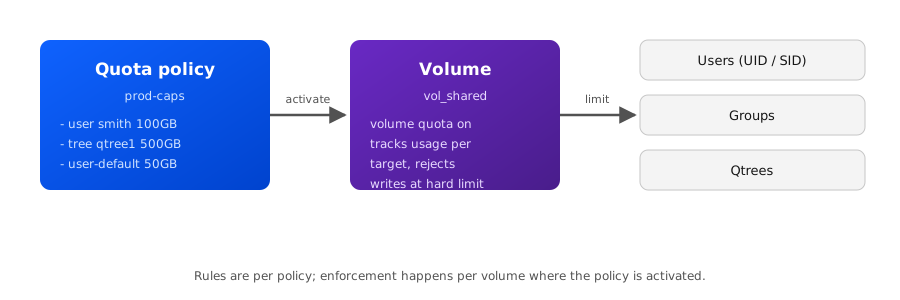
What a quota actually is
A quota is a limit on space or file count for a target (a user, a group, or a qtree) inside one volume. It is not a volume property — it lives in a quota policy, and the policy is activated on a volume with volume quota on. One policy can be applied to many volumes, which is what makes quotas manageable at scale: define the rules once, attach the policy everywhere.
Three things matter before any rule is written:
- Quota type — who the limit applies to (user, group, tree, or the corresponding default type).
- Target — the specific user (Unix UID/name or Windows SID/name), group, or qtree the rule covers.
- Limit kind — disk space (bytes) and/or files, each with a hard limit, a soft limit, and a threshold (warning).
Key mental model: volume quota policy rule create writes a rule; volume quota on makes ONTAP start tracking usage against it; volume quota report shows the result. Changing a rule does not change usage — limits are enforced on the next operation once the quota set is refreshed.
The quota types
| Type | Target | Typical use |
|---|---|---|
user | One named user (Unix name/UID or Windows name/SID) | Per-person home-directory caps on a shared volume |
group | One named group (Unix GID or Windows group) | Department or project budget on a shared tree |
tree | One qtree (by name) | Per-application or per-project hard cap on a qtree |
user-default | Every user not matched by a specific user rule | Catch-all cap so one heavy user can't exhaust the volume |
group-default | Every group without a specific rule | Baseline group budget |
tree-default | Every qtree without a specific tree rule | Baseline qtree cap |
A single policy can mix types freely — for example a tree rule that caps a qtree at 500 GB, a user rule that caps the backup service account at 100 GB, and a user-default rule that gives everyone else 50 GB. If multiple rules match one operation, the most specific matching rule wins; a named rule beats a default rule, and a user rule beats a group rule for the same target.
Hard limits, soft limits, and thresholds
| Parameter | Behavior when exceeded |
|---|---|
-disk-limit (hard) | Writes fail (ENOSPC to the client) — the user cannot consume more space |
-soft-disk-limit | Allowed for a grace period (default 7 days, configurable with -soft-disk-limit + volume quota policy modify); after the grace period the soft limit behaves like a hard limit |
-threshold | No enforcement — ONTAP logs a warning (EMS) when usage crosses the threshold, so you can act before the hard limit bites |
-files-limit / -soft-files-limit | Same hard/soft semantics, applied to inode (file) count instead of bytes |
File limits matter more than most admins expect: a volume can hit its inode ceiling before its byte ceiling, and a quota on files is the only per-user tool against that (see the FlexGroup guide's inode discussion — FlexGroup deep-dive). The default grace period is checked with volume quota show -fields ... or set per policy with volume quota policy modify -vserver vs1 -policy default -default-grace-period 3days.
The command set (ONTAP 9.x)
# --- Policy lifecycle ---
volume quota policy create -vserver vs1 -policy prod-caps
volume quota policy show -vserver vs1
volume quota policy modify -vserver vs1 -policy prod-caps -default-grace-period 3days
volume quota policy delete -vserver vs1 -policy prod-caps

# --- Rules ---
volume quota policy rule create -vserver vs1 -policy prod-caps -type tree \
  -target qtree1 -disk-limit 500GB -files-limit 2000000

volume quota policy rule create -vserver vs1 -policy prod-caps -type user \
  -target smith -disk-limit 100GB -soft-disk-limit 80GB -threshold 70GB

volume quota policy rule create -vserver vs1 -policy prod-caps -type user-default \
  -disk-limit 50GB -files-limit 500000

volume quota policy rule show -vserver vs1 -policy prod-caps
volume quota policy rule modify -vserver vs1 -policy prod-caps -type tree \
  -target qtree1 -disk-limit 750GB
volume quota policy rule delete -vserver vs1 -policy prod-caps -type tree -target qtree1

# --- Activation / enforcement ---
volume quota on -vserver vs1 -volume vol_shared
volume quota show -vserver vs1 -volume vol_shared
volume quota resize -vserver vs1 -volume vol_shared
volume quota off -vserver vs1 -volume vol_shared

# --- Reporting ---
volume quota report -vserver vs1 -volume vol_shared
volume quota report -vserver vs1 -volume vol_shared -type user -target smith
Notes on syntax: the rule targets for users can be given as a Unix name, a Windows name (DOMAIN\user), or a numeric UID/SID; ONTAP resolves and stores them, and volume quota policy rule show displays the resolution. For tree rules, the qtree must already exist on the volume. In older ONTAP 8.x documentation you will see the vserver quota ... command family — in ONTAP 9.x these are the volume quota ... commands shown above (the vserver quota forms were the pre-9.0 names and are deprecated in current releases).
Worked example: cap a shared volume end to end
Goal: on vol_shared, cap each qtree at 500 GB, give user smith 100 GB, and give everyone else 50 GB.
# 1. Create the policy and rules
volume quota policy create -vserver vs1 -policy prod-caps
volume quota policy rule create -vserver vs1 -policy prod-caps -type tree \
  -target qtree1 -disk-limit 500GB
volume quota policy rule create -vserver vs1 -policy prod-caps -type tree \
  -target qtree2 -disk-limit 500GB
volume quota policy rule create -vserver vs1 -policy prod-caps -type user \
  -target smith -disk-limit 100GB -threshold 80GB
volume quota policy rule create -vserver vs1 -policy prod-caps -type user-default \
  -disk-limit 50GB

# 2. Attach and activate on the volume
volume quota on -vserver vs1 -volume vol_shared -policy prod-caps

# 3. Verify rules and enforcement state
volume quota show -vserver vs1 -volume vol_shared

# 4. Watch actual usage
volume quota report -vserver vs1 -volume vol_shared \
  -fields type,target,disk-used,disk-limit,soft-disk-limit,threshold,status
After volume quota on, ONTAP scans the volume to baseline usage — on a large volume this can take a while; volume quota show reports the status (for example on while scanning, then fully enforced). If you change a rule later, run volume quota resize to apply the new limits immediately instead of waiting for the next automatic refresh.
Enforcement behavior and timing
- Writes are checked against the hard limit at write time. A user at 99.9 GB with a 100 GB hard limit can still write until the next 4 KB block pushes them over; ONTAP then rejects further writes until usage drops. The client sees
ENOSPC(NFS) or an "insufficient disk space" error (SMB). - Quota usage is not updated instantly on every write. ONTAP batches quota accounting;
volume quota reportcan lag slightly behind the true usage. Give it a few seconds, or trigger a refresh withvolume quota resize. - Deleting files does not always release quota immediately — deleted-space accounting catches up on the next quota scan/refresh cycle. If a user insists "I deleted files but still can't write," that lag (or a snapshot holding the deleted blocks) is the usual culprit.
- Quotas only enforce within the volume where the policy is on. A rule targeting user
smithdoes nothing on volumes without quota enabled — apply the policy everywhere you need governance.
The gotchas that bite
| Gotcha | What happens | Fix / prevention |
|---|---|---|
| Identity mismatch (NFS vs SMB) | A user written as Unix smith and the same person coming in over SMB as DOMAIN\smith can be tracked as two different quota consumers | Keep name-mapping consistent; use vserver name-mapping show to verify; quota by group where identity is messy |
| Quota on with no rules | Volume works, but nothing is enforced — the empty policy matches nothing | Always include user-default/tree-default rules if you want a catch-all; verify with volume quota show |
| Rule changed, behavior didn't | Limits are only re-read on the next quota refresh cycle | Run volume quota resize after modifying rules |
| qtree quota on a qtree that doesn't exist | Rule create fails or the rule never matches | Create the qtree first: volume qtree create -vserver vs1 -volume vol_shared -qtree qtree1 |
| Snapshots holding "deleted" space | User hits quota despite deleting files | Check snapshot usage on the volume; adjust -percent-snapshot-space or prune snapshots |
| FlexGroup quotas | FlexGroup quota semantics differ (aggregate-level accounting, no qtree quotas in some configs) | Test on a small FlexGroup first; see FlexGroup deep-dive |
One more: quota enforcement and root users — root (Unix UID 0) and the equivalent SMB admin can be exempted depending on how rules are written; do not assume root is limited just because a user-default rule exists. Check with volume quota report -fields type,target,disk-used,disk-limit for the actual tracked entries.
Quotas at scale — cloud ONTAP (FSx, ANF, GCNV)
The same quota engine runs underneath the managed ONTAP cloud services, but the knobs you see differ: on Amazon FSx for NetApp ONTAP you manage quotas through the FSx console, CLI, or the ONTAP REST API against your FSx SVM, and AWS publishes guidance on applying user/group/default quotas at scale — the concepts (policy, rule, hard/soft/threshold) are the classic ONTAP ones you configure on-prem. On Azure NetApp Files the capacity story is pool/tier based, so per-user quotas are less common — you govern at the volume level (see the Azure NetApp Files guide). Whatever the surface, the REST API is the scalable path for rolling quota rules out across hundreds of volumes: one POST /api/storage/quota call per rule, driven from Ansible or a script — see the ONTAP REST API guide for examples.
At real scale, plan the policy before rollout: name policies by tier (e.g. dev-caps, prod-caps), keep default rules generous enough to avoid support tickets, and wire threshold alerts to monitoring (threshold violations generate EMS events — event log show -severity * -message-name *quota* finds them) so you act on warnings, not hard-limit failures.
Related guides
- ONTAP SVM administration — where policies and volumes live
- Aggregate capacity math — what "usable" means before quotas
- FlexGroup deep-dive — inodes and quota semantics on FlexGroups
- Volume space troubleshooting — when "full" is not a quota
- FSx for ONTAP guide — quotas on the managed service