Google Cloud NetApp Volumes: managed ONTAP on GCP
Google Cloud NetApp Volumes (GCNV) is the third fully managed ONTAP service, alongside Amazon FSx for ONTAP and Azure NetApp Files — same ONTAP core, different cloud. This guide covers what GCNV is, how its storage model differs from the other two, and when it's the right call for GCP workloads.
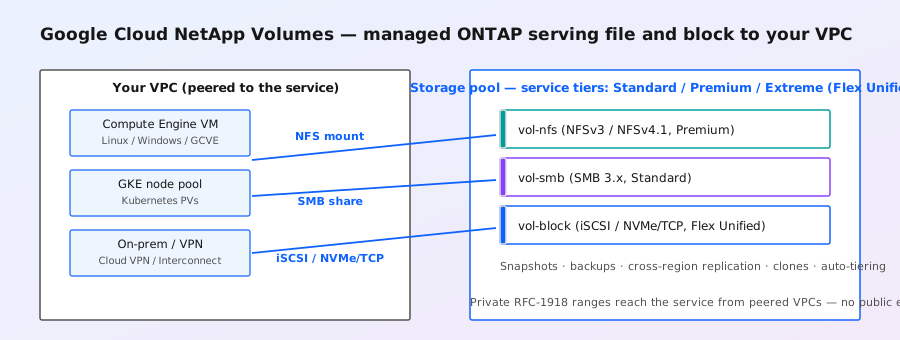
What GCNV is
- Fully managed, ONTAP-powered: Google Cloud NetApp Volumes is a first-party Google Cloud service that runs NetApp's ONTAP software behind a Google Cloud API and console. You never see a cluster, node, or aggregate — you create volumes and mount them.
- Protocols: NFS (v3/v4.1), SMB, iSCSI, and NVMe/TCP, including multiprotocol access — so the same volume can serve Linux via NFS and Windows via SMB, like on-prem ONTAP.
- No refactoring: the pitch is lift-and-optimize: mount an NFS volume exactly the way you would on an on-prem ONTAP array, point the app at it, done. Supported workloads include Linux, Windows, VMware (GCVE), Kubernetes, and SAP shared files.
- Who operates what: Google operates the ONTAP (patches, upgrades, hardware) — like FSx/ANF you get a managed API instead of SSH to a node shell. Your team keeps managing volumes, exports, snapshots, and the app itself.
Storage model: pools, tiers, and Flex Unified
- Storage pool → volumes: capacity is provisioned in storage pools (the GCNV equivalent of an ANF capacity pool), and volumes are carved from a pool. Pool sizing and per-TiB throughput commitments set the floor for volume performance.
- Service tiers: GCNV offers tiered service levels (Standard, Premium, Extreme) with increasing per-TiB throughput. Exact throughput numbers move as Google updates the offering — check the current documentation before sizing.
- Flex Unified: the high-end tier that unifies block and file on one pool, with throughput scaling up to 22 GiB/s and 750,000 IOPS per storage pool — aimed at the most demanding AI/EDA/database workloads.
- Cost features: auto-tiering (cold data to cheaper storage), independent scaling of capacity vs performance, and near-zero-footprint instant snapshots keep the bill down for tier-2 data.
Networking
- VPC-based: GCNV lives in Google Cloud networking. Volumes are reachable from Compute Engine VMs in the same or peered VPCs via the private RFC-1918 ranges Google allocates to the service.
- Access model: you allocate IP ranges for the service in your VPC (private service access style); mount points look like ordinary internal IPs, so no public exposure or VPN is needed for in-cloud clients.
- Hybrid: on-prem clients reach GCNV through Cloud VPN or Cloud Interconnect — the NFS/SMB protocol behavior is unchanged from any other ONTAP, so existing mount/export patterns carry over.
Data protection: snapshots, backups, replication
- Instant snapshots: near-zero-footprint point-in-time copies created from the console or API in seconds — the same CoW mechanics as on-prem ONTAP (see the copy-on-write deep-dive).
- Fast ransomware recovery: reverting a volume to a snapshot takes under a minute, versus hours for a from-backup restore — Google's own messaging leads with this use case.
- Backups: GCNV backup service copies volumes (full + incremental) to Google Cloud storage as a second line of defense, independent of the pool.
- Cross-region replication: asynchronous replication of volumes between regions for DR — the managed equivalent of SnapMirror. RPO/RTO planning and failover are done from the GCNV console/API.
- Cloning: instant volume clones for dev/test and data pipelines — handy for CI and ML data versioning.
GCNV vs FSx for ONTAP vs Azure NetApp Files
| Dimension | Google Cloud NetApp Volumes | Amazon FSx for ONTAP | Azure NetApp Files |
|---|---|---|---|
| Cloud | Google Cloud | AWS | Azure |
| Management surface | Google Cloud console/API (gcloud) | AWS console/CLI (FSx APIs) | Azure portal/CLI (Microsoft.NetApp) |
| Protocols | NFS, SMB, iSCSI, NVMe/TCP, multiprotocol | NFS, SMB, iSCSI (NVMe/TCP in later releases) | NFS, SMB, dual-protocol |
| Capacity model | Storage pools + service tiers (Standard/Premium/Extreme, Flex Unified) | File systems with SSD/HDD tiers, storage capacity pools | Capacity pools + service levels (Standard/Premium/Ultra) |
| Data services | Snapshots, backups, cross-region replication, clones, auto-tiering | Snapshots, FlexClone, SnapMirror to/from cloud, tiering to S3 | Snapshots, cross-region/cross-zone replication, backup vaults, cool tier |
| Differentiator | Deep GCP integration (peered VPCs, gcloud, GCVE datastores) | AWS-native ops + SnapMirror hybrid ties | Azure-native ops + large ecosystem integrations |
All three are the same ONTAP brain wearing a cloud-native coat. Pick by which cloud your VMs live in — cross-cloud replication between them and on-prem is possible via SnapMirror where the service exposes it (FSx and CVO do; GCNV replication is region-to-region within GCP).
Common use cases
- SAP on GCP: NFS shared files for SAP application servers and databases (the classic ONTAP-on-cloud play).
- EDA and chip design: read-heavy, metadata-intensive front-end and write-heavy back-end workloads — a documented GCNV strength.
- VDI and file shares: Windows and Linux user/group shares, MS-SQL shared storage, PACS images.
- VMware on GCVE: GCNV as NFS datastores alongside vSAN — scale storage independently of compute, like NFS datastores on any ONTAP.
- ML/AI data lakes: shared datasets served over NFS with snapshotting for data versioning.
Note: service-tier throughput figures, region availability, and the exact feature set (e.g. which NVMe/TCP versions, replication topology) change as Google updates the service — confirm against the current Google Cloud NetApp Volumes documentation before sizing a production deployment.
GCNV vs Cloud Volumes ONTAP on GCP
Google Cloud is the one place where the choice between managed and self-managed ONTAP is most visible: Cloud Volumes ONTAP (CVO) can also run in GCP as VMs you operate. GCNV wins on zero operations (no upgrades, no node shell) and Google console integration; CVO wins when you need the full ONTAP feature set — FlexGroup, MetroCluster, deeper CLI access, or a region GCNV doesn't cover. If you're starting fresh in GCP with standard NFS/SMB/block needs, GCNV is the default; reach for CVO when a requirement exceeds the managed envelope.
Getting started
- Enable the NetApp Volumes API in your Google Cloud project and create a storage pool (choose region, tier, and capacity).
- Allocate the VPC IP ranges GCNV uses to reach your network (the console walks you through the peering/ranges setup).
- Create a volume with the protocol you need (NFSv3/v4.1, SMB, iSCSI, or NVMe/TCP) and set export/share rules.
- Mount from your VMs:
mount -t nfs <volume-ip>:/<export-path> /mnt/data— the same command you'd run against on-prem ONTAP. - Schedule snapshots and backups, then test a restore before you rely on it.