NTP, DNS and name services on ONTAP
Time is cluster-wide; name resolution is scoped to an SVM. Configure redundant NTP sources first, then make DNS and the name service switch explicit for the cluster management SVM and every data SVM that depends on host, LDAP, NIS or Kerberos lookups.
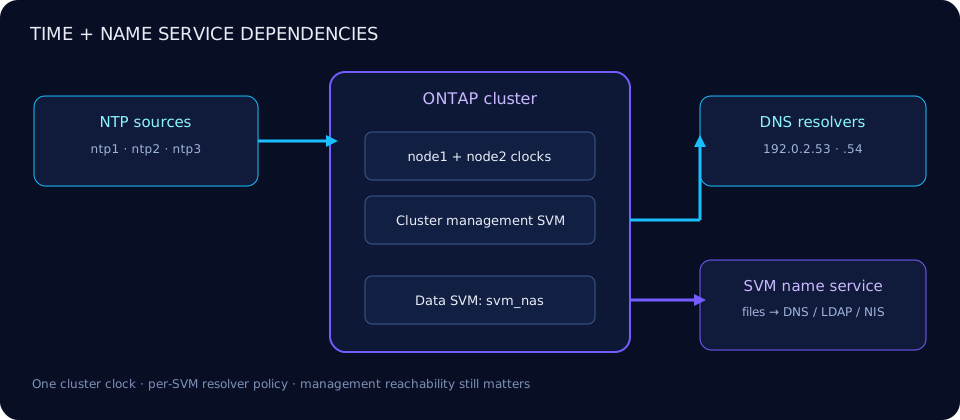
Why time synchronization matters
Accurate time makes EMS and audit timelines defensible, keeps SMB Kerberos tickets within accepted skew, and lets administrators correlate SnapMirror and SnapVault operations across clusters. Protocol state such as NFS leases also depends on orderly timekeeping. SnapLock adds a tamper-resistant ComplianceClock for WORM retention; it is not a replacement for NTP or the cluster's wall clock.
Use the same authoritative sources across storage, clients, domain controllers, DNS and monitoring. ONTAP recommends at least three external NTP servers and permits up to ten. A node joining the cluster adopts the cluster NTP configuration.
Configure NTP
The verified create options are -server, -version 3|4|auto, advanced -is-preferred, and optional symmetric-authentication -key-id. ONTAP validates the server response, synchronization and root distance/dispersion. The 9.19.1/current command reference does not document an iburst option.
cluster1::> cluster time-service ntp server create -server ntp1.example.com -version auto
cluster1::> cluster time-service ntp server create -server ntp2.example.com -version 4
cluster1::> cluster time-service ntp server create -server ntp3.example.com
3 entries were added.
cluster1::> set -privilege advanced
cluster1::*> cluster time-service ntp server modify \
-server ntp1.example.com -is-preferred true
cluster1::*> set -privilege adminPrefer only a known higher-quality source; other valid servers remain candidates. For symmetric authentication, create a matching key on ONTAP and the NTP server, then reference its ID. Never expose key material in tickets or command transcripts.
cluster1::> cluster time-service ntp server show
                                Is
                                Authentication
Server                 Version Enabled        Key ID
---------------------- ------- -------------- ------
ntp1.example.com       auto    false          -
ntp2.example.com       4       false          -
ntp3.example.com       auto    false          -
3 entries were displayed.
cluster1::> set -privilege advanced
cluster1::*> cluster time-service ntp status show
Node Server Reachable Selection State Offset (ms)
------ ----------------- --------- --------------------------- -----------
node1 ntp1.example.com true Currently Selected Server 0.417
node1 ntp2.example.com true Candidate Server 0.693
node2 ntp1.example.com true Currently Selected Server 0.381
node2 ntp2.example.com true Candidate Server 0.721NTP polls periodically and adjusts the cluster clock. Use the advanced status output for reachability, selection state, poll interval, last poll, offset, delay, stratum and reported errors. Avoid manual clock jumps while NTP is healthy.
Timezone and manual time
cluster date show displays the cluster timezone and time. The timezone changes presentation; it does not cure clock offset. For a permanently disconnected cluster, an administrator can set timezone/date/time manually, but must maintain it operationally.
cluster1::> cluster date show
Node      Date                      Time zone
--------- ------------------------- -------------------------
node1     08/27/2026 16:42:18 +00:00 Etc/UTC
node2     08/27/2026 16:42:18 +00:00 Etc/UTC
# Disconnected-cluster example: schedule and validate before changing time
cluster1::> cluster date modify -timezone Etc/UTC
cluster1::> cluster date modify -dateandtime 202608271645.00
Warning: Changing cluster date or time can affect time-sensitive services.
Do you want to continue? {y|n}: yDNS is per SVM
Each SVM can have its own search domains, resolver IPs, timeout and attempts. That separation supports tenants with different DNS views, but also explains why a name can resolve for a data SVM and fail for the cluster management SVM used by peering or management workflows.
cluster1::> vserver services name-service dns create \
  -vserver svm_nas -domains corp.example.com,example.com \
  -name-servers 192.0.2.53,192.0.2.54
DNS configuration created successfully for Vserver "svm_nas".
cluster1::> vserver services name-service dns show -vserver svm_nas
Vserver Domains Name Servers
-------- ------------------------------- -----------------------
svm_nas corp.example.com,example.com 192.0.2.53,192.0.2.54
cluster1::> vserver services name-service dns check -vserver svm_nas
Vserver Name Server Status Status Details
-------- ----------- ------ -------------------------
svm_nas 192.0.2.53 up Response time (msec): 12
svm_nas 192.0.2.54 up Response time (msec): 18dns check validates configured server reachability; it does not prove that every required forward and reverse record exists. Test the exact SVM context and name used by the failing service. Avoid -skip-config-validation true unless the resolver is intentionally unreachable during a staged build.
Static host entries (“/etc/hosts”)
ONTAP's static host table is managed with the vserver services name-service dns hosts command family—not by editing a node file and not by ... name-service hosts create. Entries are per SVM and can provide deterministic mappings when files is in the hosts lookup order.
cluster1::> vserver services name-service dns hosts create \
  -vserver Cluster -address 192.0.2.20 \
  -hostname cluster2-mgmt.example.com -aliases cluster2-mgmt
cluster1::> vserver services name-service dns hosts show -vserver Cluster
Vserver Address    Hostname                    Aliases
------- ---------- --------------------------- -------------
Cluster 192.0.2.20 cluster2-mgmt.example.com   cluster2-mgmt
Use static mappings sparingly for cluster-management, node-management or other fixed endpoints. They do not replicate DNS governance and become stale during address changes.
Name service switch order
The name service switch chooses sources and order for each SVM database. Valid sources depend on database: hosts uses files,dns; group/passwd/netgroup can use files, NIS and LDAP; namemap can use files and LDAP. LDAP and NIS configuration is separate—see the SVM administration guide.
cluster1::> vserver services name-service ns-switch create \
  -vserver svm_nas -database hosts -sources files,dns
cluster1::> vserver services name-service ns-switch create \
  -vserver svm_nas -database passwd -sources files,ldap
cluster1::> vserver services name-service ns-switch show -vserver svm_nas
Vserver  Database  Source Order
-------- --------- ----------------
svm_nas  hosts     files, dns
svm_nas  passwd    files, ldap
Order changes behavior: a stale static host wins when files precedes DNS. Keep a documented owner and test after every resolver, route or IPspace change; consult the network port reference for firewall dependencies.
Troubleshooting matrix
| Symptom | Evidence | Action |
|---|---|---|
| NTP unsynchronized | ntp status show: unreachable, no selected server, large offset; related EMS/timecheck events | Verify route, UDP 123, source quality, version and symmetric key; keep multiple independent sources |
| Peer/SnapMirror name fails | DNS works on data SVM but not Cluster SVM, or wrong search domain | Check DNS and routes in the exact SVM/IPspace used by cluster peering; prefer verified FQDNs |
| Wrong audit timestamp | UTC value is correct but displayed timezone is wrong | Set the intended timezone; do not manually shift the clock |
| SMB Kerberos clock error | Client/DC/ONTAP offsets differ; Kerberos reports KRB_AP_ERR_SKEW | Restore common NTP, then retest authentication. KDC_ERR_CLIENT_REVOKED normally indicates a revoked/disabled principal, not clock skew |
| Lookup slow or intermittent | One resolver down, high response time, excessive timeout/attempts | Fix resolver/network path and validate both configured servers |
| Wrong address returned | Static entry shadows DNS due to files,dns | Update/delete stale host entry or intentionally change lookup order |
cluster1::> event log show -time >1h -message-name *time*
Time                Node  Severity Event
------------------- ----- -------- --------------------------------
8/27/2026 15:58:02 node2 NOTICE   timecheck.clock.skew: Clock offset...
cluster1::> network route show -vserver Cluster
Vserver Destination Gateway
------- ----------- ---------
Cluster 0.0.0.0/0   192.0.2.1