Home / Reference / Cluster & SVM Peering
ONTAP Cluster & SVM Peering Guide
Cluster and Storage Virtual Machine (SVM) peering form the foundational transport layer for NetApp asynchronous SnapMirror, SnapVault, SnapMirror Active Sync, FlexCache, and cross-cluster data movement. This guide details Intercluster LIF architecture, passphrase security, IPspace segregation, in-flight TLS encryption, and deterministic troubleshooting workflows.
Architecture Overview
Peering in ONTAP is a two-tiered relationship: first, the Cluster Peer relationship establishes mutual authentication and IP network connectivity between physical ONTAP nodes across sites; second, the SVM Peer relationship authorizes specific Storage Virtual Machines to exchange replication metadata, volumes, and snapshot data streams.
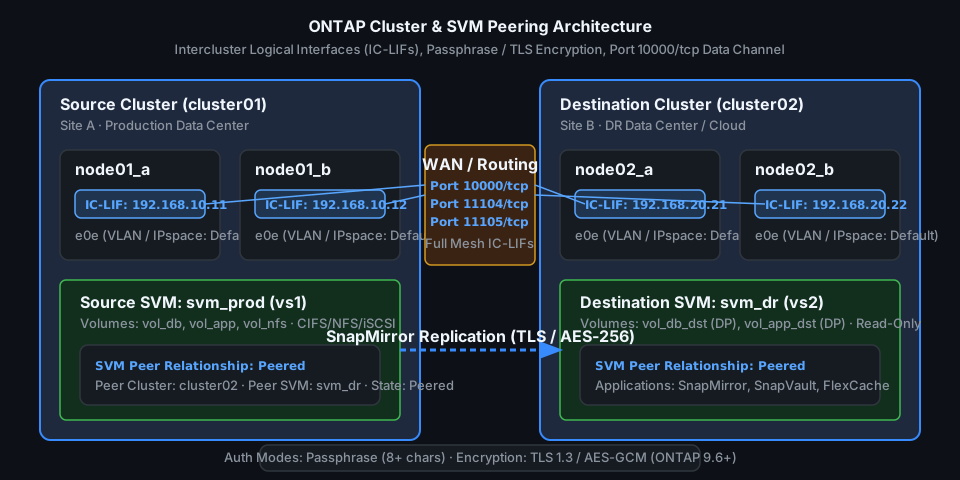
1. Core Concepts & Requirements
Before initiating cluster or SVM peering in ONTAP 9.x, ensure the networking and security prerequisites are satisfied across both source and destination environments:
- Intercluster LIFs (IC-LIFs): Every node participating in replication must have at least one Intercluster LIF. In production, configure exactly one IC-LIF per node on dedicated physical ports or VLANs (or two for multi-path failover). All IC-LIFs on Cluster A must have routed, bidirectional IP reachability to all IC-LIFs on Cluster B.
- Full Mesh Connectivity: ONTAP SnapMirror uses a full-mesh replication transport. Any node hosting a source volume might transfer data directly to any node hosting the destination volume. If even one node's IC-LIF cannot reach a remote node's IC-LIF, SnapMirror transfers may fail intermittently during aggregate relocations or volume moves.
- Network Ports & Firewalls:
10000/tcp: SnapMirror data transfer control and transport channel.11104/tcp: Intercluster cluster-management / session negotiation.11105/tcp: Intercluster cluster-to-cluster Remote Procedure Calls (RPC).ICMP / Ping: Recommended to verify MTU and path reachability usingcluster peer ping.
- MTU Consistency: Jumbo frames (MTU 9000) improve replication throughput over high-bandwidth WANs, but the entire network path (ONTAP ports, broadcast domains, TOR switches, WAN routers, firewalls, and cloud direct connects) must consistently support MTU 9000 without fragmentation. Otherwise, TCP handshakes succeed but large payload transfers hang.
- Authentication & Encryption: ONTAP 9.6+ enforces SHA-256 / AES passphrases (minimum 8 characters) and supports native in-flight TLS encryption (TLS 1.3/AES-256-GCM) across intercluster links without external IPsec appliances.
2. Step-by-Step Cluster Peering Runbook
The following runbook establishes cluster peering between cluster01 (Site A: 192.168.10.0/24) and cluster02 (Site B: 192.168.20.0/24) in the Default IPspace.
Step 2.1 — Create Intercluster LIFs on All Nodes
Execute on each node across both clusters. Verify that broadcast domains and failover groups are properly configured for intercluster traffic:
# --- ON CLUSTER 01 ---
# Create IC-LIF on node01_a
network interface create -vserver cluster01 -lif ic_lif01 \
  -service-policy default-intercluster -home-node cluster01-01 \
  -home-port e0e -address 192.168.10.11 -netmask 255.255.255.0

# Create IC-LIF on node01_b
network interface create -vserver cluster01 -lif ic_lif02 \
  -service-policy default-intercluster -home-node cluster01-02 \
  -home-port e0e -address 192.168.10.12 -netmask 255.255.255.0

# Add default gateway for the intercluster subnet
network route create -vserver cluster01 -destination 0.0.0.0/0 -gateway 192.168.10.1

# --- ON CLUSTER 02 ---
# Create IC-LIF on node02_a
network interface create -vserver cluster02 -lif ic_lif01 \
  -service-policy default-intercluster -home-node cluster02-01 \
  -home-port e0e -address 192.168.20.21 -netmask 255.255.255.0

# Create IC-LIF on node02_b
network interface create -vserver cluster02 -lif ic_lif02 \
  -service-policy default-intercluster -home-node cluster02-02 \
  -home-port e0e -address 192.168.20.22 -netmask 255.255.255.0

# Add default gateway
network route create -vserver cluster02 -destination 0.0.0.0/0 -gateway 192.168.20.1
Step 2.2 — Initiate Cluster Peering with Passphrase
Generate a secure synchronization passphrase on the local cluster and supply the remote intercluster LIF IP addresses:
# --- ON CLUSTER 01 ---
# Initiate peering request to cluster02
cluster01::> cluster peer create -peer-addrs 192.168.20.21,192.168.20.22 \
  -ipspace Default -encryption-protocol-proposed tls-psk

Notice: Use the following passphrase when creating a cluster peer relationship on cluster02:
  K8#mP$9xL2@qW4vR

# --- ON CLUSTER 02 ---
# Accept peering request and supply matching passphrase
cluster02::> cluster peer create -peer-addrs 192.168.10.11,192.168.10.12 \
  -ipspace Default -encryption-protocol-proposed tls-psk

Enter the passphrase: ****************
Confirm the passphrase: ****************
Step 2.3 — Verify Cluster Peering & Full-Mesh Reachability
# Check peering health and status
cluster01::> cluster peer show

Peer Cluster Name     Availability   Authentication
--------------------  -------------  --------------
cluster02             Available      ok

# Verify full-mesh ping and MTU across all node IC-LIF pairs
cluster01::> cluster peer ping -destination-cluster cluster02

Node: cluster01-01
Destination Cluster: cluster02
Destination Node       Destination IP    Status       RTT (ms)
--------------------  ----------------  -----------  --------
cluster02-01          192.168.20.21     reachable    1.42
cluster02-02          192.168.20.22     reachable    1.55

Node: cluster01-02
Destination Cluster: cluster02
Destination Node       Destination IP    Status       RTT (ms)
--------------------  ----------------  -----------  --------
cluster02-01          192.168.20.21     reachable    1.39
cluster02-02          192.168.20.22     reachable    1.48

4 entries were displayed. All nodes reachable.
3. SVM Peering Configuration
Once cluster peering is healthy, establish SVM peering between the source data SVM (svm_prod) and target disaster recovery SVM (svm_dr). SVM peering permits specific applications such as snapmirror and flexcache.
# --- ON CLUSTER 01 (Source) ---
# Create SVM peer request specifying allowed applications
cluster01::> vserver peer create -vserver svm_prod -peer-vserver svm_dr \
  -peer-cluster cluster02 -applications snapmirror,flexcache

# --- ON CLUSTER 02 (Destination) ---
# View pending SVM peer invitations
cluster02::> vserver peer show

Vserver       Peer Vserver  Peer Cluster  State        Applications
------------  ------------  ------------  -----------  -----------------
svm_dr        svm_prod      cluster01     pending      snapmirror,flexcache

# Accept the SVM peering request
cluster02::> vserver peer accept -vserver svm_dr -peer-vserver svm_prod

# Verify SVM peer status on both clusters
cluster02::> vserver peer show

Vserver       Peer Vserver  Peer Cluster  State        Applications
------------  ------------  ------------  -----------  -----------------
svm_dr        svm_prod      cluster01     peered       snapmirror,flexcache
SVM Peer Permission Management (Multi-Tenancy)
In secure multi-tenant environments, storage administrators can pre-authorize SVM peering relationships or restrict which destination SVMs a tenant can replicate into using peer permissions:
# Pre-create permission for an external tenant cluster
cluster02::> vserver peer permission create -vserver svm_dr \
  -peer-cluster cluster01 -peer-vserver svm_prod -applications snapmirror

# Inspect configured permissions
cluster02::> vserver peer permission show
4. IPspaces and Multi-Tenant Segregation
When multiple tenants share an ONTAP cluster but require completely isolated network routing and overlapping IP ranges (e.g. Service Providers or Cloud Volumes ONTAP deployments), cluster peering must be bound to specific IPspaces:
- IPspace Scoping: Intercluster LIFs belong to a specific IPspace. Clusters can maintain independent peering relationships across different IPspaces simultaneously.
- Routing Isolation: Routes created in
IPspace_TenantAare completely invisible toIPspace_TenantB, preventing route leakage across regulatory boundaries. - Dedicated Broadcast Domains: Assign dedicated physical 10GbE/25GbE/100GbE ports or 802.1Q VLANs to the tenant broadcast domain before creating the IC-LIFs.
# Create tenant-specific IPspace
network ipspace create -ipspace IPspace_FinTech

# Create broadcast domain in the new IPspace with MTU 9000
network port broadcast-domain create -ipspace IPspace_FinTech \
  -broadcast-domain bd_intercluster_fin -mtu 9000 -ports cluster01-01:e0g,cluster01-02:e0g

# Create Intercluster LIF inside the custom IPspace
network interface create -vserver cluster01 -lif ic_lif_fin01 \
  -service-policy default-intercluster -home-node cluster01-01 \
  -home-port e0g -address 10.100.50.11 -netmask 255.255.255.0

# Initiate peering bound to the custom IPspace
cluster peer create -peer-addrs 10.200.50.21,10.200.50.22 -ipspace IPspace_FinTech
5. In-Flight TLS Encryption for Replication
Starting in ONTAP 9.6, SnapMirror supports native in-flight TLS encryption without requiring external IPsec VPN tunnels. Transport encryption protects data replicated over untrusted transit networks or across cloud regions.
# Inspect cluster peer encryption status
cluster01::> cluster peer show -instance

                               Peer Cluster Name: cluster02
                  Remote Intercluster Addresses: 192.168.20.21, 192.168.20.22
                             Availability State: Available
                         Authentication Status: ok
                      Proposed Encryption Protocol: tls-psk
                   Current Encryption Protocol: tls-psk
                         Encryption Capabilities: tls-psk

# Enforce TLS encryption on an existing cluster peer relationship
cluster01::> cluster peer modify -peer-cluster cluster02 \
  -encryption-protocol-proposed tls-psk

# Modify SnapMirror policy to ensure transfer encryption
snapmirror policy create -vserver svm_dr -policy MirrorAllDataEncrypted \
  -type async-mirror -transfer-schedule daily
6. Troubleshooting & Diagnostics Matrix
When cluster or SVM peering fails or enters a degraded state, follow this diagnostic decision tree:
| Symptom / Error | Probable Root Cause | Diagnostic & Remediation Workflow |
|---|---|---|
Availability: Unavailable |
Intercluster LIFs down, routing missing, or firewall blocking port 11104/11105. | Run network interface show -role intercluster to verify LIF administrative/operational status. Run cluster peer ping -destination-cluster <peer> to test IP reachability. Verify firewall rules allow TCP ports 11104, 11105, and 10000. |
Authentication Status: authentication_error |
Passphrase mismatch or expired pre-shared key. | Re-synchronize the peering passphrase: on Cluster 1 run cluster peer modify -peer-cluster cluster02 -auth-status-admin ok and re-enter matching passphrase on both ends using cluster peer modify. |
cluster peer ping fails for specific node pairs |
Asymmetric routing, missing VLAN trunking, or misconfigured MTU. | Verify that every node's IC-LIF has a valid route (network route show). Test ICMP ping with large packet sizes (network ping -node <node> -destination <remote_ip> -packet-size 8972 -disallow-fragmentation true) to detect MTU mismatch drops. |
SVM Peer State: pending |
SVM peer invitation was created on source cluster but not accepted on destination cluster. | Log in to destination cluster and run vserver peer show. If state is pending, run vserver peer accept -vserver <dst_vserver> -peer-vserver <src_vserver>. |
SnapMirror transfer hung / failed: transfer_failed |
Port 10000/tcp blocked on WAN firewall or MTU black-hole. | Verify TCP 10000 connectivity between all IC-LIFs. Check EMS event log: event log show -message-name *snapmirror* -time >1h. |
RPC: Remote system error |
ONTAP version mismatch with deprecated TLS cipher suites or major version disparity (>2 major versions). | Check ONTAP version compatibility matrix. Verify both clusters support compatible RPC protocol versions. Run cluster peer show -instance to verify encryption protocol negotiation. |
Essential Diagnostic Commands
# 1. Check cluster peer detailed health and latency statistics
cluster peer show -instance

# 2. Check Intercluster LIF operational status and assigned IPspace
network interface show -service-policy default-intercluster -fields lif,vserver,address,status-oper,curr-node,curr-port

# 3. Check intercluster network routing tables
network route show -vserver <cluster_name>

# 4. View intercluster session connections
cluster peer session show

# 5. Check SVM peer health and permitted applications
vserver peer show -instance

# 6. Monitor real-time EMS peering events
event log show -message-name *peer* -time >24h
Related Reference Guides
- SnapMirror Active Sync & SM-BC Guide — Zero RPO/RTO synchronous replication
- SVM DR: Setup, Failover & Failback — Whole-SVM SnapMirror disaster recovery built on this peering foundation
- ONTAP Backup & Restore Guide — SnapVault, SnapMirror, and NDMP
- ONTAP SVM Administration Guide — Multi-tenancy, protocols, and LIF management
- NetApp Network Ports & Protocols Matrix — Firewall port rules and listener tables
- FabricPool Cloud Tiering Deep-Dive — Object storage tiering architecture