FlexVol deep dive
A FlexVol is ONTAP's standard flexible volume: a separately managed WAFL file system inside an aggregate. Its logical size can exceed currently allocated physical space, it can grow or shrink, and NAS clients can reach it through an SVM junction while SAN hosts consume LUN files inside it.
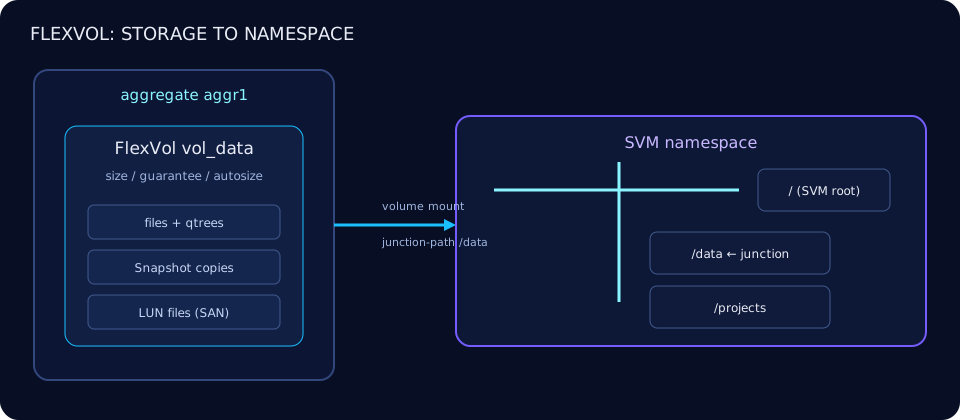
Volume anatomy
Four coordinates identify a FlexVol: its SVM context, unique volume name within that SVM, containing aggregate, and optional NAS junction path. The aggregate supplies physical blocks; the volume owns files, metadata, Snapshot copies, qtrees and any LUNs.
cluster1::> volume show -vserver svm_nas -volume vol_projects \
  -fields aggregate,size,state,junction-path,space-guarantee
vserver volume       aggregate size state  junction-path space-guarantee
------- ------------ --------- ---- ------ ------------- ---------------
svm_nas vol_projects aggr1     2TB  online /projects     none
A volume can move between aggregates without changing the client namespace; see the volume move runbook.
Space guarantees: volume, file or none
-space-guarantee controls when aggregate space is reserved. volume reserves the volume size from the aggregate; none thin-provisions it. file is a legacy file/LUN-oriented guarantee whose availability and behavior depend on platform and release—check ONTAP 9.19.1 command help before selecting it.
cluster1::> volume create -vserver svm_nas -volume vol_projects \
  -aggregate aggr1 -size 2TB -space-guarantee none \
  -snapshot-reserve 5 -junction-path /projects
[Job 8421] Job succeeded: Successful
cluster1::> volume show -fields size,available,percent-used,space-guarantee
vserver volume size available percent-used space-guarantee
------- ------------ ---- --------- ------------ ---------------
svm_nas vol_projects 2TB 1.61TB 15% none
svm_san vol_db 1TB 388GB 60% volumeLogical size is what the client can address; guaranteed space is what the aggregate commits. A thin volume can therefore report free logical space while the aggregate is running out. Monitor both layers. -fractional-reserve reserves a percentage of a data-protection volume's size for overwrite space; current defaults and valid use cases depend on volume and guarantee type, so check your release rather than blindly forcing 0%.
cluster1::> volume modify -vserver svm_san -volume vol_db \
  -fractional-reserve 100
Volume modify successful on volume vol_db of Vserver svm_san.
Autosize guardrails
grow expands a volume above its grow threshold. grow_shrink also contracts it below the shrink threshold, but shrinking deserves conservative testing because application and Snapshot behavior can make used space oscillate. Set explicit minimum and maximum bounds.
cluster1::> volume modify -vserver svm_nas -volume vol_projects \
  -autosize-mode grow -max-autosize 4TB \
  -autosize-grow-threshold-percent 85
Volume modify successful on volume vol_projects of Vserver svm_nas.
cluster1::> volume autosize -vserver svm_nas -volume vol_projects
Vserver Volume Mode Grow% Shrink% Minimum Size Maximum Size
-------- ------------ ---- ----- ------- ------------ ------------
svm_nas vol_projects grow 85% 50% 2TB 4TBSome releases expose autosize display/modify through volume autosize as well as volume fields. Use volume modify ? and volume autosize ? on the target release.
Snapshot reserve
-snapshot-reserve sets the percentage reserved for Snapshot copies; it is not a retention schedule. A 5% reserve on a 2 TiB volume separates roughly 102 GiB for Snapshot use, subject to ONTAP accounting. When that reserve fills, Snapshot consumption can spill into active-file-system space according to volume behavior.
cluster1::> volume modify -vserver svm_nas -volume vol_projects -snapshot-reserve 10
Volume modify successful on volume vol_projects of Vserver svm_nas.
cluster1::> volume show -volume vol_projects -fields percent-snapshot-space
vserver volume       percent-snapshot-space
------- ------------ ----------------------
svm_nas vol_projects 10%
Junctions and the SVM namespace
A NAS FlexVol is mounted beneath the SVM root volume. The junction is a namespace pointer, not a directory that copies data. Mounting vol_projects at /projects makes that volume reachable through data LIFs, subject to protocol and export/share configuration.
cluster1::> volume mount -vserver svm_nas -volume vol_projects \
  -junction-path /projects
Volume vol_projects on Vserver svm_nas is mounted at /projects.
cluster1::> volume show -vserver svm_nas -junction
Vserver Volume Language Active Junction Junction Path
-------- ------------- -------- ------- -------- -------------
svm_nas svm_nas_root C.UTF-8 true true /
svm_nas vol_projects C.UTF-8 true true /projectsFor SAN, a LUN is a file-like object allocated inside a FlexVol and presented through an igroup mapping; the volume still controls capacity, Snapshot copies, efficiency and replication. Learn the enclosing SVM model in the SVM guide.
FlexVol versus FlexGroup
| Question | FlexVol | FlexGroup |
|---|---|---|
| Layout | One volume on one aggregate | One namespace spread across constituent FlexVols |
| Scale | Bounded by one volume/node placement | Scale-out capacity, throughput and metadata work |
| Operations | Direct volume management | Manage the FlexGroup; avoid manual constituent changes |
| Choose when | General NAS/SAN, predictable placement, feature compatibility | Very large NAS namespace or high parallelism |
Feature support changes by ONTAP release. Confirm workload requirements against the FlexGroup deep dive.
Quotas, efficiency and clones
Quotas limit or report user, group and qtree consumption inside the volume; they do not reserve aggregate capacity. Dedupe, compression and compaction reduce physical use and affect logical reporting; see storage efficiency. Depending on platform/release, efficiency operates at volume and aggregate layers. A FlexClone starts as a writable, block-sharing clone of a parent Snapshot and consumes new space as blocks diverge.
cluster1::> volume clone create -vserver svm_nas -flexclone vol_projects_test \
  -type RW -parent-volume vol_projects -parent-snapshot nightly.0 \
  -junction-path /projects_test
[Job 8460] Job succeeded: Successful
Offline and delete safely
Confirm shares, exports, LUN mappings, mirrors, clones and application ownership first. Current ONTAP uses volume delete; some older operational language says “destroy,” but volume destroy is not the current command. Deleted volumes may enter the recovery queue unless the chosen force behavior bypasses it.
cluster1::> volume unmount -vserver svm_nas -volume vol_old
cluster1::> volume offline -vserver svm_nas -volume vol_old
Volume "vol_old" on Vserver "svm_nas" is now offline.
cluster1::> volume delete -vserver svm_nas -volume vol_old
Warning: Are you sure you want to delete volume "vol_old"? {y|n}: y
[Job 8498] Job succeeded: Successful
Troubleshooting matrix
| Symptom | Prove | Likely fix |
|---|---|---|
| Volume full, aggregate free | Volume active/total/Snapshot space and quota report | Resize/autosize, remove approved data or snapshots; do not assume aggregate free space expands it |
| Aggregate full, thin volume says free | Aggregate available plus all thin commitments | Free/move capacity or add storage; cap autosize contention |
| Autosize did not grow | Mode, grow threshold, maximum, aggregate headroom | Raise maximum or restore aggregate capacity; inspect EMS/job errors |
| NAS path absent | Volume state, junction, export/share and data LIF | Mount at the intended junction and validate protocol policy |
| Unexpected used space | Snapshot, LUN, clone and efficiency accounting | Identify the owner before deleting anything |