ONTAP audit and event logging
A precise guide to ONTAP’s two audit planes: SVM-level NAS access evidence and cluster-level administrative request history, with configuration, rotation, parsing, compliance design, and failure recovery.
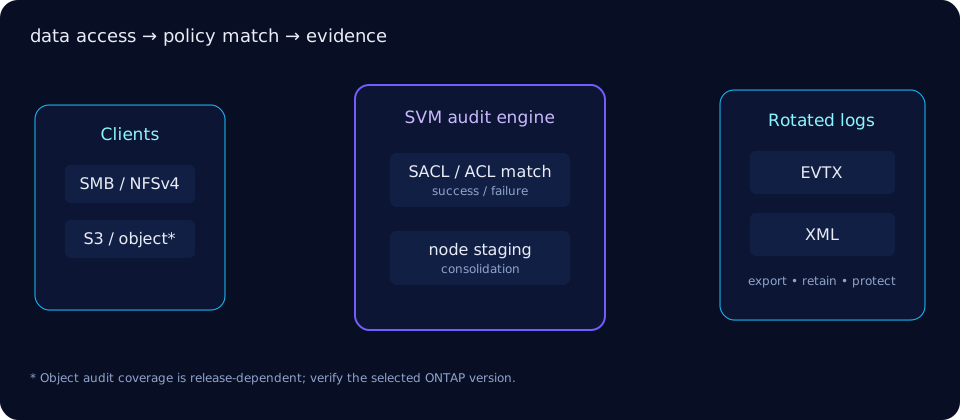
What ONTAP audits
NAS auditing records selected SMB/CIFS and NFSv4 file access when an applicable audit policy/SACL requests it. Depending on protocol and release, events can cover file operations, logon/logoff and central access policy staging. ONTAP S3/object auditing has its own supported event model; confirm your release before promising parity with NAS events. Administrative CLI/API activity is captured separately by the cluster security audit log.
Think in two planes: an SVM's consolidated NAS audit files answer “who touched this data?”, while security audit answers “which administrator issued this management request?”
Create and enable an SVM audit configuration
The audit destination is a directory inside the SVM namespace. Create the configuration, select event classes and output format, then enable it. EVTX is convenient for Windows Event Viewer; XML is convenient for pipeline parsing. Check vserver audit create ? because supported -events values vary by ONTAP release.
cluster::> vserver audit create -vserver svm_files   -destination /audit -format evtx -events file-ops,cifs-logon-logoff   -rotate-size 200MB -rotate-limit 30
  (command completed successfully)
cluster::> vserver audit enable -vserver svm_files
cluster::> vserver audit show -vserver svm_files
Vserver: svm_files
Auditing State: true
Log Destination Path: /audit
Format: evtx
Events to Audit: file-ops, cifs-logon-logoffEvent-class labels are version-specific. Broadly, file-op events capture requested object actions; authentication/logon events identify session establishment; authorization-policy events capture policy decisions; account/security-group changes record identity administration where supported. Administrative management requests do not require adding an “administrative” NAS event—they appear in the cluster security audit log.
Audit policy is attached to data, not created by ONTAP CLI
There is no vserver audit policy command family in the ONTAP 9.19.1 CLI reference. For SMB, administrators apply NTFS SACL entries to files/directories (often through Windows security tools); for NFSv4, auditing depends on supported NFSv4 ACL audit flags. Thus policy can differ by directory and volume through ACL inheritance, while vserver audit controls collection and consolidation for the SVM.
# Inspect the SVM audit collector (not file SACLs)
cluster::> vserver audit show -vserver svm_files -instance
Auditing State: true
Log Destination Path: /audit
Format: evtx
Log Rotation Size: 200MB
Log Rotation Limit: 30
Test both successful and failed access that matches the SACL. Auditing every read on a busy share can create high event volume and extra CPU/I/O; scope file-op auditing to evidence requirements.
Read NAS and administrative audit records
Copy rotated EVTX files to a Windows analysis host and open them with Event Viewer. Parse XML with a streaming parser or SIEM collector; preserve timestamps, SVM, user SID/name, client address, object path, operation and outcome. vserver audit show displays configuration, not the content of the EVTX/XML file.
# Example XML pipeline after copying a rotated log to an analysis host
$ xmllint --xpath '//*[local-name()="Event"]' audit_svm_files_20260827.xml | head
<Event><System>...</System><EventData>...</EventData></Event>
cluster::> security audit show -timestamp >8/27/2026 -application ssh
Timestamp Node Application User State
-------------------------- ----- ----------- -------- -------
8/27/2026 14:03:11 +00:00 node1 ssh admin Success
cluster::> security audit log show -fields timestamp,user,application,command
timestamp user application command
8/27/2026 14:03:11 +00:00 admin ssh volume showThe verified command is security audit show / security audit log show, not vserver security audit show. The CLI cheat sheet provides related administrative commands.
Rotation and retention
ONTAP first stages individual node records, then consolidates them into the SVM destination. Rotation can be time- or size-driven; -rotate-size caps the active file, while -rotate-limit limits retained rotated files. A limit of zero can have special “unlimited” semantics in some releases—verify before use. Capacity-plan the destination and export logs to immutable or separately administered storage if policy requires longer retention.
cluster::> vserver audit modify -vserver svm_files   -rotate-size 500MB -rotate-limit 90 -format xml
cluster::> vserver audit rotate-log -vserver svm_files
  (command completed successfully)
cluster::> volume show -vserver svm_files -volume audit_vol -fields size,available,percent-used
vserver volume size available percent-used
---------- ---------- ----- --------- ------------
svm_files audit_vol 2TB 1.62TB 19%Compliance use cases and cautions
Audit evidence can support access reviews, incident investigations and controls commonly mapped to SOX or HIPAA, but enabling a log is not compliance by itself. Define who can administer SACLs, where logs are exported, retention/immutability, time synchronization, review cadence and tested retrieval. Cross-link the design with security hardening, SVM administration and S3 on ONTAP.
Troubleshooting
| Symptom | Likely cause | Action |
|---|---|---|
| No audit records | Collector disabled, no matching SACL, wrong events, client used another protocol | Verify state, policy and a controlled access test |
| EVTX appears corrupt | Reading active/unconsolidated file or interrupted copy | Force rotation, then copy the closed file |
| Audit destination full | High event rate or retention too large | Export/retain externally, free capacity, right-size limits |
| Performance regression | Overbroad file-op SACL | Audit required paths/actions only and measure again |
cluster::> vserver audit show -vserver svm_files -fields state,destination,format
vserver    state destination format
---------- ----- ----------- ------
svm_files  false /audit      evtx
cluster::> vserver audit enable -vserver svm_files
  (command completed successfully)
Official ONTAP sources
Commands and behaviors in this guide were checked against NetApp's ONTAP documentation. Always select your installed ONTAP and host-software release before making a production change.