ONTAP licensing: feature keys, capacity entitlements, and cleanup
A field guide to answering three operational questions: what is licensed, what is consuming capacity, and what will happen when a term ends. Examples follow the ONTAP 9.19.1 command reference; older trains and managed-cloud products can expose different fields.
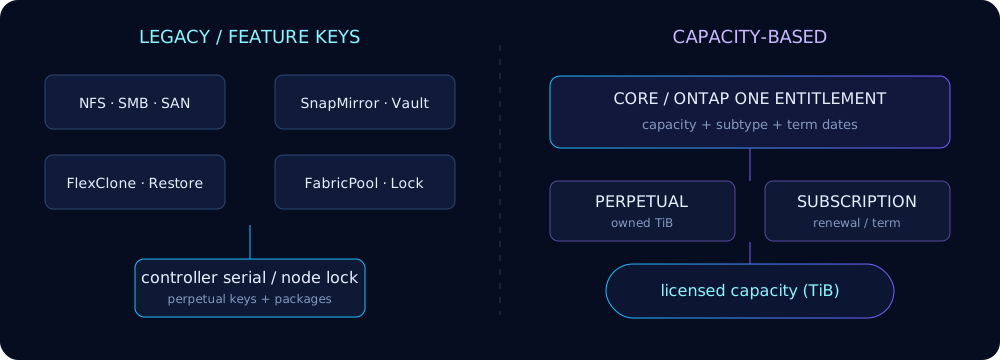
Two licensing models
Legacy licensing unlocks named packages. Depending on system generation and purchased bundle, rows can include NFS, CIFS/SMB, iSCSI/FC, NVMe-oF, FlexClone, SnapRestore, SnapMirror, SnapVault-era protection, deduplication/storage efficiency, SnapLock, encryption, S3 and FabricPool/cloud tiering. A key is normally associated with a controller serial number; licenses from multiple nodes can appear cluster-wide.
Capacity-based licensing (CBL) expresses entitlement as capacity and subtype instead of treating every feature as an independent add-on. Modern commercial offers may be perpetual or subscription/term-based, and license-as-a-service can deliver or refresh entitlement through NetApp management services. ONTAP 9.15.1+ expanded CBL reporting; exact commercial bundle names remain order-specific, so reconcile CLI rows with the entitlement certificate or NetApp Console.
| Question | Legacy key | Capacity-based |
|---|---|---|
| Primary identity | serial + package | serial/host + bundle/subtype |
| Meter | feature enabled | licensed capacity (normally TiB) |
| Term | often perpetual | perpetual or subscription |
| Audit focus | package rows and owner | capacity, expiration and subtype |
AFF, ASA, FAS, and ONTAP Select
- AFF and FAS: hardware-controller serials anchor classic node-locked keys. Current systems are commonly sold with bundled ONTAP software rather than an à-la-carte historical package list.
- ASA: SAN-focused bundles omit NAS semantics; ASA r2 also differs operationally from classic ONTAP, so do not infer entitlement from an AFF example.
- ONTAP Select: software-defined nodes use a host/deployment identity and licensed capacity. Moving a VM is not the same as transferring its license; follow the Deploy rehost/relicense workflow.
- Cloud Volumes ONTAP: marketplace and capacity/package licensing is controlled through the cloud control plane; see BlueXP and CVO.
Read system license show
cluster1::> system license show
Serial Number: 1-81-000000000000001234567890
Owner: node1
Installed License: Core Bundle
Capacity: 24TiB
Package       Type      Description          Expiration
------------- --------- -------------------- -------------------
NFS           capacity  NFS License          -
CIFS          capacity  CIFS License         -
SnapMirror    capacity  SnapMirror License   2027-06-30 23:59:59
3 entries were displayed.
The header describes one installed license: identity/serial, owning node or cluster context, installed-license name, and licensed capacity. Package rows are the features that entitlement supplies. A dash in expiration is not proof that every commercial obligation is perpetual—check the license type, subtype and contract.
cluster1::> system license show -instance
cluster1::> system license show -fields serial-number,owner,package,type,capacity,expiration
cluster1::> system license show -type capacity
Install, replace, and delete
Save the entitlement file locally, keep the original intact, and record pre-change output. ONTAP 9.19.1 accepts license codes and file-based input; the exact flag visible at your privilege level is authoritative.
# One or more 28-character legacy codes
cluster1::> system license add -license-code ABCDEFGHIJKLMNOPQRSTUVWXYZ12
License for package "NFS" and serial number "123456789" installed successfully.
# File delivered with an entitlement (path is reachable by the CLI client)
cluster1::> system license add -use-license-file true
Enter the path to the license file: /tmp/NLF-123456789.txt
Licenses were installed successfully.Some workflows identify the entitlement by serial/host within the supplied file rather than a separate CLI -serial switch. Run system license add ? before automation.
cluster1::> system license delete -serial-number 123456789 -package SnapMirror
Warning: Deleting a license can disable licensed functionality. Continue? {y|n}: y
1 license was deleted.
Deletion can be rejected while the package is in use. Inventory consumers first—relationships described in the backup and restore guide, tiering for FabricPool, clones and locked volumes for SnapLock are not interchangeable cleanup targets.
Thirty-day trials, evaluation mode, and expiration
Where the platform and package support it, ONTAP exposes a 30-day trial workflow often shown in System Manager as “Start trial.” CLI spelling has varied; on releases that advertise it, inspect license trial start ? (or the fully qualified help path shown by system license ?) rather than scripting the abbreviated phrase blindly.
cluster1::> license trial start -package SnapMirror
Warning: The 30-day trial begins immediately and cannot be paused. Continue? y
Trial license started. Check expiration with system license show.
The example documents the operator workflow requested by current UI/help. If 9.19.1 CLI help does not resolve that command on your platform, start the evaluation in System Manager or obtain a demo license from NetApp; do not invent a license code.
Evaluation mode is temporary entitlement, not a safe steady state. Expiration behavior is feature-specific: existing data is generally not erased, but new operations or configuration can be blocked and EMS/health alerts persist. For a protection or compliance feature, treat expiration as an outage risk and verify the exact package behavior before the deadline.
cluster1::> system license show -fields package,type,expiration
package      type  expiration
------------ ----- -------------------
SnapMirror   demo  2026-09-26 00:00:00

cluster1::> event log show -messagename *license* -time >7d
Moving or reclaiming licenses
Before controller replacement or ONTAP Select rehosting, capture serials, system IDs and any host ID shown by the licensing subsystem. Never delete the old entitlement merely to “make room.”
cluster1::> system node show -fields node,serialnumber,systemid
node   serialnumber  systemid
------ ------------- ----------
node1  123456789     0537000111
node2  123456790     0537000222

cluster1::> license host-id show
Host ID: 0537000111
license host-id show is a product/workflow spelling, not present on every hardware cluster. Prefer fields from system license show -instance and system node show when it is absent, then have the entitlement reissued to the replacement identity.
# Preview first; remove only expired and unaffiliated licenses
cluster1::> system license clean-up -expired true -unused true -simulate true
Serial Number  Package  Reason
-------------  -------  -------------------------
123456788      CIFS     License has expired

cluster1::> system license clean-up -expired true -unused true
Capacity-based reporting in 9.15.1+
CBL makes the capacity field operationally important. Use the subtype field when supported to distinguish entitlement categories, and retain term dates in monitoring. ONTAP reports binary capacity units such as TiB; do not compare them directly with decimal TB on a quote without conversion.
cluster1::> system license show -fields installed-license,subtype,capacity,expiration
installed-license  subtype       capacity  expiration
-----------------  ------------  --------  -------------------
Core Bundle        subscription  24TiB     2027-06-30 23:59:59
Data Protection    perpetual     48TiB     -
If -subtype is rejected, use -instance and check your ONTAP version. A CBL capacity row is an entitlement measure, not the same as aggregate raw, usable, or volume logical capacity; see capacity math and storage efficiency.
Common errors and audit runbook
| Symptom | Meaning / next action |
|---|---|
LICENSE_EXPIRED | Find the package and expiration; renew or install the replacement entitlement before retrying. |
license-in-use | A configured object depends on the package. Inventory and migrate/disable it; do not force compliance features away. |
| Serial mismatch | Key is issued to another controller/host. Compare node serial and host ID, then request rehost/reissue. |
| Capacity exceeded | Confirm subtype and licensed unit versus deployed/managed capacity; reconcile with the commercial portal. |
| Duplicate key | Usually harmless evidence the entitlement already exists; compare serial/package instead of reinstalling repeatedly. |
system license show -instance
system node show -fields node,serialnumber,systemid
system license clean-up -expired true -unused true -simulate true
event log show -messagename *license*
system health alert show
Keep the before/after output with the change record. For feature-level checks, cross-reference ONTAP tools and the security baseline.